Read and get familiar with all safety precautions and procedures before using the device. Strictly follow all safety precautions. Ensure that the device is properly assembled and is working properly.
Intended use: This product is designed for laser cutting and laser engraving of specific materials. The ultraviolet laser can process stainless steel, aluminum, brass, silver, platinum, titanium, wood, acrylic, leather, glass, stone, paper, and rubber. Any use beyond the intended purpose, or not in accordance with the Safety Instructions, constitutes misuse. The company assumes no responsibility for any loss resulting from such misuse.
Laser safety
Lasers are categorized into several different classes depending on the extent of the potential hazard associated with the laser, with Class 1 being the least dangerous and Class 4 the most dangerous. The United States Food and Drug Administration has indicated that Class 4 lasers may pose an “immediate skin hazard and eye hazard from exposure to either the direct or reflected beam; may also present a fire hazard.”
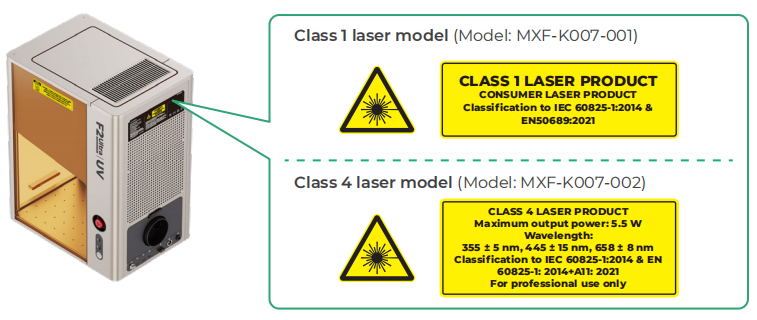
xTool F2 Ultra UV is equipped with a Class 4 working laser, a Class 3B indicator laser, and a Class 3R indicator laser. The product is available in two models: Class 1 and Class 4. The differences between these models are as follows:
Model | Product structure | Safety information |
|---|---|---|
Class 1 laser model (Model: MXF-K007-001) | Without the emergency stop button | Generally, the laser module is completely enclosed in the casing and protective enclosure during operation to prevent human access to laser radiation beyond Class 1. The device is equipped with safety interlock switches on the protective enclosure. If the protective enclosure is lifted during operation, the device will stop working and automatically decrease its laser power below Class 1. |
Class 4 laser model (Model: MXF-K007-002) | With the emergency stop button | Class 4 laser devices are intended for professional use only, and particular attention must be paid for safe operations. Diffused laser beams may leak out from the openings when the protective enclosure is lifted during operation, and you may be exposed to Class 4 laser radiation. |
If you use the Class 1 laser device, follow the safety precautions:
- Do not operate the product when any part of it is removed. Removing any part may expose the laser system and cause damage to the product.
- Laser operation is prohibited when the protective enclosure is lifted. Make sure that the protective enclosure is closed during operation and do not tamper with the safety mechanism of the protective enclosure.
- Do not place magnets around the safety interlock switches, or the safety interlocks may fail.
- You are advised to use xTool materials and recommended parameters for engraving or cutting. You can visit easyset.xtool.com and choose your device to find applicable xTool materials and the recommended parameter settings. Note that all parameter settings are for reference only. Please perform testing before starting an actual task. If you are not using xTool materials or parameters recommended by xTool, or if you are not sure whether the material is applicable to your device, please contact our customer service at support@info.xtool.com for help to ensure safe operation and optimal processing results.
- To protect the product, ensure that the laser is correctly focused when processing highly reflective materials like stainless steel and copper. Otherwise, the product may be damaged by reflected laser beams.
The reference standards for laser safety are the American National Standard for Safe Use of Lasers (Z136.1-2022), International Electrotechnical Commission Standard (IEC 60825-1:2014), and European Standards (EN 60825-1:2014/A11:2021).
If you use the Class 4 laser device, follow the safety precautions:
- ONLY professionally trained personnel are allowed to use the product. A qualified Laser Safety Officer (LSO) must be designated and the product shall be operated by or under the guidance of the LSO. The LSO is obliged to evaluate the laser safety risks and set up safety control mechanisms to ensure the safety of operators and prevent untrained persons from entering the laser radiation hazard area. Based on the safety evaluation and safety control mechanisms of the LSO, you can set up a safety-controlled area by using the remote interlock function of the access-control key. You can visit support.xtool.com/article/1367 to find the operation guide.
- Before using the product, complete xTool's Laser Safety Awareness Training Course and review LSO Training documents, available at xTool software and support.xtool.com/article/1171 for more information on Class 4 lasers, their uses, and their potential hazards. In the workplace context, you shall also receive adequate Class 4 laser product safe operation training as set forth in ANSI Z136.1, which is on the responsibility of the employer to provide.
- Do not operate the product when any part of it is removed. Removing any part may expose the laser system and cause damage to the product.
- When you use this product, wear safety goggles that can shield your eyes from 355 ± 5 nm laser beams and do not put your hands into the processing area. Avoid eye or skin exposure to direct or scattered laser radiation. Do not stare at the laser beam. You can visit support.xtool.com/article/1443 to find information about how to choose safety goggles.
- If the protective enclosure can fully close with the material placed inside the working area, ensure it remains closed during processing and confirm that the "Stops when enclosure opened" function is enabled in xTool software so that the safety interlock is active. This way, if the protective enclosure is opened during operation, the laser will stop working.
- If the protective enclosure cannot fully close due to oversized materials or accessories or other reasons, you should set up a laser controlled area under the guidance of the LSO, and ensure that all personnel wear necessary personal protective equipment (PPE) before entering the laser controlled area. During processing, lower the protective enclosure as much as possible. If the material remains stationary, pull down the protective enclosure until it touches the material. If using a rotary attachment, conveyor, or other accessories, pull down the protective enclosure until it remains no more than 5 mm above the material.
- If your skin gets burned by laser beams, disinfect the skin with a povidone-iodine solution immediately and apply burn ointment to the wound. If you are severely burned, go to a hospital and see a doctor as soon as possible.
- Do not use the product in public places, or on other occasions where untrained persons or children are present.
- Ensure that only trained professionals with personal protective equipment enter the laser radiation area. You can visit support.xtool.com/article/1444 to learn about the Maximum Permissible Exposure (MPE) and Nominal Ocular Hazard Distance (NOHD) of Class 4 xTool laser devices.
- You are advised to use xTool materials and recommended parameters for engraving or cutting. You can visit easyset.xtool.com and choose your device to find applicable xTool materials and the recommended parameter settings. Note that all parameter settings are for reference only. Please perform testing before starting an actual task. If you are not using xTool materials or parameters recommended by xTool, or if you are not sure whether the material is applicable to your device, please contact our customer service at support@info.xtool.com for help to ensure safe operation and optimal processing results.
- To protect the product, ensure that the laser is correctly focused when processing highly reflective materials like stainless steel and copper. Otherwise, the product may be damaged by reflected laser beams.
Chemical safety
Some materials may release toxic and harmful dust, smoke or gases after laser processing. Therefore, precautions are required for chemical safety during material processing.
Follow the safety precautions:
- Before processing, evaluate whether the material will release substances harmful to human health, air purifiers, the environment, or the equipment itself. Never process any unknown materials or materials incompatible with laser processing.
- Users are responsible for implementing appropriate protective measures based on the material to be processed. These measures include, but are not limited to: ensuring proper ventilation of the workplace, using suitable air purifiers, and wearing personal protective equipment (PPE). Users are also responsible for ensuring compliance with local regulations regarding limits on dust, fumes, and gas emissions.
- Exercise caution when you process materials that contain PVC, vinyl, ABS, polycarbonate, or substances such as chlorine, benzene, ammonia, fluorine, phenol, and aldehydes. When being processed by laser, these materials can generate dust, smoke, or gases toxic and harmful to human and corrosive vapor that may damage the product. Do not process them without adequate protection. Necessary protective measures include: ensuring proper ventilation of the workplace, using suitable air purifiers, and wearing PPE.
- Before use, ensure that the smoke exhaust pipe is attached to the product and directed outdoors or to a qualified air purifier. Direct indoor discharge is strictly prohibited.
- You are advised to use the product with an xTool air purifier. During use, check and maintain its filters regularly to ensure proper operation of the purifier.
- During processing, if you smell strong pungent odors or experience symptoms such as respiratory irritation, dizziness, or suffocation, immediately stop the operation and evacuate to a well-ventilated safe area. Do not return to the workplace until the harmful gases have fully dissipated and your physical discomforts are gone.
Fire safety
Ultraviolet laser processing is considered a "cold processing" method, characterized by minimal thermal impact. However, improper laser focusing or processing of flammable materials may still result in ignition or open flames.


Read the following warnings and suggestions carefully:
- Familiarize yourself with fire safety knowledge.
- Equip your workspace with fire extinguishing equipment, including CO2 extinguishers and sprinklers, and perform regular inspection and maintenance on them. Keep the CO2 extinguishers on hand, and all personnel should be trained in the usage of the extinguishers.
- Ensure that the area around the product is clean and neat and that the workspace is well-ventilated so that the generated smoke can be discharged in time.
- Do not place any flammable materials, explosives, or volatile solvents, such as paper, acetone, alcohol, or gasoline, around the product. They may cause the spread of flames and increase the risk of material ignition.
- Do not leave the product unattended when it is working. If the product works with setting errors and is left unattended for a long period of time, or if a mechanical or electrical fault occurs, a fire may be caused.
- When the laser device cuts or engraves flammable materials at low speed and high power, the materials may ignite, forming an open flame. If an open flame occurs, please press the emergency stop button immediately to stop processing in time, keep a safe distance, and use a fire extinguisher to put it out.
- Each time after you finish processing, immediately remove the processed material, carefully inspect the working area of the device to ensure no flames remain, and then clean the processing area. Otherwise, the accumulation of residues and chippings from cutting and engraving would pose a fire risk.
- Place and use the product in locations where children are not likely to be present.
- Use the product with the compatible xTool Fire Safety Set as an additional measure to reduce fire risk. When installing the fire safety set, strictly follow the installation guide. Visit support.xtool.com/product/17 for detailed instructions on how to connect the fire safety set to the product.
Electrical safety

Follow the safety precautions:
- Do not open any access panel on the product when the product is connected to the power supply. Accidental contact with the power supply may cause injury.
- Do not touch any electronic area with your hands or other tools when the product is connected to a power supply.
Use and maintenance
Follow the operating principles:
- Check the product for damage every time before you use it. Do not operate it in any way when any damage or defect is found.
- Place and use the product on a stable, flat, and non-flammable surface. Keep the workspace clean and neat.
- Do not disassemble the product or change its structure in any way without authorization. Do not modify or decompile its operating system.
- Do not leave the product unattended during operation. When the product is working, pay attention to whether it is working properly and the information displayed on the touchscreen controller.
- Metal materials remain hot after processing. To avoid skin burns, wait for the materials to cool down before handling, or wear heat-resistant gloves to take them out.
- Keep the inside of the product clean. Residues and chippings accumulated during cutting and engraving are dangerous and may cause a fire. Clean the chippings and residues inside the work area regularly.
- The device works properly at the temperature of +10℃ to +30°C and can be stored properly at the temperature of –10°C to +60°C. Do not operate it at a temperature lower than 0°C.
- Cut off the power before maintaining the product.
- This product is not user-serviceable. It must be returned to the factory or repaired by authorized professionals.
- Use of controls or adjustments or performance of procedures other than those specified herein may result in hazardous radiation exposure.
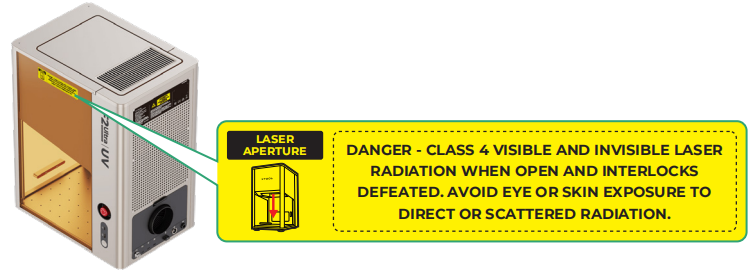
Warning and instruction signs
On the product, the warning and instruction signs are labeled where physical injuries or damage to the product may be caused before and/or during operation. If a sign is damaged or lost, replace it immediately. You can use the following template to print the sign you need.
Laser specifications
Laser type | Wavelength | Beam divergence | Maximum output power |
|---|---|---|---|
Working laser | 355 ± 5 nm | < 1.745 mrad | 5.5 W |
Indicator laser | 658 ± 8 nm | < 1.745 mrad | 7 mW |
445 ± 15 nm | < 1.745 mrad | 2 W |
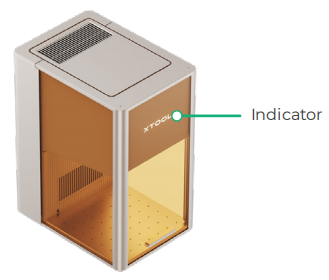
Common device states and indicator display
Indicator display | Device state | |
|---|---|---|
| Solid on | Powered on |
| Blinking slowly | Processing |
| Blinking rapidly | Setting network / Upgrading firmware |
| Going off | Sleeping / Powered off |