
About the machine
1. Is xTool P2 compatible with xTool Smoke Purifier and RA2?
Yes, it is.
2. How to use LightBurn on xTool P2?
You can use LightBurn to create your design and operate xTool P2 to cut materials.
Currently, the camera, auto-focus, and framing functions are not supported by LightBurn. So you need to predict the processing area and input the material thickness manually.
3. What is the difference between the distant-view camera and the close-view camera?
The distant-view camera is fixed on the back inner plate. This allows it to capture a larger area, but it also introduces positioning errors due to the distance between the camera and the positioning point.
The close-view camera is on the laser head, enabling it to capture images at any position within the processing area.
Due to taking photos vertically to the processing position, the close-view camera has higher positioning accuracy than the distant-view camera.
4. What are the differences between Class 1 and Class 4 laser machines?
You can identify whether your machine is a Class 1 or Class 4 one based on the sticker on the back of the machine.
The requirements for using a Class 1 laser machine are higher than those for using a Class 4 one. For Class 1 laser machines, the laser module needs to work with the working area fully enclosed. All covers and plates must be installed properly before the laser can be operational.
The laser module of a Class 4 laser machine can process materials in an open working area. You can remove the baseplate and choose Open plane on XCS to process large and thick materials.
5. What are the positioning precisions of distant-view and close-view positioning?
Theoretically, when the material is placed directly under the camera, the error for the close-view positioning is 0.3 mm to 0.5 mm; and for distant-view positioning, the error is also 0.3 mm to 0.5 mm.
6. What are the measurement errors for the close-view camera and distant-view camera of P2?
In the center of the processing area, the close-view camera has a theoretical measurement error of 0.3mm and the distant-view camera has an average measurement error of 0.5mm to 1mm. The measurement is more accurate when the material is placed on the slats.
7. With Class 1 xTool P2 and the rotary attachment, what is the maximum size of cylinders I can process?
With the slats removed and using the rollers of RA2, you can process cylinders of diameter up to 42 mm.
8. How do I read the information on the state display screen?
- Progress bar, where you can see the progress of a processing task
- Lid locked/unlocked
Do not open the lid forcibly when it is locked. You can press the button on the machine to unlock the lid before opening it. - The machine is connected through Wi-Fi.
- The machine is connected through the USB cable.
- Exceptions occur.
- Liquid temperature. H lighting up indicates that the temperature is too high, and L lighting up indicates that the temperature is too low.
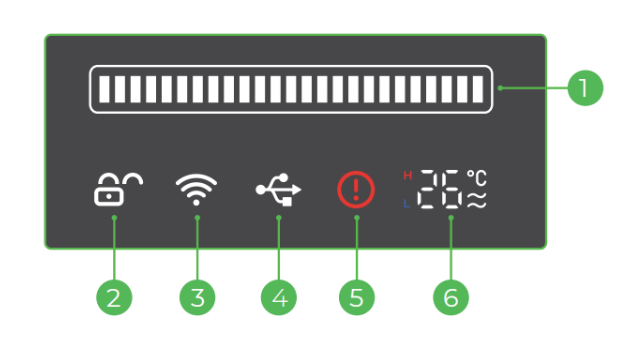
9. About the size of the light spot during different processing
- The width of the engraved line is consistent with the size diameter of the laser spot.
- The cutting kerf is affected by the material's thickness.
- Overall, the cutting kerf is greater than or equal to the size of the laser spot.
- The kerf width on the front side and back is not the same during cutting.
- Since the laser beam is conical after focusing (as shown in the picture below), the laser beam is focused on the surface of the material (where the focus point is the thinnest part of the beam), so the cutting kerf is basically consistent with the size of the laser spot.
- The material on the backside is away from the focus point and is in a position where the beam is wider, resulting in a cutting kerf wider than the laser spot.
- The thicker the wooden board, the greater the difference.
10. What is the function of the red light projected onto the machine's processing area?
The red light is emitted by distant-view or close-view infrared lasers and is used to measure the material's thickness (height).
During distance measurement, please make sure that the red spot is projected onto the material's surface.
11. If I need to purchase protective goggles, what specifications are required?
The lid is designed to filter laser light, so you don't need to buy separate protective goggles. However, if you do, make sure they have an OD4 protection level and are wavelength-rated for 10640nm.
12. Can a third-party USB cable be used to connect P2?
- It is not recommended to use third-party cables.
- The connection may fail if using a double-ended USB-C cable. You are advised to use the one delivered with xTool P2 to ensure a more stable connection.
13. With the slats installed, what is the maximum thickness supported for processing?
The maximum thickness is 25 mm.
14. What kind of curved surface does xTool P2 Curve Process Support?
When P2 is properly focused, the air nozzle should be about 3.9mm above the material surface. This means that when processing curved surfaces with P2, the surfaces must meet the requirements in the picture below.
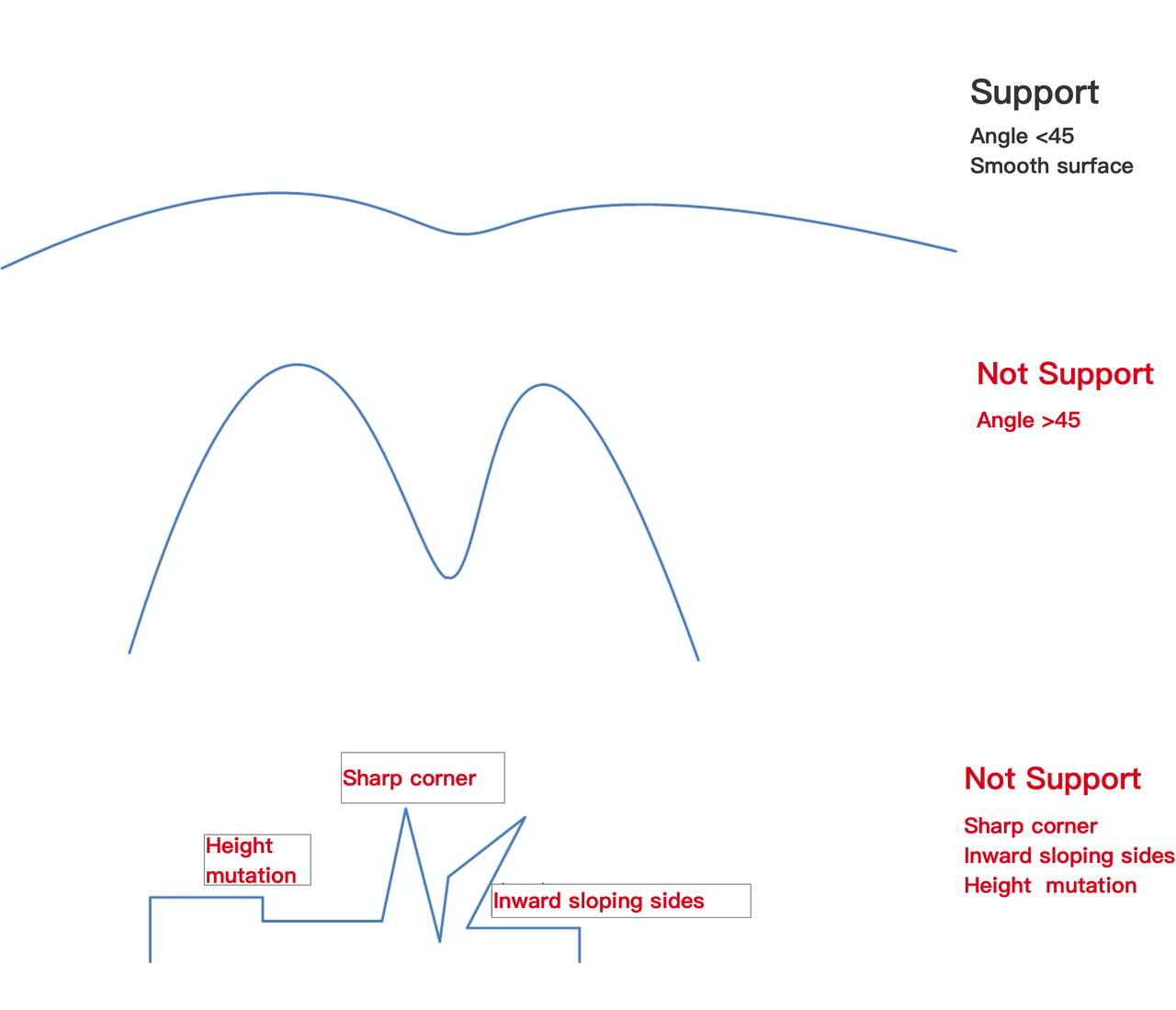
15. What is the storage temperature of P2?
The recommended storage temperature range for P2 is 10°C to 45°C.
The definition of the storage temperature for P2 refers to the recommended range of temperatures in which the machine should be kept while it's not in use and in a stationary state. This is to maintain a stable performance for the machine and prevent the aging and damage to components. This temperature range is usually determined based on the characteristics and work requirements of the machine's internal electronic components in laser cutting machine, mechanical parts, and optical systems.
16. What are the base dimensions of P2?
The base dimensions of P2 are 800*450 mm.
17. How to obtain the MAC address of P2?
- Connect the P2 to your computer using a USB cable.
- Open a browser and enter the corresponding URL based on your operating system, then press Enter:
The MAC address of the machine will be displayed on the resulting page (example shown below).
18. What is the slat spacing on the P2?
The slat spacing is 13.25mm.
19. Are P2S accessories compatible with P2?
Yes, all accessories in the P-series are fully interchangeable. This includes devices such as the conveyor feeder, riser base, rotary attachment, honeycomb panel, and fire safety set.
20. How loud is P2 during material processing?
P2 runs at about 75 db.
21. Can P2 perform relief engraving?
Currently, P2 cannot perform relief engraving.
22. What is the input voltage of P2's power adapter?
The power adapter operates at 110 V in the U.S. and 220V in Europe, the UK, and Australia.
Rotary Attachment of xTool P2
1. What is the maximum diameter of the material supported by the rotary attachment?
When using xTool P2 with baseplate equipped, the rotary attachment supports cylinders with diameters ranging from 3 to 42 mm.
When using xTool P2 with Riser Base, the rotary attachment supports cylinders with diameters ranging from 0 to 180 mm.
2. What are the differences between the rotary attachment of P2 and M1?
They are the same except for the tape measure that comes with them.
3. Does P2 support xTool Rotary Attachment 1 (RA1)?
Yes, it does.
Material engraving
1. Can I engrave on glass with xTool P2?
Yes, you can use xTool P2 to engrave on glass. You are advised to stick a piece of masking paper on the glass before you connect your machine to XCS for engraving, so that distance measurement can be properly performed.
2. Can I cut glass with xTool P2?
No, but you can engrave on glass with xTool P2.
3. Can I cut metal with xTool P2?
No, but you can use xTool P2 to engrave on coated metal, anodized aluminum alloy, and titanium steel. For stainless steel, you need to spray a coating on it before engraving it.
4. What is the maximum thickness of wooden boards I can cut with xTool P2?
You can cut solid wood of thickness up to 18 mm, such as black walnut and cherry wood.
When cutting plywood, you are advised not to cut a piece thicker than 12 mm. The cutting of thick plywood may cause a fire.
5. What materials can I process with xTool P2?
Most organic materials, such as wooden boards, corrugated paper, density boards, cloth, ceramics, glass, acrylic, stone, and leather.
6. What materials can't I process with xTool P2?
Do not use xTool P2 to process leather containing chromium, polyvinyl chloride, or polyvinyl butyral; and polytetrafluoroethylene, beryllium oxide, and any materials containing halogens, epoxy, or phenolic resins.
7. What is the maximum thickness of transparent acrylic I can cut with xTool P2?
You can cut transparent acrylic thickness up to 20 mm.
About P2 usage
1. How to exhaust the smoke out of the machine?
Way 1: Connect one end of the smoke exhaust pipe to the machine and the other end to the open air. The fan inside the machine exhausts the smoke out of the machine.
Way 2: Connect the other end of the smoke exhaust pipe to a purifier. You can purchase xTool Smoke Purifier at: https://www.xtool.com/products/pre-order-xtool-smoke-purifier?_pos=1&_psq=purifier&_ss=e&_v=1.0
2. How to connect xTool P2 through Wi-Fi?
- Connect the machine using a USB or network cable;
- Launch XCS, go to "Settings", "Basic info", and then "Wi-Fi setting".
- A Wi-Fi connection can be used after the configuration is finished.

3. How to conduct automatic distance measurement when using the rotary attachment 2 (RA2 pro)?
- Place the RA2 Pro in the center of P2 where the red spot is.
- Select the Laser cylindrical on XCS;
- Move the rotary attachment to allow the red spot to fall at the highest point of the material.
- Click Quick-measure to start automatic distance measurement.
4. How to clean the slats after the process of cutting?
Use a tissue with stain removers or kitchen cleaners to wipe the slats.
5. How to transport xTool P2?
- For short-distance manual handling:
- Please remove the peripheral devices of P2 (the exhaust pipe, connecting cables, automatic conveyor feeder, etc.).
- Avoiding damage from collisions, falls, etc., handle with care.
- For long-distance transportation:
- Remove the peripheral devices of P2 (the exhaust pipe, connecting cables, automatic conveyor feeder, etc.).
- Drain the antifreeze from the laser tube.
- Secure the laser module, X-axis gantry, drawers, slats, lid, and other movable components.
- Use crash-resistant materials such as EPE foam to wrap P2, to prevent P2 from being impacted or dropped during transportation.
- If possible, try to use the original packaging materials and packaging method to repackage P2 before transportation.

