
xTool O1 Omni Printer Safety First (Important)
Updated Oct 28,2026
Updated Oct 28,2026
Read and get familiar with all safety precautions and procedures before using the device. Strictly follow all safety precautions. Ensure that the device is properly assembled and is working properly.
1. Laser safety
- Do not operate the product when any part of it is removed. Removing any part may expose the laser system and cause damage to the product.
- The reference standards for laser safety are the American National Standard for Safe Use of Lasers (Z136.1-2022), International Electrotechnical Commission Standard (IEC 60825-1:2014), and European Standards (EN 60825-1:2014/A11:2021).
- Lasers are categorized into several different classes depending on the extent of the potential hazard associated with the laser, with Class 1 being the least dangerous and Class 4 the most dangerous. The United States Food and Drug Administration has indicated that Class 4 lasers may pose an "immediate skin hazard and eye hazard from exposure to either the direct or reflected beam; may also present a fire hazard." This product is classified as a Class 1 laser device.
2. UV light safety
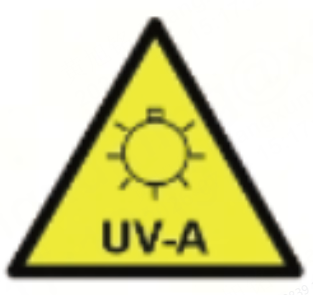
WARNING - UV radiation emitted. Avoid unnecessary exposure.
- Long-time exposure to UV light may cause eye or skin damage.
- Do not look directly at UV light while the product is in operation.
- It is strongly recommended to operate the device with the covers closed. If operation with the covers open is necessary, maintain a safe distance of at least 20 cm from the device and wear appropriate safety goggles.
- Do not operate the device with the cover open when children are present.
3. Electrical safety
- Make sure that the power cable complies with local safety standards.
- Use only the power cable that comes with the product. Using the power cable of another equipment may cause fires or electrical shock.
- Make sure that your product connects to a properly grounded power outlet.
- Place the power cable properly to avoid abrasions, pinching, fraying, twisting, or kinking. Do not place objects on it and do not allow it to be stepped on or run over.
- Do not disassemble, modify, or repair the power cable, plug, or components of this device.
- Do not use the device if the power cord or plug is damaged.
- Do not plug in or unplug the device with wet hands.
- Use only the power source indicated on the product label.
- Do not touch any electronic area with your hands or other tools when the product is connected to a power supply.
- Do not open any access panel on the product when the product is connected to the power supply. Accidental contact with the power supply may cause injury.
4. Fire safety
- Do not place any flammable materials, explosives, or volatile solvents, such as paper, acetone, alcohol, or gasoline, around the product. They may cause the spread of flames and increase the risk of material ignition.
- Do not leave the product unattended when it is working. If the product works with setting errors and is left unattended for a long period of time, or if a mechanical or electrical fault occurs, a fire may be caused.
- Do not use the product if it emits smoke or if you notice abnormal odors or noises. There is a risk of electric shock or fire. Immediately turn off the power or unplug the power cord and contact after-sales services.
5. Operation safety
- The product is heavy and should not be moved by a single person.
- Do not tilt the product more than 10 degrees in any direction while moving it. Doing so may cause the product to fall, resulting in damage to the product or personal injury.
- If the product is placed on a stand with casters, make sure the casters are securely locked before performing any work to prevent movement. Movement of the stand during operation could result in injury.
- Always operate the printer in a well-ventilated area. When using the printer indoors, open doors and windows or use fans to improve air circulation. Using an air purifier can also enhance safety.
- Leave enough room at the rear of the device for proper cabling and above the device for lid opening.
- Ensure that the product is placed on a flat and stable surface.
- It is not recommended to place the device outdoors for long-term use. If temporary outdoor use is necessary, it is advisable to take proper protective measures to prevent the device from being affected by moisture or dust. Do not place it in environments that are dirty, dusty, with water or heat sources, with high temperatures or humidity, or in a place prone to vibration and shaking.
- Do not leave the product unattended during operation. When the product is working, pay attention to whether it is working properly and what the indicators show by light.
- Do not disassemble the product or change its structure in any way without authorization. Do not modify or decompile its operating system.
- Do not allow liquids to enter the product or operate it with wet hands.
- Do not insert foreign objects into the slots of the device.
- Keep your fingers away from the gap during printhead movement to prevent potential injury.
- Do not tilt or invert the device during storage or transport, as this may cause ink leakage.
- The power plug serves as the disconnection device.
- The product is intended to be operated up to 2000m above sea level.
6. Ink safety
General precautions
- UV-printed areas are not intended for direct contact with food or beverages. Do not UV print on surfaces that may come into direct contact with food or beverages.
- Keep the ink away from children. Do not allow children to drink ink or touch ink bottles.
- Always wear rubber or plastic gloves when handling UV ink.
- Wipe small stains with a clean cloth or paper towel. Residual ink can be removed with an alcohol-based cleaner.
- When installing or replacing ink cartridges, exercise caution to prevent ink from staining your clothing. DTG ink can be hard to clean, and UV ink may cause permanent stains or damage.
- When the ink level is low, the printer may get damaged if you continue using it. Please refill the ink as soon as possible.
- Keep the ink in a cool and dark place.
- Ink cleaning solution is classified as industrial waste. Dispose of the cleaning solution in accordance with local laws and regulations, such as by entrusting it to an authorized industrial waste disposal company.
Precautions for UV ink spills
- Immediately wear personal protective equipment, such as chemical-resistant gloves and a filtered mask.
- Remove all ignition sources, ensure proper ventilation, and avoid contact with eyes, skin, or clothing. Prevent inhalation of vapors and dust.
- Ensure that ink does not enter drains or waterways. Use suitable materials to safely contain and clean up any spills.
Precautions for UV ink exposure
- During operation, avoid inhaling fumes and prevent contact with eyes, skin, or clothing.
- If ink gets on your skin, immediately wash the affected area with plenty of soap and water for at least 15 minutes. Remove contaminated clothing. If irritation persists, seek medical attention.
- If ink enters your eyes, immediately rinse them with clean water for at least 15 minutes, ensuring thorough flushing under the eyelids. Seek medical attention without delay.
- If ink is swallowed, do not induce vomiting. Seek immediate medical attention or contact a poison control center. Do not give anything by mouth to an unconscious person.
7. Use and maintenance
- Check the device for damage every time before you use it. Do not operate it in any way when any damage or defect is found.
- Ensure that the workspace is clean and flat.
- Keep the inside of the device clean.
- Do not store the product in an environment with sudden changes in temperature and humidity. Do not expose the product to direct sunlight, hard light, or heat sources.
- The device works properly at temperatures between 15°C and 30°C and relative humidity levels between 30% and 80%. It is recommended that the device work at the temperature of 20°C to 30°C and at a relative humidity of 50% to 80%. Do not operate it at temperatures lower than 5°C or higher than 40°C.
- The device is not user-serviceable. It must be returned to the factory or repaired by authorized professionals.
- Disconnect the power supply before replacing any components, such as replacing the printhead.
- Please follow the online maintenance schedule. Otherwise, it can cause head clogs and even serious printer damage.
- UV ink in the printer cures when exposed to sunlight or ultraviolet light. Avoid using the printer in direct sunlight or under fluorescent lighting, as this may cause the printhead nozzle to clog.
- Do not disassemble the ink tank while the product is in operation, as this may cause a malfunction.
- Maintenance, such as cleaning and replacing consumables, must be performed according to usage frequency or at recommended intervals. Failure to perform regular maintenance may result in a decline in print quality.
- To achieve optimal print quality, use ink cartridges before the expiration date indicated on the packaging or within one year of installation.
8. Warning and instruction signs
On the product, the warning and instruction signs are labeled where physical injuries or damage to the product may be caused before and/or during operation. If a sign is damaged or lost, replace it immediately. You can use the following template to print the sign you need.
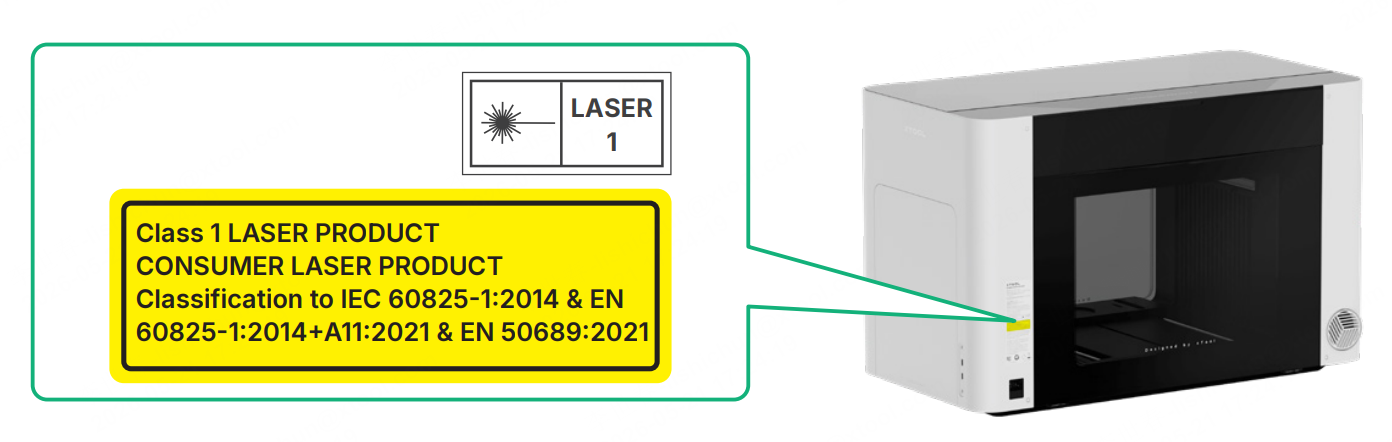
9. Laser specifications
Infrared light for distance measuring:
- Wavelength: 650 ± 15 nm (<0.39 mW)
- Beam divergence: <1°
- Maximum single pulse energy: 9.584 × 10⁻¹¹–6.438 × 10⁻⁹ J
- Pulse width: 1-50 µs
- Repetition frequency: 10 kHz
10. UV light specifications
- Wavelength: 395 nm (typical value)
- Wavelength range: 390–400 nm
- Beam divergence: 60° (typical value)
- Half-power angle: 55–60°
Preview
Was this page helpful?
35 out of 36 found this helpful
Help Ticket
Use this help ticket to submit your issue. We will respond within 1 business day
Submit a Ticket 
