
About specifications
1. Which processing modules does xTool M2 support?
- xTool M2 10W/20W/40W laser module
- xTool M2 3W infrared module
- xTool M2 CMYK inkjet module
The xTool M2's processing module is not compatible with processing modules from other xTool devices.
2. What is the wavelength of the laser module? What kinds of materials can be processed by xTool M2?
For detailed information on xTool M2 compatibility with various materials, refer to the article.
- Blue-light laser module (10W/20W/40W):
- Wavelength: 445 nm (±15 nm)
- Materials that can be processed: Wood, acrylic, leather, paper, corrugated cardboard, black aluminum oxide, thin metal, stone, bamboo products, and so on.
- Processing type: Cutting and engraving
The blue-light laser module is not suitable for processing highly reflective materials, such as mirror-finished metals, unoxidized aluminum, copper, and mirror-finished stainless steel, to prevent laser reflection injuries or device damage.
- Infrared module (3W):
- Wavelength: 1064 nm (±10 nm)
- Materials that can be processed: Metal (Stainless steel, copper, aluminum, precious metals), anodized aluminum, certain plastics, etc.
3. What is the processing area of xTool M2?
- 10W module: 16.7'' × 12.6'' (426 mm × 320 mm)
- 20W module: 16.7'' × 12.6'' (426 mm × 320 mm)
- 40W module: 16.7'' × 12.3'' (426 mm × 312 mm)
- 3W infrared module: 16.2'' × 12.2'' (412 mm × 310 mm)
- CMYK inkjet module: 11.8 × 11.5'' (300 mm × 294 mm)
4. What is the laser spot size of xTool M2?
- 10W module: 0.0016" × 0.0024" (0.06 mm × 0.04 mm)
- 20W module: 0.0024" × 0.0031" (0.08 mm × 0.06 mm)
- 40W module: 0.0031" × 0.0039" (0.08 mm × 0.1 mm)
- 3W infrared module: ≤60 μm
5. What are the size and weight of xTool M2?
- Size: 24.0'' × 22.4'' × 7.1'' (610 × 569 × 180 mm)
- Weight: 12.3 kg
6. What is the power output of xTool M2 power adapter?
- 10W module/3W infrared module/CMYK inkjet module: 25V 4.8A
- 20W module: 25V 6A
- 40W module: 25V 8A
7. What class of laser device is xTool M2?
xTool M2 is classified as a Class 1 laser device.
Class 1 laser products pose the lowest risk, while Class 4 laser products pose the highest risk. Class 4 lasers refer to those whose direct and reflected beams pose a direct hazard to the eyes and skin and may present a fire hazard.
Under normal operating conditions, xTool M2 embedded laser is enclosed within a housing and operates behind a protective cover, ensuring that the laser radiation accessible to humans does not exceed Class 1. The product’s protective cover and baseplate are equipped with safety interlock switches. If the protective cover is opened or the baseplate is removed during operation, the laser module stops working.
8. What is the cutting capability of different laser modules?
Maximum cutting thickness
Laser module | Basswood plywood | Black acrylic |
|---|---|---|
10W | 8 mm | 3 mm |
20W | 10 mm | 8 mm |
40W | 15 mm | 11 mm |
Recommended cutting parameters for basswood plywood
*All recommended settings below use 100% power and a single pass.
Laser module | Thickness | Cutting speed |
|---|---|---|
10W | 3 mm | 8 mm/s |
6 mm | 3 mm/s | |
8 mm | 2 mm/s | |
20W | 3 mm | 15 mm/s |
6 mm | 6 mm/s | |
10 mm | 3 mm/s | |
40W | 3 mm | 15 mm/s |
6 mm | 6 mm/s | |
15 mm | 2 mm/s |
Recommended cutting parameters for black acrylic
*All recommended settings below use 100% power.
Laser module | Thickness | Cutting speed | Processing pass |
|---|---|---|---|
10W | 3 mm | 4 mm/s | 2 |
20W | 3 mm | 4 mm/s | 1 |
40W | 3 mm | 10 mm/s | 1 |
9. Product information
Standard specifications | |||
|---|---|---|---|
Power supply specification | 10W module/3W infrared module/CMYK inkjet module: 25V 4.8A (power adapter), 25V 2A (laser module rated power) 20W module: 25V 6A (power adapter), 25V 3.4A (laser module rated power) 40W module: 25V 8A (power adapter), 25V 6A (laser module rated power) | ||
Unit size | 610 × 569 × 180 mm | ||
Packaging size | 700 × 630 × 285 mm | ||
Unit weight | 12.3 kg (basic kit) | ||
Packaging weight | 15.9 kg (basic kit) | ||
Working temperature and humidity | Working temperature: 0 ~ 35℃ Working humidity: 20 ~ 85% | ||
Storage temperature and humidity | Storage temperature: -10 ~ 45℃ Storage humidity: 10 ~ 90% | ||
Laser lifespan | Power loss: <10% within 720 hours Service life: 8000 hours | ||
Safety class | Class 1 | ||
Processing specifications | |||
|---|---|---|---|
Module | 10W/20W/40W module | 3W infrared module | CMYK inkjet module |
Laser module size | 10W: 55 × 56 × 105 mm 20W: 55 × 56 × 105 mm 40W: 60 × 69.27 × 75 mm | 65 × 65 × 110 mm | 77 × 65 × 107 mm |
Processing area | 10W/20W: 426 × 320 mm 40W: 426 × 312 mm Multi-processing: 422 × 283 mm Vertical laser processing: 100 × 358 mm | 412.5 × 310 mm | Without bottom cap: 396 × 294 mm With bottom cap: 300 × 294 mm |
Laser spot | 10W/20W: 0.04 × 0.06 mm 40W: 0.08 × 0.10 mm | 3W: ≤60 μm | / |
Positioning and preview |
| ||
Z-axis distance/Maximum processing height |
| ||
Maximum movement speed/acceleration | XY axes:
Z axis:
| ||
Movement accuracy/repeated positioning accuracy (XY axes) |
| ||
Positioning accuracy (Z-axis) |
| ||
Distant-view and close-view cameras | Distant-view camera
Close-view camera
| ||
Other specifications | |||
|---|---|---|---|
Communication mode | USB/Wi-Fi | ||
Control mode | PC | ||
Compatible software | xTool Studio | ||
System supported | Windows/macOS | ||
File format supported | SVG/DXF/JPG/JPEG/PNG/BMP and so on | ||
10. What are the differences between xTool M2 and xTool M1 Ultra?
xTool M2: Focuses on laser processing and CMYK inkjet printing applications. It incorporates the ACS™ technology and dual-camera system from our flagship series, delivering a fully visual and highly automated workflow.
xTool M1 Ultra: A fully featured "four-in-one" workstation (combining laser cutting, blade cutting, pen drawing, and hot foiling) designed specifically for makers who need to work with a variety of materials. xTool M1 Ultra does not include a camera system, and its price is approximately twice that of xTool M2.
About using the device
1. What xTool accessories are compatible with xTool M2?
Exclusive accessories:
- xTool Rotary Attachment 3 Lite (RA3 Lite)
- xTool M2 CMYK Inkjet Module
- xTool M2 3W Infrared Module
General accessories:
- xTool Desktop Smoke Purifier (needs an adapter)
- xTool SafetyPro™ AP2
- xTool SafetyPro™ AP2 Max
- xTool Screen Printer
- xTool Fire Safety Set 1.5
- xTool SafetyPro™ IF2
- xTool SafetyPro™ IF2 2.0
Other:
- xTool M2 does not support the riser base.
- xTool M2 does not support the conveyor feeder.
- xTool M2 does not support the honeycomb panel.
- xTool M2 is compatible with the slats of xTool M1 Ultra.
- Accessories not listed here are not compatible with xTool M2.
2. Does xTool M2 require an air assist system?
No, that's not necessary.
xTool M2 comes with a built-in air pump, so no additional air assist is required. You can set different air pump power depending on engraving or cutting.
3. Does a cutting mat come with xTool M2?
xTool M2 does not come with an extra cutting mat as xTool M1 Ultra does.
Since the cutting mat is used for blade-cutting functions, xTool M2 primarily uses blue-light lasers to cut materials.
Before processing, users should place a protective material on the baseplate, such as a thick silicone mat with good flatness or a black-coated aluminum oxide plate. It is not recommended to use materials containing flammable components or highly reflective materials as pads, as the laser beam may be reflected into the laser module, causing damage.
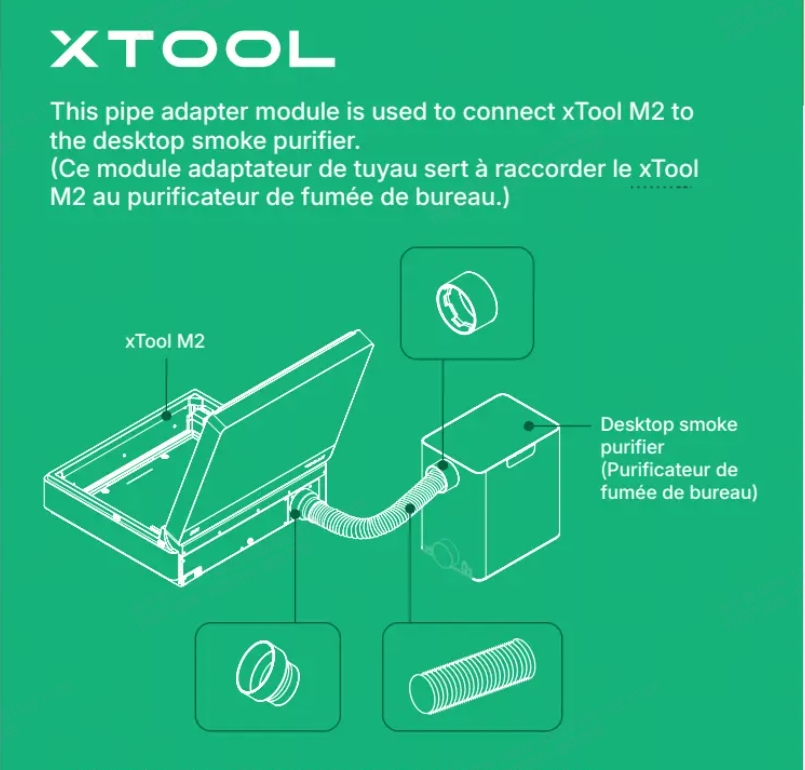
4. How to install the adapter when xTool M2 is connected to the desktop smoke purifier?
Refer to the illustration below to install the pipe adapter.
5. What should I do if the blue light from the laser module is not clear during framing?
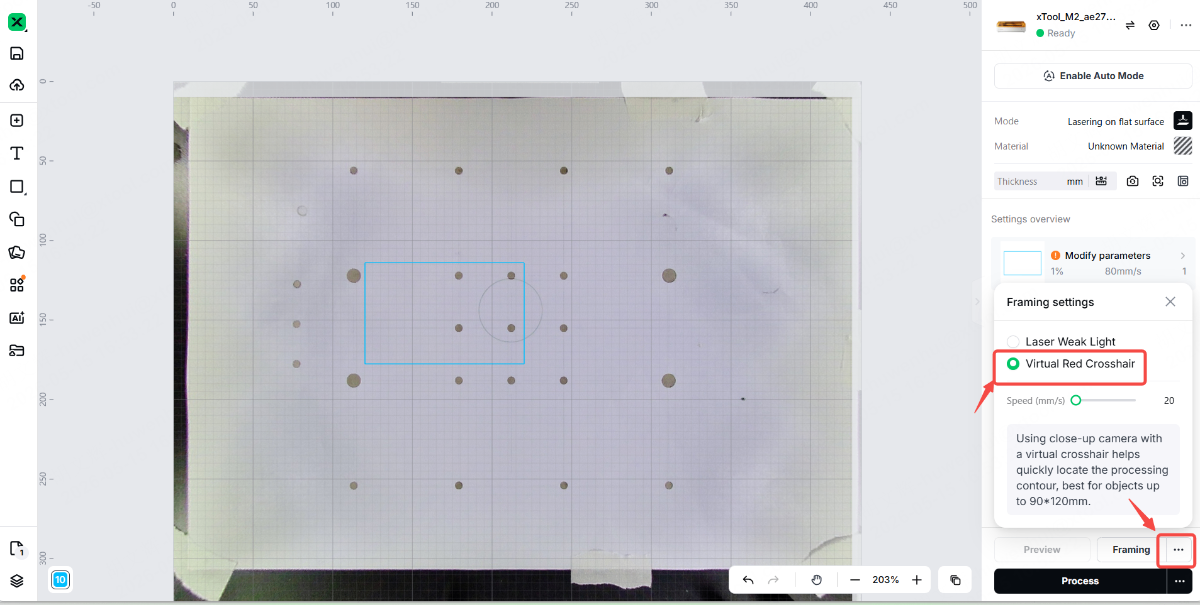
xTool M2 laser module does not come with a red cross emitter. Instead, it uses a low-intensity light for positioning. The light is the same blue light (455 nm wavelength) used during actual engraving. To comply with Class 1 laser safety standards, we strictly limit the power of the light used for framing, so the alignment light's intensity is relatively low, which may lead to insufficient clarity. When the device is framing, you can open the orange lid to observe the blue light.
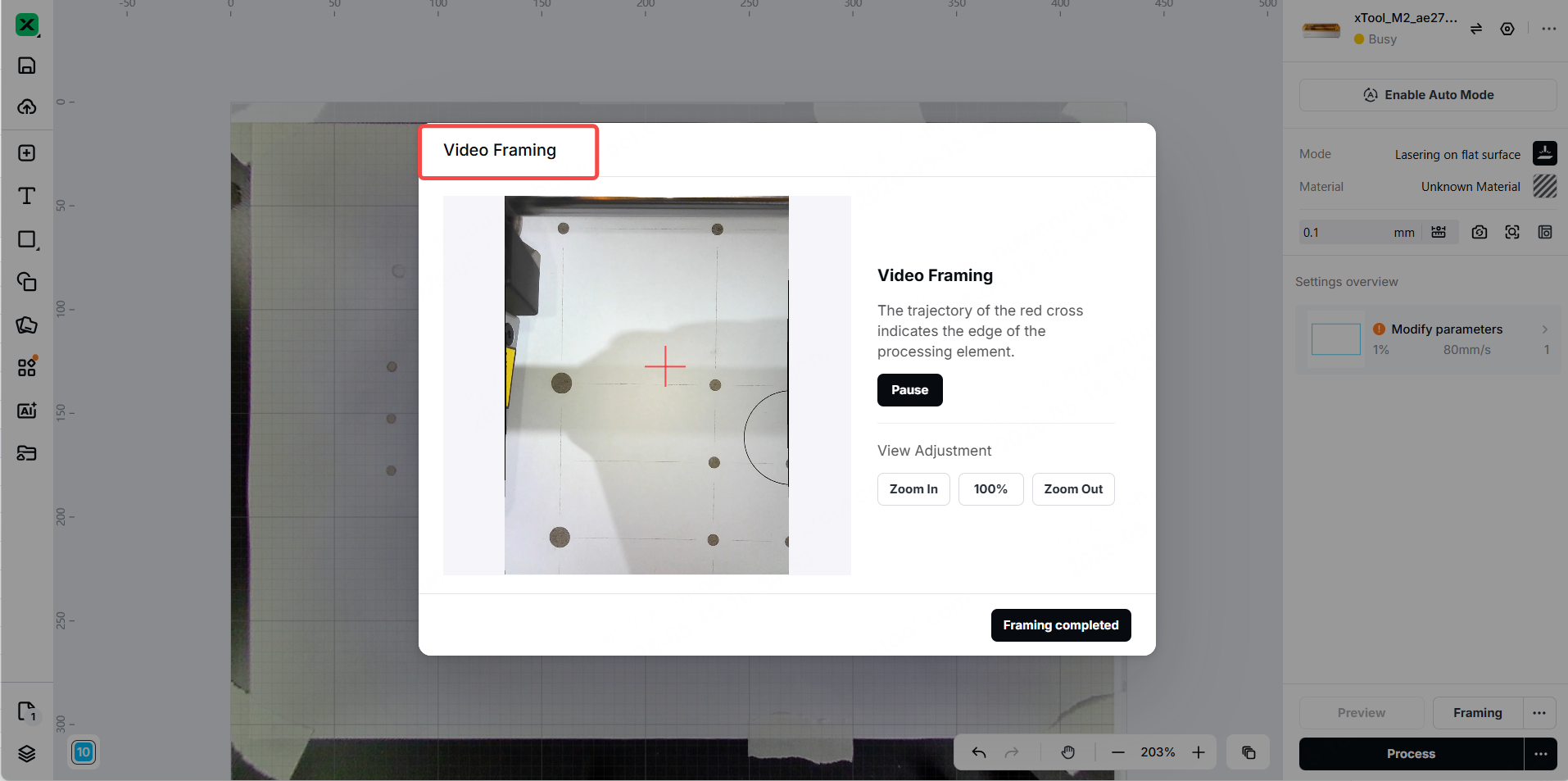
In addition, we support the "Virtual Red Crosshair" for framing. You can use the "Video Framing" in the software to determine the position of the design on the material.
6. What kinds of file formats xTool M2 support?
General vector and bitmap formats are supported: SVG, DXF, JPG, JPEG, PNG, BMP, and so on.
7. Are Lightburn and XCS compatible with xTool M2?
xTool M2 is not compatible with Lightburn or XCS.
8. Can the processing monitor video of xTool M2 be exported?
No.
Because processing monitor videos requires large memory, and the device's main control board has limited memory capacity, it cannot meet the storage requirements. Currently, the processing monitor can only be viewed via live streaming.
9. Does xTool M2 support offline processing?
Yes.
Offline processing: The software does not need to connect to the device. The device can perform tasks directly. Double-click the button to perform offline processing.
Note: Offline processing can only process the task last executed on the device. It cannot be performed by importing G-code.
10. Which processing modes are supported when framing?
All processing modes in xTool M2 support framing.
11. What is vibration suppression calibration?
Vibration suppression calibration is primarily used to solve processing vibration issues caused by insufficient structural strength. It is recommended to perform vibration suppression calibration every 50 hours of operation.
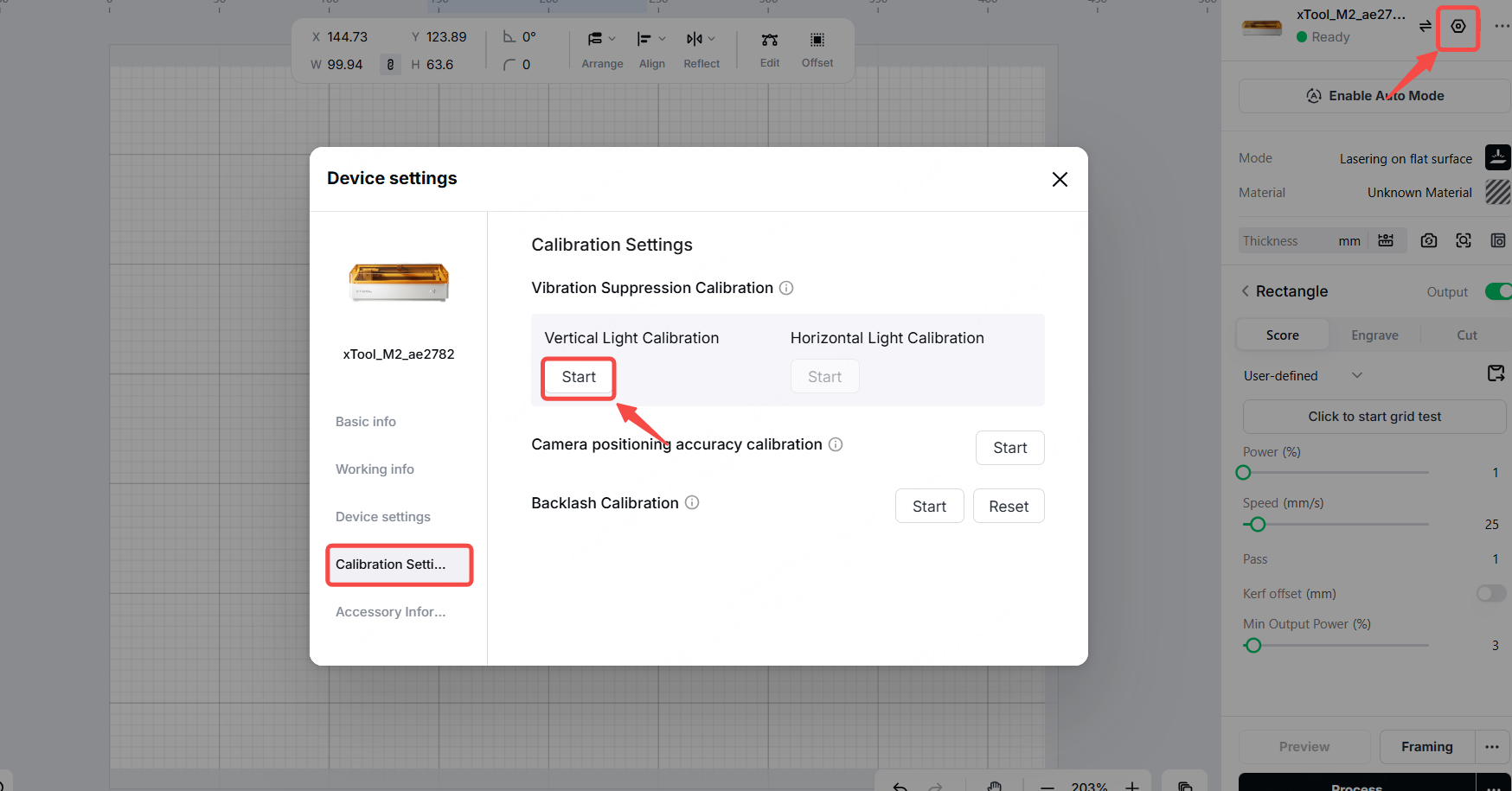
As the device is used, structural strength or belt condition may change and require recalibration to maintain stability. However, it does not necessarily indicate a problem with the device. It is more of preventive maintenance.
12. There are obvious vibration noises during vibration suppression calibration. Why?
Noise is generated during the normal operation of the laser module during vibration recognition. It is a normal phenomenon.
13. What is the Z-axis calibration of xTool M2?
Z-axis calibration is primarily used to level the baseplate, compensating for any unevenness in the baseplate to ensure processing accuracy.
14. What is the automation (ACS) of xTool M2?
Automated Creation System (ACS) is an intelligent processing technology developed by xTool, designed to streamline the operation of laser engraving devices and deliver a highly efficient, intelligent processing experience.
Once automation mode is enabled in the software, the device automatically takes photos, aligns the image, focuses, and measures the material thickness. If you use consumables with the official QR code, the software automatically matches them and provides the appropriate processing parameters. After loading the material, enable automation mode and close the lid to trigger the automatic process—there is no need to manually click the buttons for taking photos or focusing.
For information on using automation mode, refer to:
15. xTool M2 produces sparks during laser cutting. Why?
This is normal. xTool M2 has a smaller spot size than other xTool laser engravers, with higher energy density at a single point, resulting in better cutting performance but also making it easier to spark.
If you want to prevent the cut pieces from becoming black, follow these points:
- Ensure that the material being processed is flat. Avoid using materials with warping to ensure accurate distance measurement.
- Ensure that the material being processed is neither too dry nor too damp.
- Apply masking tape to both sides of the material. Once cutting is complete, peel off the tape to get a clean surface.
16. When using a laser module with the same wattage and processing parameters to process the same material, xTool M2 delivers more power than xTool S1 or xTool M1 Ultra. Why?
xTool M2's laser module produces a smaller spot size than that of xTool S1 or xTool M1 Ultra at the same wattage, resulting in higher energy density per unit area and, consequently, superior cutting performance.
17. How to optimize or prevent yellowing when cutting materials with xTool M2?
- Apply masking tape to both sides of the material. Once cutting is complete, peel off the tape to get a clean surface.
- Ensure that auto focus is enabled.
- Adjust the processing parameters. You can increase cutting speed, reduce power, and increase the number of passes.
- Make sure the air pump is turned on. Set the built-in air pump to maximum speed and keep it running continuously.
18. What is the maximum thickness that the magnetic fixtures can hold?
- 0<H ≤ 6 mm materials: the magnetic fixtures can clamp
- > 6 mm materials: place the material on the magnetic fixtures
19. What kinds of curved materials does that xTool M2 support?
Different laser modules support different angles for curved surface processing.
- 10W module:
- Supported processing angle: 7.5°
- Supported processing depth: 11 mm
- 20W module:
- Supported processing angle: 7° – 9°
- Supported processing depth: 11 mm
- 40W module:
- Supported processing angle: 6° – 8°
- Supported processing depth: 11 mm
- 3W infrared module:
- Supported processing angle: 8°
- Supported processing depth: 11 mm
20. After connecting xTool M2 to xTool desktop smoke purifier, the purifier's name does not appear in the software's accessory information. Why?
An adapter is required to connect xTool M2 to xTool desktop smoke purifier. Due to the product’s design, the desktop smoke purifier will not appear in the software when connected to any xTool devices. When you see that the indicator light on xTool desktop smoke purifier is in automatic mode, xTool M2 successfully pairs with the purifier.
21. Can xTool M2 laser cut vinyl material?
If the vinyl materials contain PVC, they cannot be laser cut. During laser processing, Vinyl materials containing PVC produce toxic and corrosive gases (such as chlorides). These gases are not only extremely harmful to human health but also damage devices.
Unlike xTool M1 Ultra, xTool M2 does not support physical blade cutting and cannot cut all vinyl materials.
22. The fan on the 3W infrared module intermittently stops working. Why?
This is normal. The fan speed of the 3W infrared module is intelligently adjusted based on temperature to ensure it operates at an appropriate temperature.
23. The USB cable I received is different from the one on the material card. Why?
The USB cable included in your xTool M2 packaging may come in one of two versions.
- Version 1: USB cable + adapter (detachable)
- Version 2: Integrated design of USB cable and adapter (all-in-one)
Both versions are compatible connection cables for xTool M2. They have the same electrical performance and data transmission stability, and both ensure the device operates normally. The difference between the versions is only due to material supply from different production batches or package configurations, and does not affect any functionality.
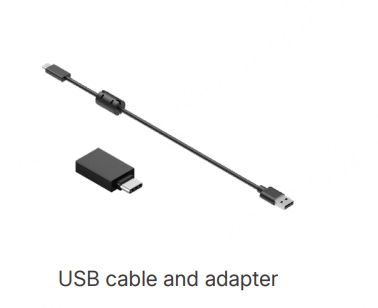
Version 1
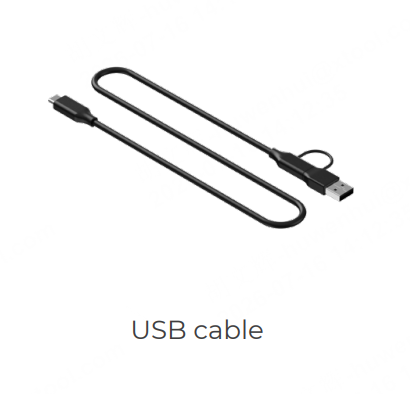
Version 2
24. Why does xTool M2 40W laser module trigger a temperature alarm?
When the laser module operates continuously for extended periods or in a high-temperature environment, it may trigger overheat protection and display an abnormal temperature warning. This is a normal protective mechanism designed to prevent overheating damage to core components.
If an alarm occurs, shut down the device immediately and place it in a well-ventilated area to cool naturally. Wait until the internal temperature of the laser module drops below 35°C before turning the device back on. Do not use water or cold air to force cooling, as this may damage the optical components.
It is recommended to keep the operating environment temperature between 0°C and 35°C, avoid direct sunlight or prolonged operation in enclosed spaces, and regularly check that the laser module’s cooling fan is operating properly.
This alarm is part of an active protection mechanism. Normal operation can resume once the unit has cooled down, with no impact on laser power, processing accuracy, or the service life of the laser module. If the alarm continues to occur frequently after cooling, contact after-sales support to have the cooling system checked.
25. Why is the black metal business card missing from xTool M2 packaging?
Black metal business cards are included only in the xTool M2 Deluxe Material Kit, which is currently available exclusively with the xTool M2 Deluxe Bundle on Amazon. They are not included in other versions.
This business card is used for Backlash Calibration. It is not a standard material or required for everyday use; Only if the device produces misaligned results or exhibits accuracy issues. If you need one later, you may prepare a similar metal sheet yourself or contact us to purchase one.
About maintenance
1. What is the cleaning frequency of the device?
Blue-light laser module protective lens: Clean after a cumulative processing time of more than 42 hours
Laser module focusing module: Clean after a cumulative processing time of more than 30 hours
Exhaust fan: Clean after a cumulative operating time of more than 30 hours
Back panel: Clean after a cumulative processing time of more than 30 hours
Fill light: Clean after a cumulative operating time of more than 30 hours
Camera cover: Clean after a cumulative processing time of more than 30 hours
You can also connect xTool M2 to the software. Click the Device self-check in the software, and it helps determine whether any components need to be cleaned.
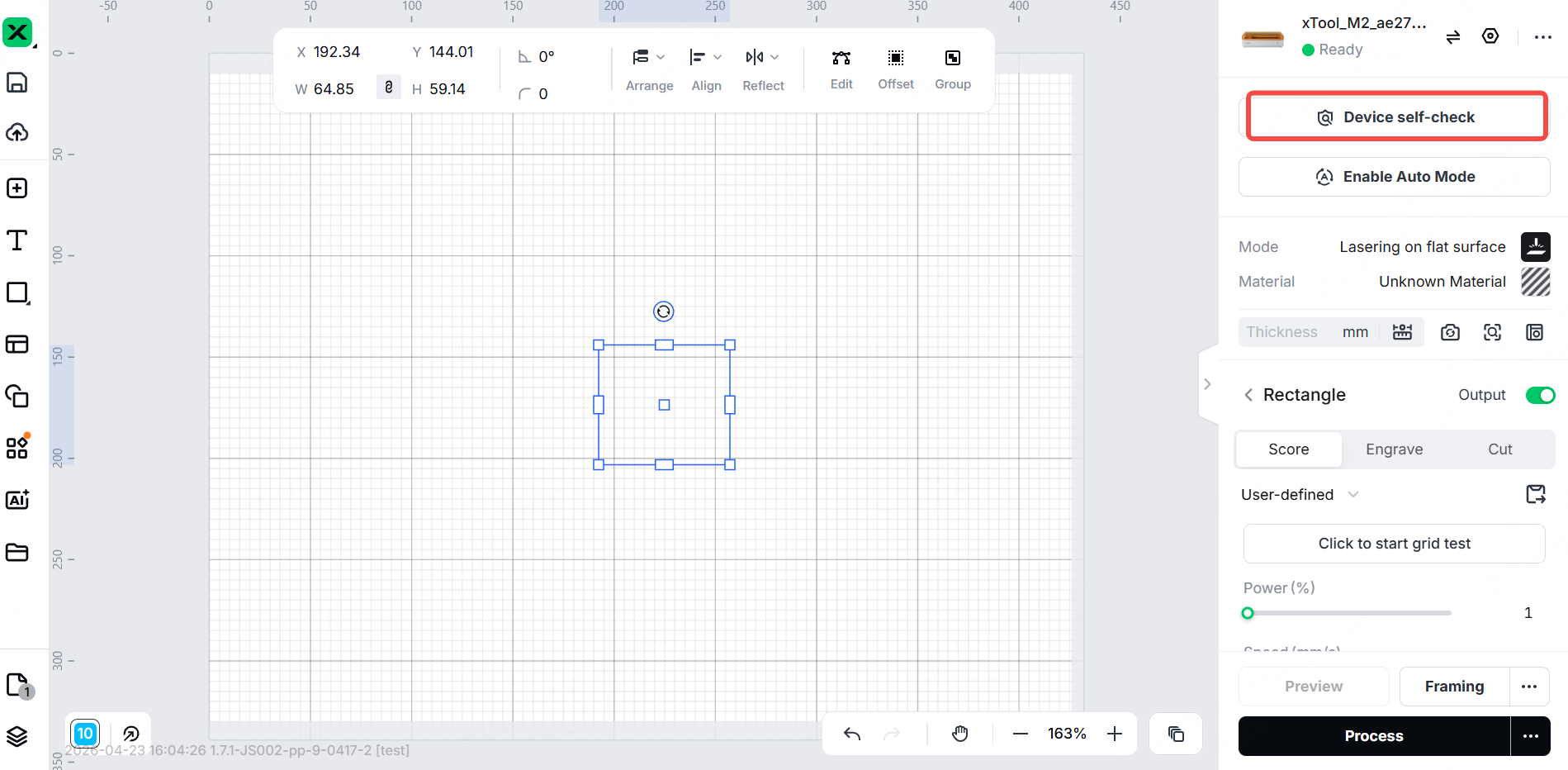
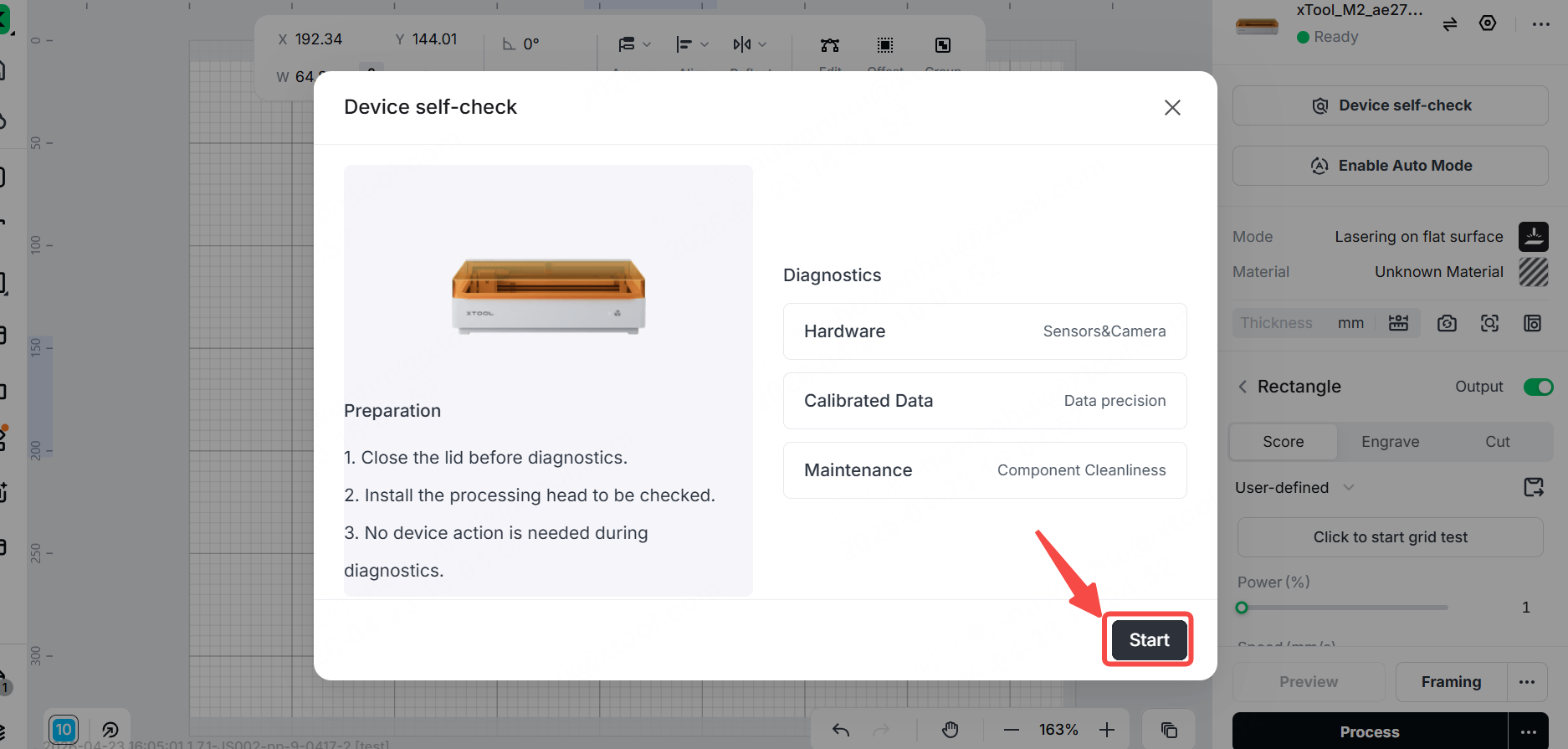
2. Causes and solutions for staining on the baseplate after laser processing
When a laser engraver cuts solid wood (especially softwoods such as pine and cypress) or wood with a high resin content, the high temperatures cause the resin and lignin in the wood to pyrolyze, forming gaseous tar that condenses and adheres to the cooler baseplate upon contact. Additionally, if the laser focal point is set too low or the cutting parameters (power/speed) are too high, the laser energy will strike the baseplate directly after penetrating the wood, potentially causing damage to the baseplate.
Before use, we recommend that you ensure magnetic fixtures are in place to prevent the consumables from coming into direct contact with the baseplate.
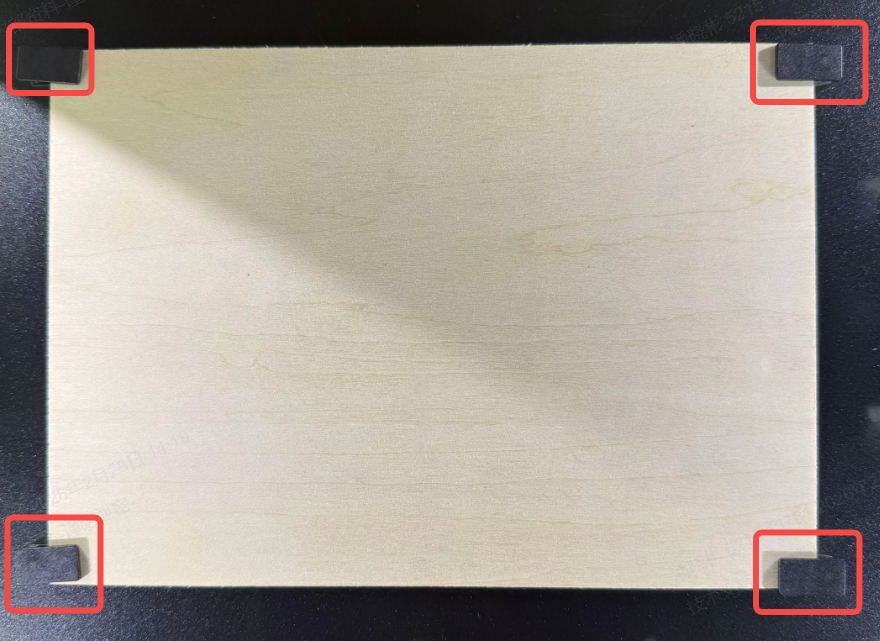
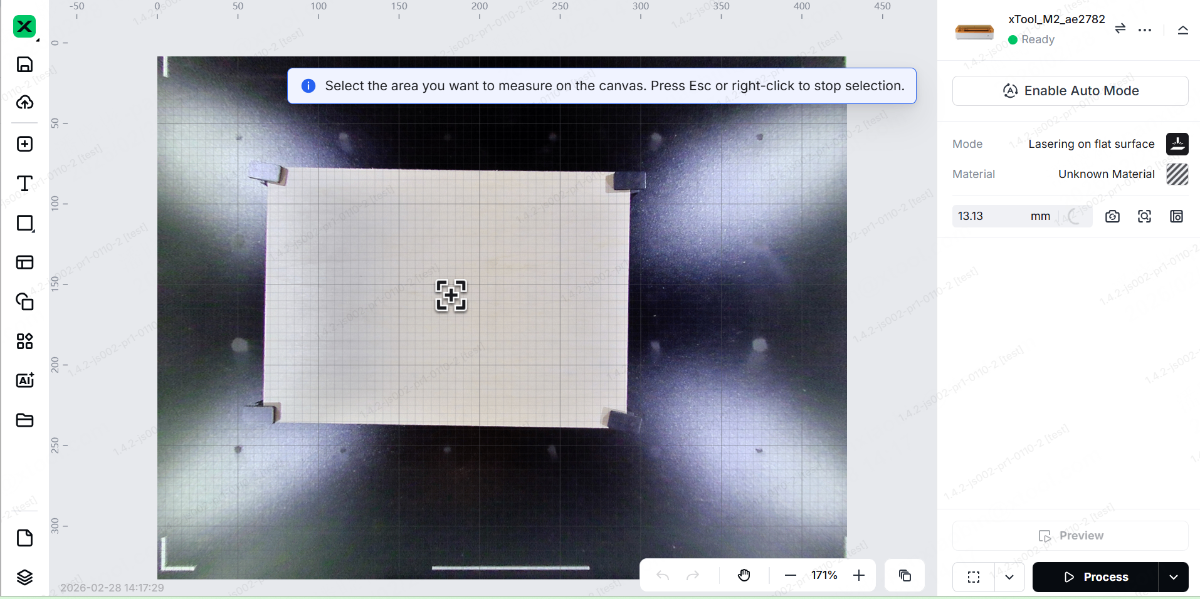
Perform the auto-measure before processing. Make sure the focus is on the surface of the material.
After use: First, vacuum up any surface dust, then wipe with a dry cloth. Spray a neutral detergent (such as dish soap mixed with water), 75% alcohol, or a specialized industrial grease remover onto a cloth and wipe the surface, then gently scrape off any residue with a plastic scraper (be careful not to scratch the surface of the baseplate).
Replacing the baseplate: Since the baseplate is a consumable part, it is not covered by our warranty. If you need to replace it, go to the official website and purchase one.
3. How can I prevent or reduce burn marks on xTool M2 baseplate?
It is difficult to completely avoid burn marks on the baseplate during laser processing. Since the baseplate is made of stainless steel, these burn marks are more noticeable compared to other xTool products.
If you are concerned about burn marks, it is recommended to place a protective material on the baseplate before processing, such as a thick silicone mat with good flatness or a black-coated aluminum oxide plate. It is not recommended to use materials that contain flammable or highly reflective materials.
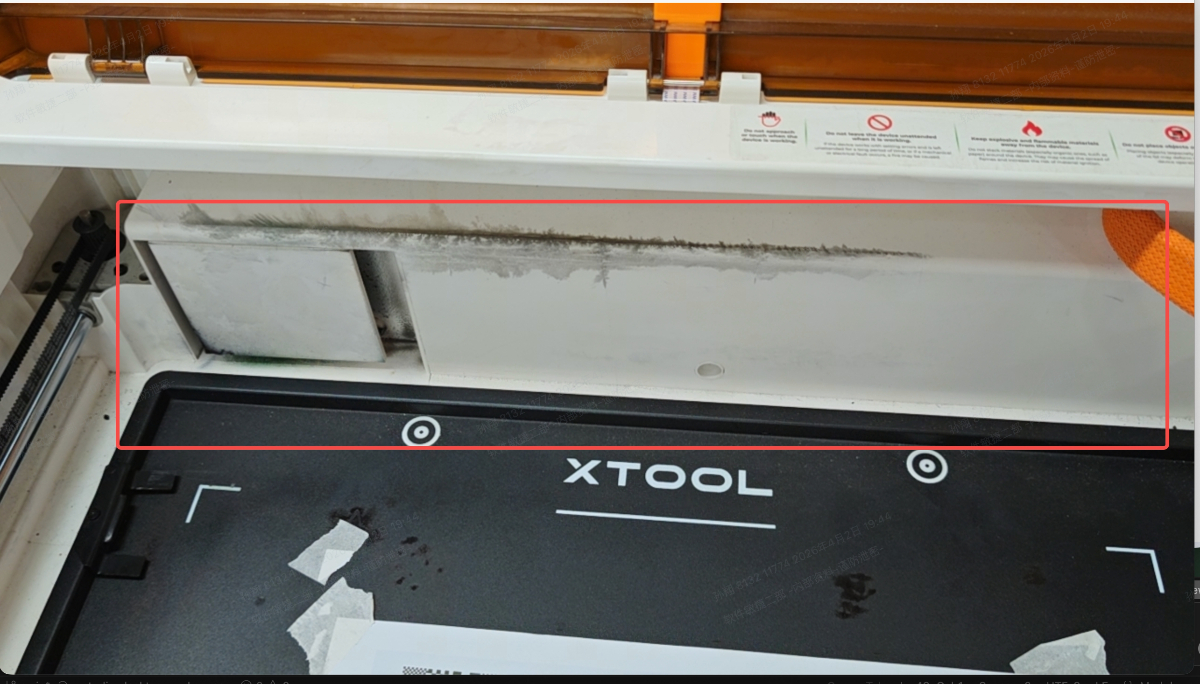
4. What causes the inside of the device to turn black, and how can I solve it?
Due to the constant movement of the drag chain and friction against the interior, as well as debris generated during processing, the interior of the device may become discolored. You can clean it by wiping with alcohol and a non-woven cloth.
About troubleshooting
1. Why?xTool M2 fails to start up or processing pauses. Why?
It may be due to a data transmission error. Try to restart the device and turn it on or resume processing. If the problem persists, please contact xTool after-sales service.
2. xTool M2 experiences an abnormal situation where all the fill lights turn off, the exhaust fan stops running, and the indicator light flashes white. Why?
It may be caused by a main control board malfunction or system lag. Try to update to the latest firmware and then restart the device to see if the issue is resolved.
If the problem persists after the update, please contact xTool after-sales service.
3. xTool M2's laser module experiences a collision during power-on reset. Why?
Update the firmware to the latest version first, then restart the device to see if the issue is resolved. If the problem persists after the update, please contact xTool after-sales service.
4. xTool M2 produces streaks and blurry results when engraving bitmap images. Why?
Process the material as close to the center as possible and use the recommended parameters.
If you encounter streaks, first test the material using the parameter matrix and adjust the parameters.
If the issue persists, please provide your processing file and material specifications, and contact xTool after-sales service.
5. The air pump makes noise when xTool M2 is in operation. Why?
It is normal for the air pump to emit a humming sound while processing.
6. When xTool M2 is processing with blue light, the laser module emits a beeping sound as it moves from left to right. Why?
On a device’s main control board or other component boards, when a multilayer ceramic capacitor (MLCC) is subjected to an AC voltage, it deforms due to the piezoelectric effect, causing it to vibrate and produce sound. This vibration is particularly common in circuits that use PWM (pulse width modulation), where high-frequency charging and discharging trigger the vibration. This is completely harmless; it is an acoustic phenomenon and not an electrical malfunction.
7. xTool M2 can't laser engrave or inkjet print on paper. Why?
The issue may be caused by incorrect processing parameters. Please try engraving or printing using the recommended parameters in the software.
If the problem persists, please contact xTool after-sales service.
8. The metal sheet of the 3W infrared laser module deforms. Why?
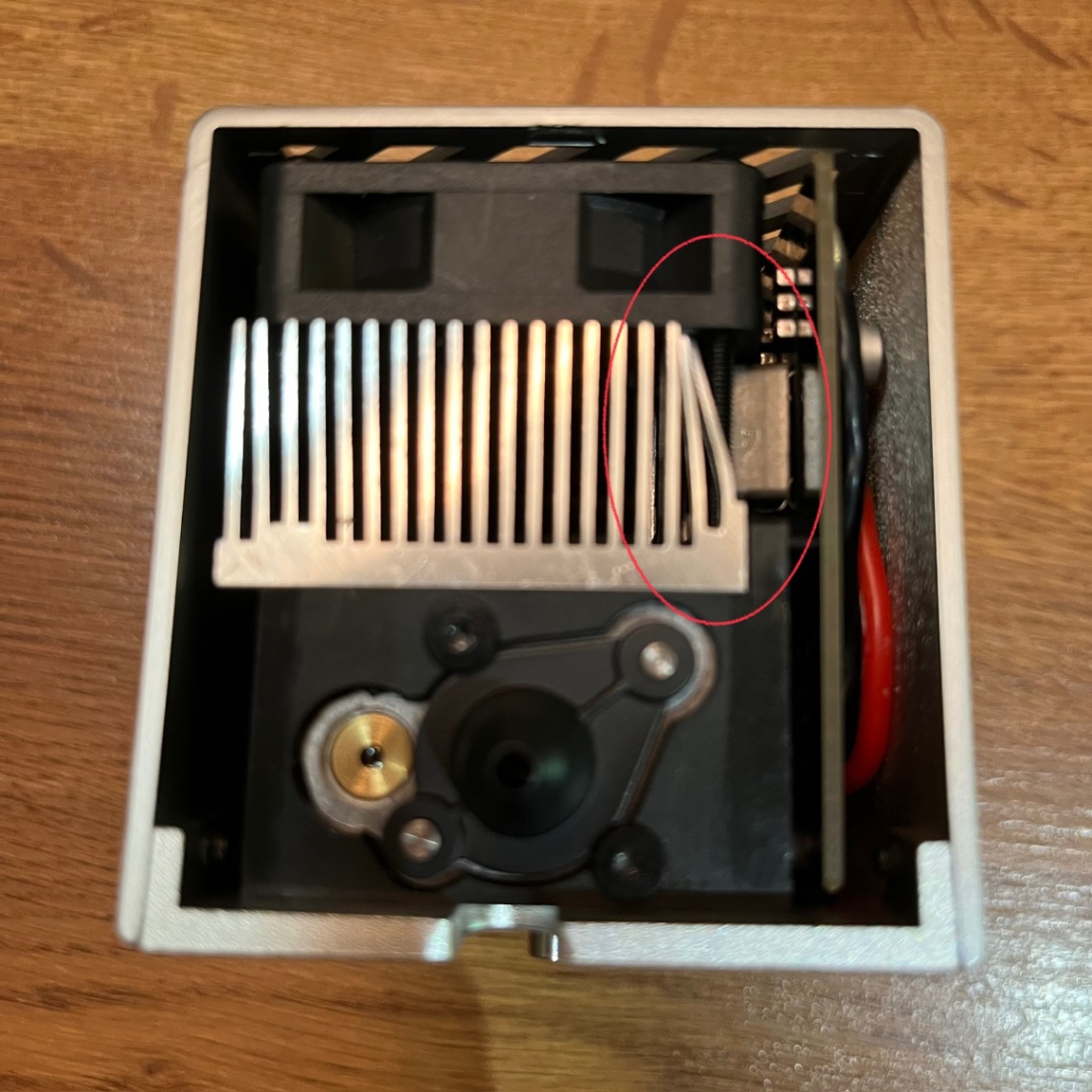
The deformed part is the metal heat sink of the 3W infrared laser module. Local warping or unevenness in the heat sink is a normal occurrence resulting from the stamping process and the release of metal stress. It does not affect heat dissipation efficiency, laser accuracy, or service life so that you can install and use it with confidence. If you’d like to adjust it yourself, you can refer to this video.
9. When xTool M2 is used with the desktop smoke purifier, it triggers stalling alarms. Why?
xTool M2 exhaust fan operates at 100% capacity. The desktop smoke purifier is prone to stalling and displaying error messages when set to the medium or low levels. It is recommended to use the desktop smoke purifier at its highest setting during operation.
10. xTool M2 40W laser module emits blue light as soon as it is connected to the device, or flickers abnormally during processing. Why?
This issue is caused by defective internal components in some of the laser modules in this batch; it is a material batch issue specific to the laser modules themselves and is unrelated to the overall design of xTool M2 or the main control board circuitry. The machine’s main control board control logic, power output, and signal transmission are all functioning normally, and other components are not affected.
We will replace it with a brand-new 40W laser module free of charge. The replacement laser module has undergone rigorous quality inspection to ensure it is free of similar issues. Rest assured that the device will return to normal operation after the replacement, with no impact on performance.

