
Issue description
When attempting to pair your xTool Apparel Printer and xTool OS1 Shaker Oven with xTool SafetyPro™ AP2 (xTool AP2) air purification system, you encounter one of two primary issues:
- Detection Failure: The "Accessories list" in the software displays "No accessory found" when you try to establish a Bluetooth connection.
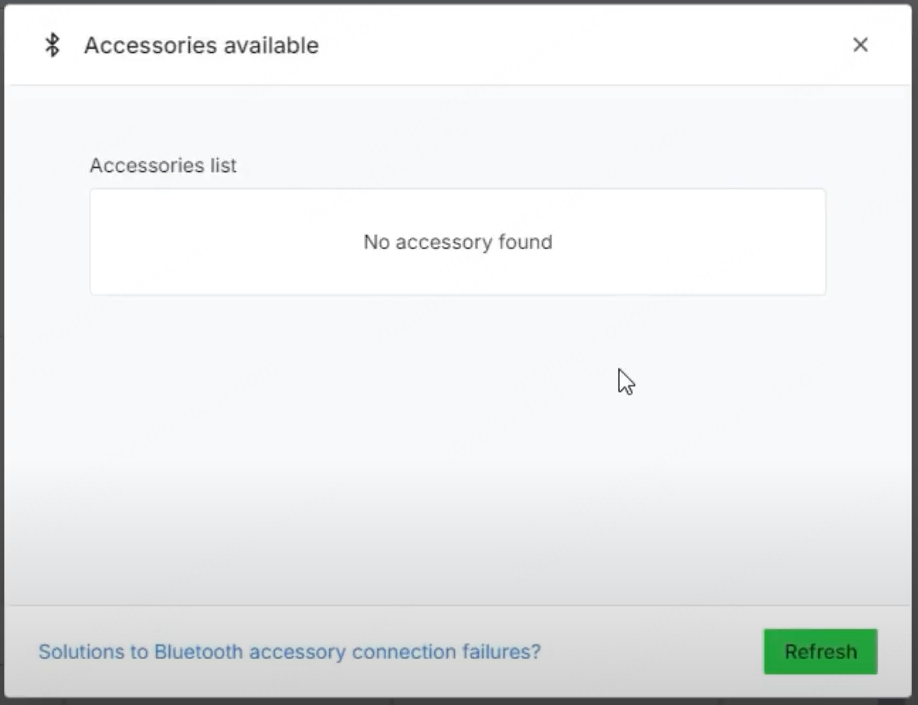
- Frequent Disconnections: xTool AP2 was previously configured and connected successfully, but it frequently disconnects without warning during operation.
Potential causes
- Outdated Printer Firmware
- Incorrect Setup: A Bluetooth dongle was mistakenly inserted, interfering with the built-in connection.
- Hardware Malfunction (Rare): The Bluetooth module on the printer's Motion Controller Board has failed.
Troubleshooting steps
Step 1: Check & update printer firmware
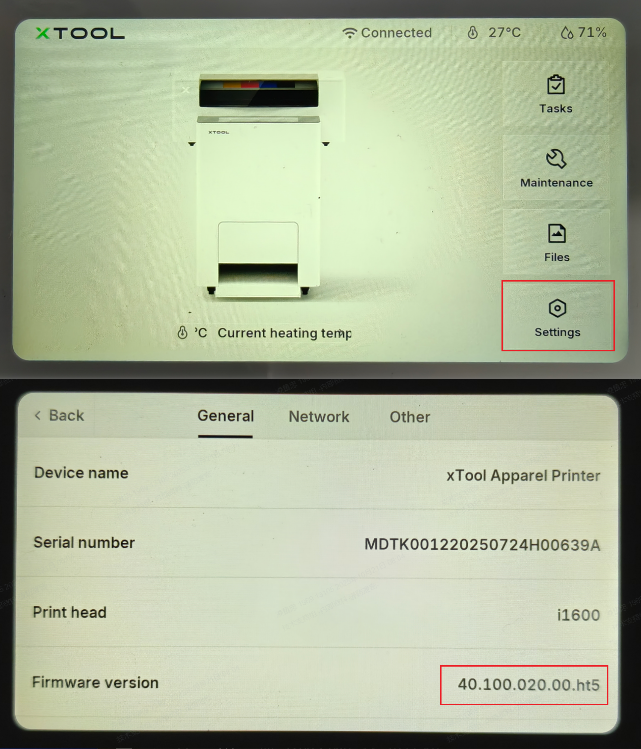
The most common cause of xTool AP2 connection instability is outdated firmware. The connection bug was resolved in firmware versions ending in 023 and above.
- Check Current Version: On the printer's LCD control panel, tap: Settings > General.
- Scroll down to find your current firmware version.
- Look at the last three digits. If the number is lower than 023 (e.g., 021, 022), you must update.
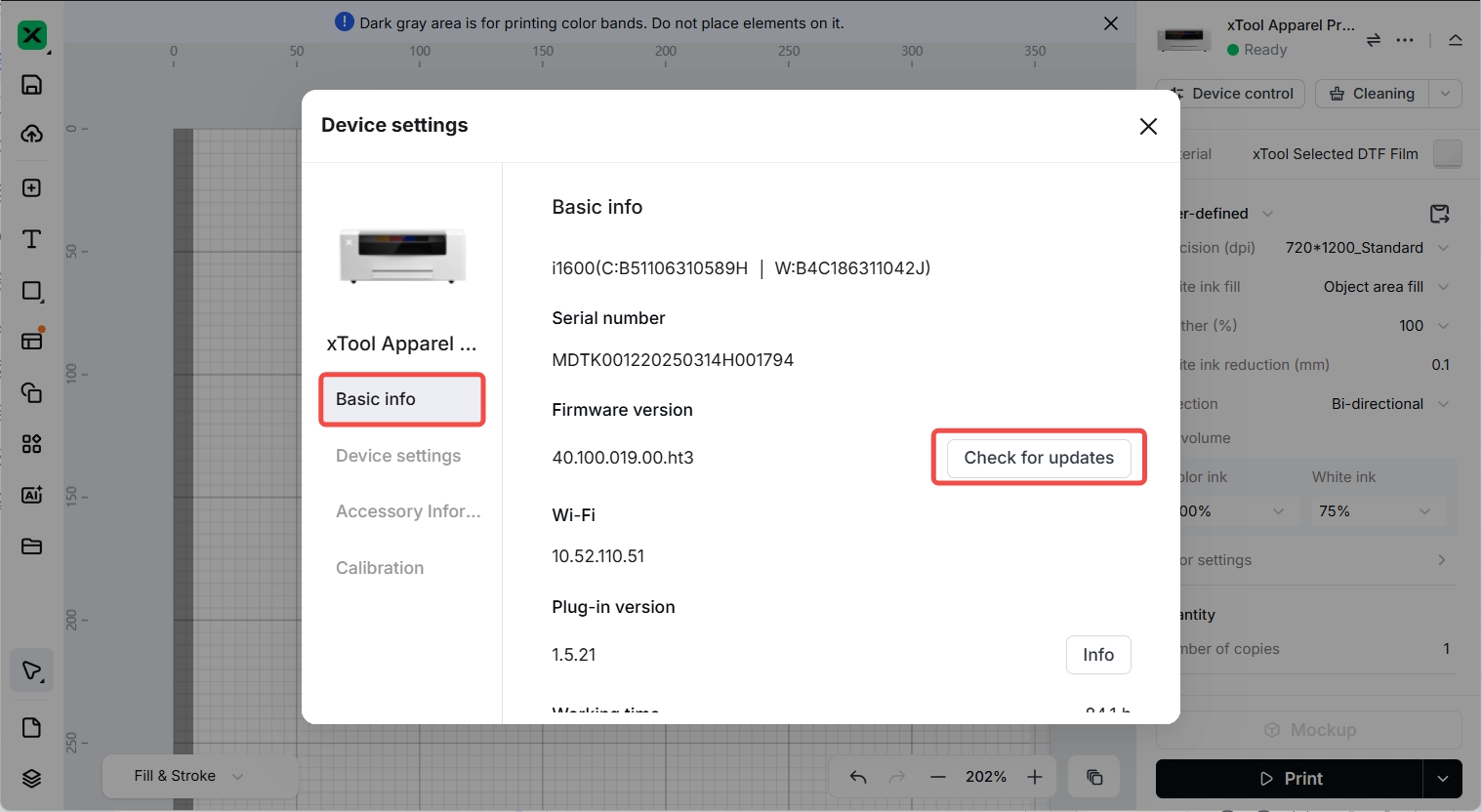
- Update Firmware:
- Connect your printer to your computer and open xTool Studio.
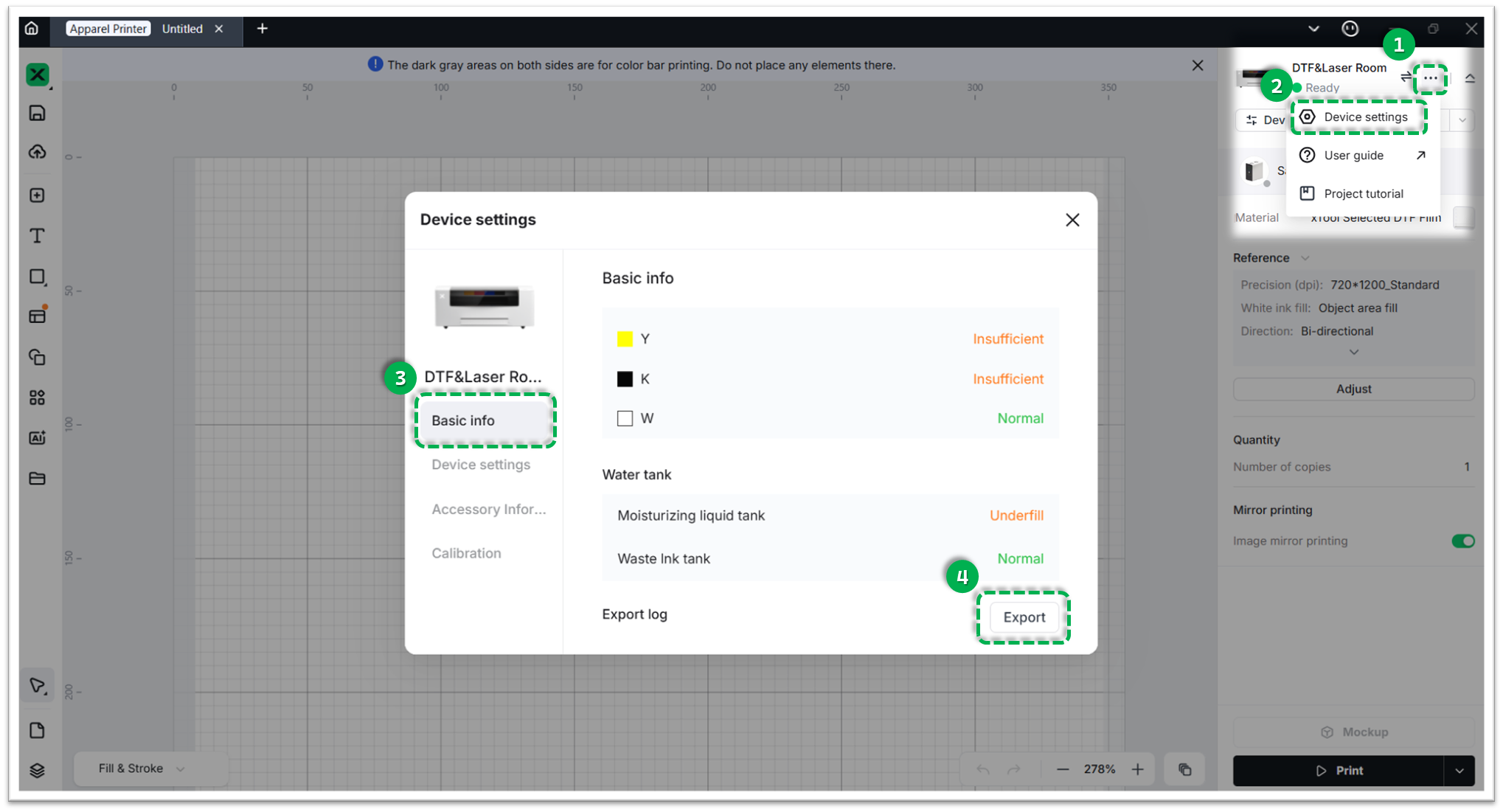
- Click the Three dots icon (top-right) > Device settings > Basic info.
- Click Check for updates and follow the prompts to install the latest firmware.
- Test: After updating, attempt to connect xTool AP2 again. If your firmware was already up to date, proceed to Step 2.
Step 2: Forget device & reconnect
If the firmware is already up-to-date, the existing Bluetooth pairing profile may be corrupted, or the setup method might be incorrect.
💡 NOTE: No Need To Use Its Bluetooth Dongle
Your xTool Apparel Printer and xTool OS1 Shaker Oven have built-in Bluetooth modules. Do not plug xTool AP2's Bluetooth USB dongle into the device.
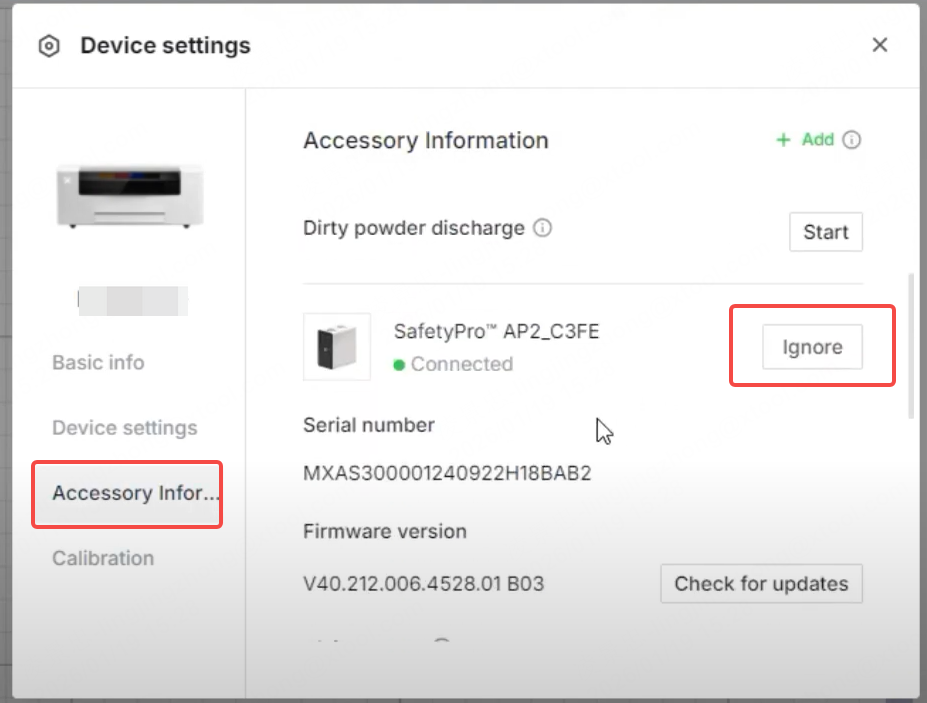
- Forget the Device: In the software's accessory management window, "Ignore" the previously connected xTool AP2 profile.
- Reset the AP2: Restart the xTool SafetyPro™ AP2 unit.
- Reconnect Properly: Follow the exact steps outlined in the video tutorial: Connect an Air Purification System to xTool OS1 Shaker Oven to establish a fresh connection.
- Test: If the software still says "No accessory found" or the connection drops, proceed to Step 3.
Step 3: Export logs for hardware analysis
If the firmware is fully updated and the connection procedure is correct without a dongle, there is a small probability that the Bluetooth module on the printer's Motion Controller Board has failed.
To confirm this, our engineers need to analyze the printer's internal logs. Please proceed to the section below to export your logs and contact Customer Service.
If the problem persists
Should the issue persist after completing the preceding steps, please submit a ticket via the "Submit a Ticket" button. The standard response time for xTool Customer Service is one business day.
Please include the following details to facilitate a quick diagnosis:
1 Work log files
Please export the device logs so our engineers can pinpoint the exact cause of the communication failure.
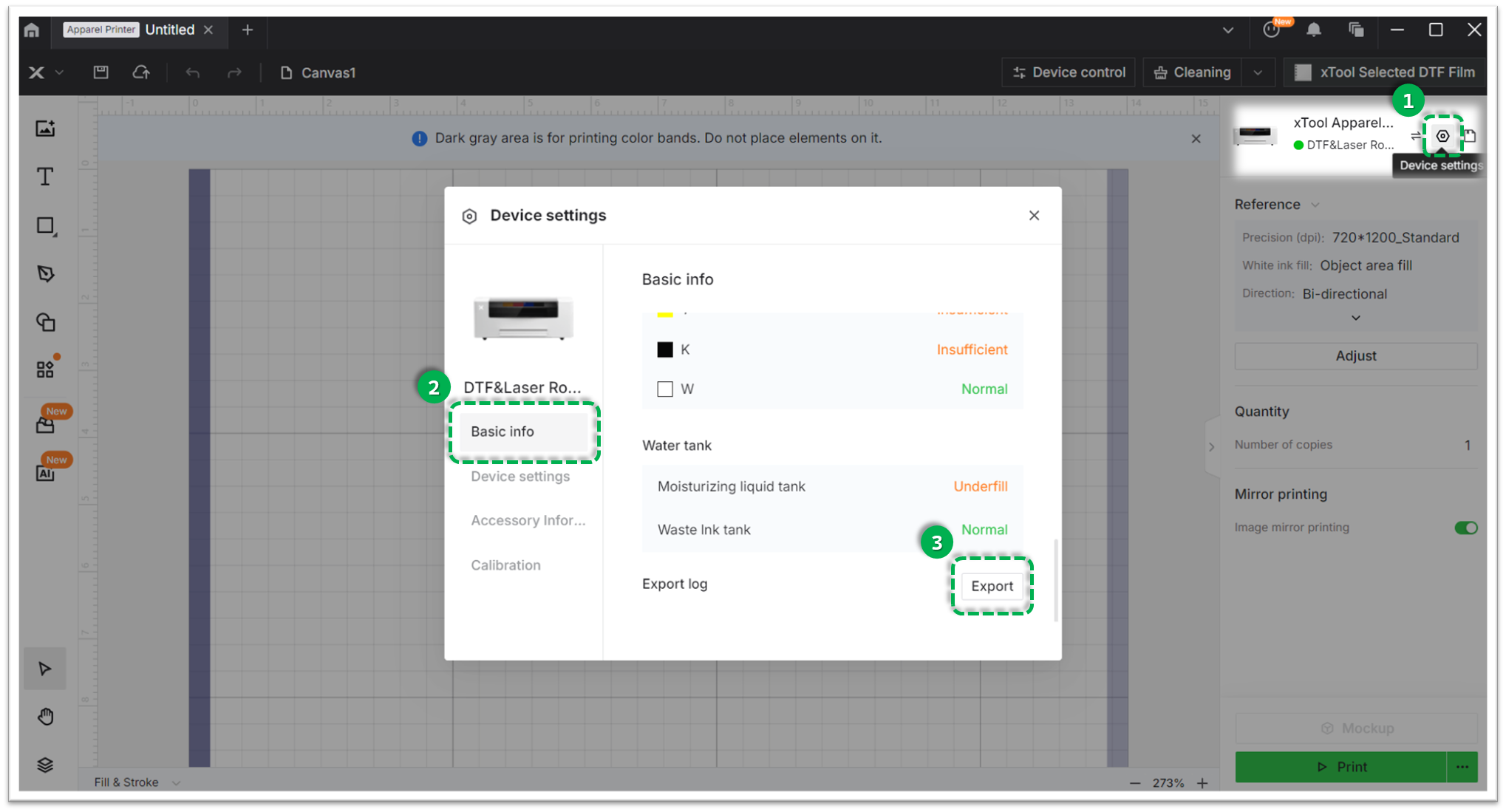
- Via xTool Creative Space (XCS):
Settings (gear icon) > Basic info > Export log
- Via xTool Studio:
Three dots icon > Device Settings > Basic info > Export log
- Please compress the generated folder into a
.zipfile and attach it to your ticket.
2 Device information
- Serial Number (SN): Provide the SN for the xTool Apparel Printer (located on the rear panel label).
Documentation feedback
Help improve this content by providing feedback. If this content did not meet your requirements, select "No" in the "Was this page helpful?" section below. Include specific details about what was unclear or missing in the pop-up suggestion box. Feedback submissions are reviewed by xTool technical writers to enhance future documentation.

Services & Help
Learn & Education

Copyright © 2025 xTool All Rights Reserved.