
General
1. What is WonderPress?
WonderPress is a 3D automatic heat press with interchangeable creative modules. More than just a heat press, it is a modular creative platform. By switching between different functional modules, a single device can perform flat heat pressing, 3D sublimation, vacuum forming, and versatile creative baking—combining the capabilities of multiple devices into one.
2. What modules does WonderPress support?
WonderPress is built around a heat press and supports three interchangeable functional modules:
- Heat Press Module: For flat heat transfer, flat sublimation, and curved-surface sublimation (such as mugs).
- Craft Oven Module: For DTF film curing, acrylic heat bending, dried flowers, polymer clay, shrink plastic, and other creative baking applications.
- 3D Form Module: For vacuum forming (such as packaging and molds) and 3D sublimation (such as phone cases, keycaps, and button badges).
- Optional accessories: Dual Station and Laser Positioning Pen.
3. Will xTool offer an official phone case jig?
Yes. xTool plans to offer an official mold for phone case transfer. The product is currently undergoing final validation and preparation for mass production.
For availability and purchasing information, refer to the latest information on the xTool official website.
4. What safety features does WonderPress include?
WonderPress includes multiple built-in safety features:
- Automatic standby: The device automatically enters standby mode after 15 minutes of inactivity.
- Slide-out safety tray: The device features a slide-out tray that allows materials to be loaded and unloaded safely while keeping hands away from the heated area.
- Overheat protection: An intelligent thermal protection system helps prevent abnormal temperature conditions.
Specifications & Compatibility
1. What are the main processing parameters for each module?
Module | Key Specifications |
|---|---|
Heat Press Module | • Working Area: 15" × 15" (380 × 380 mm) • Maximum Processing Thickness: 3 in. (75 mm) |
3D Form Module | • Vacuum Forming Film Size: Approx. 8" × 10" (203 × 258 mm) |
Craft Oven Module | • Maximum Baking Chamber Size: 15.2" × 6.2" × 3.1" (397 × 157 × 78.7 mm) |
2. What are the dimensions and weight of the main unit (Heat Press Module)?
- Dimensions: 16.5" × 21.6" × 16.1" (418 × 549 × 410 mm)
- Weight: 22 kg
3. What are the dimensions and weight of the Craft Oven Module and 3D Form Module?
- Craft Oven Module
- Dimensions: 8.3" × 18.3" × 5.5" (465 × 465 × 140.7 mm)
- Weight: 4.33 kg
- 3D Form Module
- Dimensions: 20.5" × 16.1" × 4.2" (522 × 410 × 108 mm)
- Weight: 6.78 kg
4. What is the rated power of WonderPress?
- US version
- Rated power is 1850 W
- Input voltage: 100–120 V, 50/60 Hz.
- EU version:
- Rated power is 1700 W.
- Input voltage: 220–240 V, 50/60 Hz.
5. What materials and applications does the Heat Press Module support?
The Heat Press Module supports a wide range of materials and applications:
- Supported materials:
- Soft materials: Cotton, polyester, blended fabrics, canvas, felt, and more; commonly used for T-shirts, hoodies, tote bags, pillow covers, and similar items.
- Rigid materials: Acrylic, wood, metal, ceramic, and other materials with a sublimation coating.
- Supported applications: HTV (Heat Transfer Vinyl), DTF (Direct-to-Film), sublimation, and more.
6. What types of films does the 3D Form Module support?
xTool offers a variety of compatible films for different applications:
- PETG: Suitable for a wide range of vacuum forming projects.
- HIPS: Ideal for molds and packaging. Easy to paint or color.
- TPU: Suitable for applications requiring flexibility.
- 3D Sublimation Film: Ideal for decorating the surfaces of phone cases, button badges, and similar items.
- EVA: Suitable for making molds, such as ice molds. (Not sold by xTool.)
7. What is the maximum material thickness supported by WonderPress?
The Heat Press Module accommodates materials up to 3 in. (75 mm) thick, making it easy to process thick sweatshirts, hoodies, and items with raised seams or other bulky features.
8. How many favorite parameter sets can the device save at most?
The device can store up to 25 favorite parameter sets in total.
- Heat Press mode: 10
- Vacuum Forming mode: 10
- Baking & Curing mode: 5
Once the limit is reached, delete an unused parameter set before adding a new one.
Setup & Use
General Use
1. How do I operate the device and set the processing parameters?
There are two ways to control WonderPress:
- On the device
Operate the device using the 1.8-inch Control knob / Screen, which integrates both display and control functions. Rotate and press the knob to easily adjust the temperature, pressure, time, and processing mode. - In the xTool Studio App
Connect the device through the xTool Studio App to access a comprehensive library of material presets. You can send processing parameters with a single tap, monitor the device in real time, and fine-tune settings as needed.
2. Can WonderPress be used offline?
Yes.
WonderPress comes with 20 built-in parameter presets, which can be accessed directly on the device without connecting to the xTool Studio App.
3. Does WonderPress require an external power adapter?
No.
WonderPress features a built-in switching power supply and does not require an external power adapter.
It supports universal AC input voltages of 100–120 V and 220–240 V, 50/60 Hz, allowing it to be connected directly to a standard power outlet.
The internal switching power supply converts the AC input into the DC voltage required by the device.
4. How do I add new favorite parameters to the device?
Connect the device to the xTool Studio app, enter the corresponding processing mode, and add and save a new favorite parameter set. Once saved, the parameters will be synced to the device display.
If the maximum number of favorite parameter sets has been reached for that mode, delete an unused set before adding a new one.
5. What is Vacuum Height Calibration in the app and when should I use it?
Vacuum Height Calibration calibrates the distance between the heating plate and the raised support in Vacuum Forming mode.
Accurate distance calibration helps optimize the heating time of the forming film, improving heating efficiency and forming results.
6. How do I switch between modules? Do I need any tools?
No tools are required.
All functional modules, including the Craft Oven Module and 3D Form Module, feature a tool-free plug-and-play design with a robust alignment mechanism, allowing modules to be swapped quickly and smoothly in just seconds.
7. Why does the heating plate temperature measured with a thermal camera or infrared thermometer differ significantly from the temperature shown on the device?
This is normal and does not necessarily indicate an issue with the temperature control of your WonderPress.
The temperature data obtained in xTool's laboratory is measured through direct contact with the heating plate. Thermal cameras and infrared thermometers, however, measure temperature without contact by detecting infrared radiation from an object's surface. Their readings can be affected by factors such as surface emissivity, measurement angle, and measurement distance.
Why can measuring a metal heating plate result in a temperature difference?
Among these factors, emissivity is one of the key factors affecting the accuracy of infrared temperature measurements. Different materials have different emissivity values:
- Shiny, smooth metal surfaces, such as polished stainless steel, aluminum foil, and chrome-plated surfaces, have relatively low emissivity and tend to reflect infrared radiation from their surroundings. As a result, infrared temperature readings may deviate significantly from the actual surface temperature.
- Matte, rough, non-metallic surfaces, such as wood, rubber, skin, and paper, generally have higher emissivity. Some have an emissivity of around 0.95, making it easier to obtain accurate temperature measurements.
The WonderPress heating plate has a metal surface. If you measure it directly with a thermal camera or infrared thermometer without setting the appropriate emissivity for the surface, the measured temperature may differ significantly from the actual temperature.
Test results
We set the WonderPress temperature to 210°C and measured the heating plate using a thermal camera.
To demonstrate how emissivity affects the measurement, we applied black heat-resistant tape with an emissivity of approximately 0.94–0.96 to the heating plate.
The test results were as follows:
- With the thermal camera's emissivity set to 0.95, the area covered with black heat-resistant tape showed a higher temperature than the exposed metal surface of the heating plate.
- After adjusting the measurement angle and distance, the maximum measured temperature of the taped area gradually reached 209°C, while the maximum measured temperature of the exposed metal surface was 206°C.
- After changing the emissivity setting to 0.9, the maximum measured temperature of the taped area was 215°C, while the exposed metal surface measured 210°C.
These results show that emissivity settings, measurement angle, and measurement distance can all affect infrared temperature readings. Therefore, we do not recommend determining whether the WonderPress temperature control is accurate based solely on heating plate temperatures measured directly with a thermal camera or infrared thermometer.
If the processing result is still not as expected
If you are using the officially recommended material and processing parameters but the result is still not as expected, contact xTool Technical Support and provide the material used, processing parameters, and details of the issue for further troubleshooting.
Heat Press Module
1. Can I remove the heat insulation pad from the Heat Press Module for heat pressing?
No. The heat insulation pad must remain installed during heat pressing. Removing it prevents the heating plate from applying pressure to the material when it reaches the lowest position.
2. Is it normal for a small amount of smoke to be generated during heat pressing?
Yes.
A small amount of smoke may be generated under the following conditions:
- The device has not been used for an extended period or has been stored in a humid environment, causing internal moisture to evaporate during heating.
- Sublimation materials are being processed, causing sublimation inks to vaporize at high temperatures.
Craft Oven Module
1. How is the Craft Oven Module different from a conventional oven?
The Craft Oven Module is specifically designed for creative applications and offers features that conventional ovens do not.
Designed for creative projects
- DTF film curing
- Acrylic heat bending
- Polymer clay baking
- Dried flower crafts
- Shrink plastic projects
Built-in air purification
The Craft Oven Module features a three-stage filtration system (F8 pre-filter + activated carbon + H13 HEPA) that helps capture fine airborne particles, odors, and smoke generated during processing, helping maintain a cleaner and more comfortable working environment.
2. What temperature does the screen display when xTool Craft Oven Module is used?
When xTool Craft Oven Module is used, the temperature set and displayed on the screen refers to the heating plate temperature, not the air temperature inside the module.
Therefore, the actual temperature inside the module may differ from the temperature shown on the display.
3. When does the exhaust fan of xTool Craft Oven Module operate?
The exhaust fan operates only in Baking & Curing mode and does not run in Baking Sublimation mode.
Sublimation requires a stable temperature inside the Baking Module. Running the exhaust fan would draw outside air into the module, which may lower the temperature or prevent it from reaching the required level.
4. Will uncured DTF ink transfer onto the mesh tray during DTF film curing?
No. During the DTF printing process, the ink is applied to only one side of the film. When curing, simply place the film with the non-printed side facing down, so the wet ink will not come into contact with the mesh tray.
5. Why is there still white smoke after DTF film curing in the Craft Oven Module?
This is normal.
After curing is complete, the DTF film retains residual heat, which continues to heat the adhesive powder and may generate a small amount of white smoke. At this stage, the chamber is no longer sealed, allowing the smoke to escape into the air.
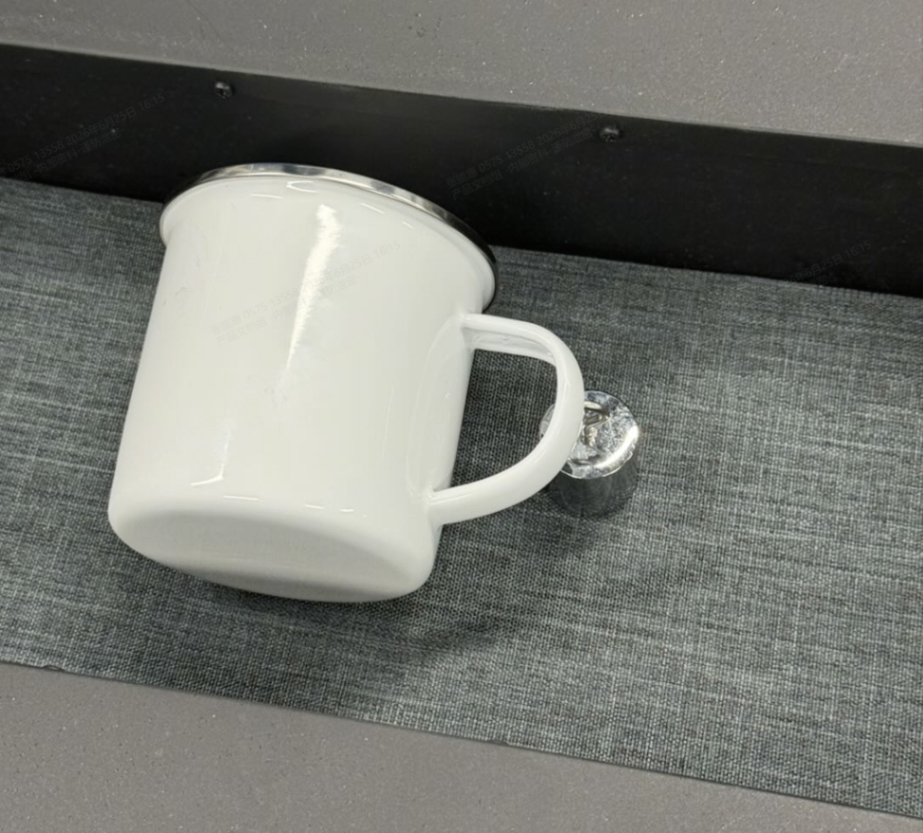
6. What should I pay attention to when printing a full-wrap design on a handled mug?
If the design area is less than 2.5 cm from the handle, it is recommended to place a heat-resistant object under the handle during processing to raise the handle until it is level with the base.
3D Form Module
1. What are the two functions of the 3D Form Module?
The 3D Form Module supports both 3D sublimation and vacuum forming.
- 3D Sublimation
Unlike conventional flat sublimation, WonderPress uses the 3D Form Module to soften the sublimation film with heat and then tightly wrap it around the object using vacuum pressure. This enables the ink to penetrate the coating on curved surfaces, producing full-coverage, edge-to-edge transfers on items such as phone cases, irregularly shaped objects, button badges, and keycaps. - Vacuum Forming
Vacuum forming uses vacuum pressure to draw a heated plastic sheet tightly over a mold. Once cooled, the sheet retains the mold's three-dimensional shape. This process is suitable for making chocolate molds, fragrance trays, packaging, and other molded products.
2. How can I identify the different types of films included with the 3D Form Module?
Three types of films are included with the 3D Form Module:
- PETG film: The rigid film used for general vacuum forming.
- TPU film: A softer film designed for flexible forming applications.
- 3D sublimation film: A smaller white film used for creating button badges through 3D sublimation.
3. Why does the 3D sublimation film curl after being placed in the chamber?
The chamber remains hot immediately after processing. If the 3D sublimation film is placed inside but is not immediately secured with the Sealing Frame, the heat may soften and deform the film, causing it to curl.
To prevent this, install the Sealing Frame promptly after placing the film.
Dual Station
1. What is the Dual Station used for?
The Dual Station allows you to prepare one project while another is being processed, helping improve workflow efficiency.
2. Which screws should I use when installing the Dual Station?
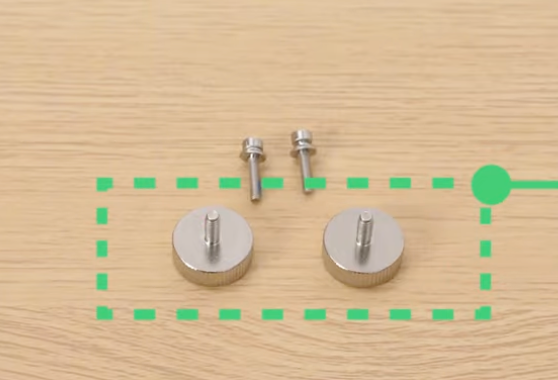
The Dual Station Module includes two types of screws:
- For securing the Dual Station Module base: Use the screws within the green dashed box in the image
- For securing the balancing plate: Use the screws that are not boxed in the image
For detailed installation instructions, refer to xTool WonderPress Dual Station Unboxing and First Use.
Laser Positioning Pen
1. What is the Laser Positioning Pen used for?
The Laser Positioning Pen projects alignment guides to help position designs consistently, reducing manual positioning errors during batch production.
2. Can I use the Dual Station and Laser Positioning Pen together?
xTool does not recommend using the Laser Positioning Pen while the Dual Station is installed. Frequently switching between the two stations may cause slight shifts in laser alignment and affect positioning accuracy.
Maintenance
1. How do I clean and maintain WonderPress?
- Routine cleaning
Wipe the exterior of the device with a soft, dry cloth to remove dust and stains. After the heating plate has completely cooled, use a non-abrasive degreaser or isopropyl alcohol to remove any adhesive residue. - Air filter
The filter in the Craft Oven Module is a consumable item and should be replaced when its filtration performance declines. Replacement intervals depend on usage frequency and the operating environment. We recommend checking the airflow and any noticeable odors to determine when replacement is needed. - Safety check
WonderPress is equipped with a 15-minute automatic standby function and a slide-out safety tray. Before use, make sure these safety features are functioning properly.
2. Why does the device housing turn yellow, and how can I remove the discoloration?
During prolonged operation of the Heat Press Module (up to 210°C / 410°F), the cotton heat press pad gradually undergoes thermal decomposition at high temperatures, releasing trace amounts of yellow volatile organic compounds (VOCs). These vapors condense and accumulate on the cooler white housing, eventually causing yellow discoloration.
This discoloration is not caused by a product defect. It results from deposits left by vapors released from the cotton heat press pad during high-temperature operation.
If slight yellowing occurs, gently wipe the affected area with a soft cloth lightly moistened with 75% isopropyl alcohol. The alcohol can help dissolve and remove some of the surface deposits.
3. How often should I replace the air filter in the Craft Oven Module?
Replacement frequency depends on how often the module is used.
We recommend checking the color of the filter regularly or replacing it when prompted by the xTool Studio App to maintain optimal smoke and odor filtration performance.
4. Does the heating plate require regular calibration or replacement?
No.
The heating plate features a high-density dual-heating-element design to provide uniform heat distribution. Under normal operating conditions, the heating elements are highly durable and do not require routine calibration.
If you experience uneven heating or a heating-related malfunction after extended use, please contact xTool Customer Support for inspection or replacement.
Troubleshooting
1. Why doesn't the heating plate lower after I press the Start/Stop button?
Please make sure the slide-out tray has been pushed completely inward until it is fully locked into place.
If the tray is fully inserted and locked but the heating plate still does not lower, please contact xTool Customer Support.
2. The heating plate won't lift after pressing down. How can I fix it?
1. Turn off the device and wait for the heating plate to cool completely.
2. Turn the device back on, then gently lift or slightly wiggle the heating plate from side to side. It should automatically return to its normal position.
3. If the heating plate still does not lift, please contact xTool Customer Support.
3. Why won't the film temperature reach the preset temperature during vacuum forming?
If the main unit is placed directly in the airflow from an air conditioner or fan during processing, the infrared temperature sensor may not accurately detect the film temperature. As a result, the measured temperature may never reach the preset value.
To ensure accurate temperature control, avoid placing the device where it is exposed to direct airflow during processing.
If the problem persists after eliminating these conditions, please contact xTool Customer Support for further assistance.
4. Why does the heating plate shake or make unusual noises when moving up or down?
A new device may occasionally exhibit slight shaking or unusual noises while the heating plate moves up or down. This is generally normal and does not affect device operation or processing results.
Moving components inside the device, such as the lead screw and guide columns, are lubricated before shipment. After long-distance transportation or extended storage, the lubricant may not be evenly distributed. As the device operates, the lubricant will gradually redistribute, and the shaking or noise will typically decrease or disappear.
If the shaking or noise persists, becomes significantly worse, or affects normal movement of the heating plate, contact xTool Technical Support.
5. Why does the 3D sublimation film come loose during processing?
After placing the film for 3D sublimation, install the Sealing Frame immediately to hold the film firmly in place.
If the frame is not installed promptly, is misaligned, or does not apply sufficient pressure, the film may deform and allow air to leak into the chamber. This can cause the film to detach and result in transfer failure.
Always make sure the Sealing Frame is properly aligned with the film and securely fastened.

