
Hardware
1. What materials are suitable for processing with xTool F2 Ultra UV?
xTool F2 Ultra UV is suitable for almost all materials. Its 355 nm UV laser has extremely wide applicability and can be absorbed by almost all materials.
Engraving: Glass (supports precision surface engraving as well as "magical" 3D/2D inner engraving); almost all plastics (such as ABS, PVC, PC, and silicone), the "restricted zone" for traditional lasers; acrylic (no melting), wood (clean results without yellowing), leather (no burnt edges), metal, ceramics, stone, and more.
Embossment: Glass, acrylic, wood, silicone, ceramics, and more. (Note: Metal cannot be used for embossment.)
Cutting: Wood, acrylic, plastic, leather, fabric, paper, glass, and more.
2. Can xTool F2 Ultra UV engrave inside a crystal ball?
It is possible to engrave inside a crystal ball, but special techniques are required.
Due to the irregular refraction and reflection caused by the crystal ball, direct inner engraving within the crystal ball is not feasible. However, inner engraving can be achieved by using oil for inner engraving or a glass fixture to transform the top surface of the crystal ball into a flat surface.
- Inner engraving oil immersion method: Submerge the crystal ball in the oil for inner engraving, using the oil's horizontal surface to compensate for the curved surface of the crystal ball. The inner engraving oil needs to meet the following criteria: refractive index close to glass, high transparency, non-toxic, and harmless.
- Complementary fixture method: Use a glass fixture that complements the curvature of the crystal ball, with the other side being flat. This allows the crystal ball to be simulated as a flat object for inner engraving.
3. Can xTool F2 Ultra UV perform 2D inner engraving on glass?
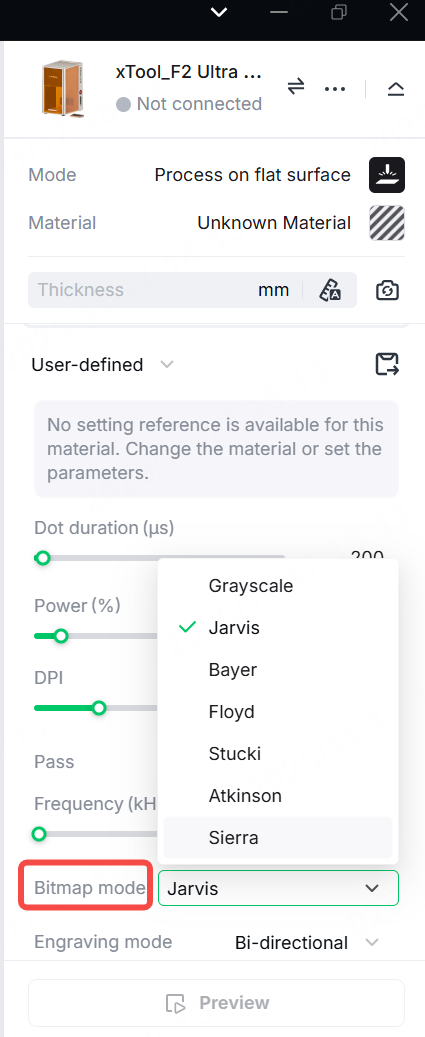
Yes, it can. To engrave 2D images (such as photos or bitmaps) inside glass, select an image mode for the best results, such as Jarvis or other modes.
Do not use the Grayscale mode.
4. What types of glass do not support inner engraving or have poor inner engraving results?
The most widely used glass for inner engraving is K9 glass, which is well-suited for laser inner engraving processes and delivers ideal results.
Laser inner engraving relies on high-energy lasers to form micro-fracture points inside the glass, creating patterns through light scattering. This process demands extremely high purity, uniformity, and structural stability of the glass. The following types of glass are not suitable for inner engraving or yield poor results:
- Tempered glass: Due to high internal stress, the micro-fracture points triggered by the laser can lead to breakage of the whole glass.
- Laminated glass: The middle interlayer absorbs and reflects the laser, preventing the precise formation of micro-fracture points and potentially causing delamination.
- Deeply tinted glass: The colorants in the glass absorb a large amount of laser energy, making it difficult to form clear and uniform patterns.
5. How thick can xTool F2 Ultra UV cut wood, acrylic, and glass?
The following data was tested and obtained in the laboratory.
- Wood: Maximum thickness up to 15 mm
- Acrylic: Maximum thickness up to 12 mm
- Glass: Maximum thickness up to 1 mm
6. Can xTool F2 Ultra UV perform color engraving?
The color engraving capability of xTool F2 Ultra UV is very limited. It can produce some specific colors on metal, but the results are unstable and cannot compare to professional MOPA lasers.
This is determined by two completely different working principles:
- Color engraving relies on heat. The color engraving effect you see on metal (such as those achieved by MOPA lasers) relies on the heat generated by the laser to produce a very precise layer of "oxidation" on the metal surface. This oxidation layer changes the reflection of light, thereby displaying rich colors.
- Ultraviolet laser processing is considered a "cold processing" method. xTool F2 Ultra UV's short-wavelength laser does not rely on thermal radiation. Instead, it uses high-energy photons to directly break the molecular bonds of the material. Therefore, it cannot generate the stable, controllable oxidation layer required for color engraving like "thermal processing" lasers do.
The occasional colors produced by xTool F2 Ultra UV are usually the result of defocusing or dispersed laser spots, creating an unstable oxidation layer. This makes it difficult to achieve the consistent and reliable results of MOPA or other wavelength lasers.
7. Can xTool F2 Ultra UV perform inner engraving on acrylic materials?
No, xTool F2 Ultra UV is not capable of performing inner engraving on acrylic materials.
8. What is the maximum size for glass inner engraving with F2 Ultra UV?
The maximum effective engraving volume for glass inner engraving is 70 mm × 70 mm × 150 mm (L × W × H).
9. What accessories are compatible with xTool F2 Ultra UV?
Rotary: Rotary Attachment 3 (RA3), RA2 Pro, and RA2.
Automation: Auto Streamline™ Conveyor, Pedal Switch, Button Switch
Safety and purification: Fire Safety Set, SafetyPro™ AP2 (purifier), SafetyPro™ IF2 2.0 (inline fan), SafetyPro™ IF2 (inline fan)
10. How fast can xTool F2 Ultra UV engrave?
xTool F2 Ultra UV has a maximum engraving speed of up to 15,000 mm/s.
11. Is the baseplate of xTool F2 Ultra UV removable?
xTool F2 Ultra UV features an integrated design, and its baseplate is NOT removable.
12. Is the cooling method of xTool F2 Ultra UV air cooling or water cooling?
xTool F2 Ultra UV uses air cooling.
13. What is the maximum processing height of xTool F2 Ultra UV?
When processing flat objects, its maximum processing height is 150 mm.
14. Does xTool F2 Ultra UV come with safety goggles?
Safety goggles are not included with xTool F2 Ultra UV. You need to purchase them separately. You can click the link below to buy specialized safety goggles from xTool official store:
Laser Safety Goggles for 316nm-450nm & 900nm-1080nm Lasers
Please select safety goggles that include the attenuation wavelength band of 355 nm, and it is recommended to choose goggles with an optical density value of 5 or higher.
15. Can xTool F2 Ultra UV's inner engraving function be used together with the conveyor?
No, they cannot be used simultaneously. Inner engraving relies on parameter positioning, while the conveyor relies on camera positioning. Additionally, when using xTool F2 Ultra UV for inner engraving, the inner engraving lens must be installed. For use with the conveyor, the surface engraving lens should be installed.
16. What are the recommended storage temperature and humidity for xTool F2 Ultra UV?
The optimal conditions for storing and running xTool F2 Ultra UV are as follows:
- Storage (when the device is not in use):
Temperature: -10°C~+60°C
Humidity: 10%~60% RH
- Working (when the device is in use):
Temperature: +10°C~+30°C (IMPORTANT)
Humidity: 10%~60% RH
We strongly recommend using xTool F2 Ultra UV in a stable room temperature and dry environment.
17. How long can xTool F2 Ultra UV run continuously?
Under suitable operating temperature and humidity conditions, it can run continuously and stably. However, to maximize the lifespan of the laser, we recommend limiting the continuous operation time to no more than 8 hours each time.
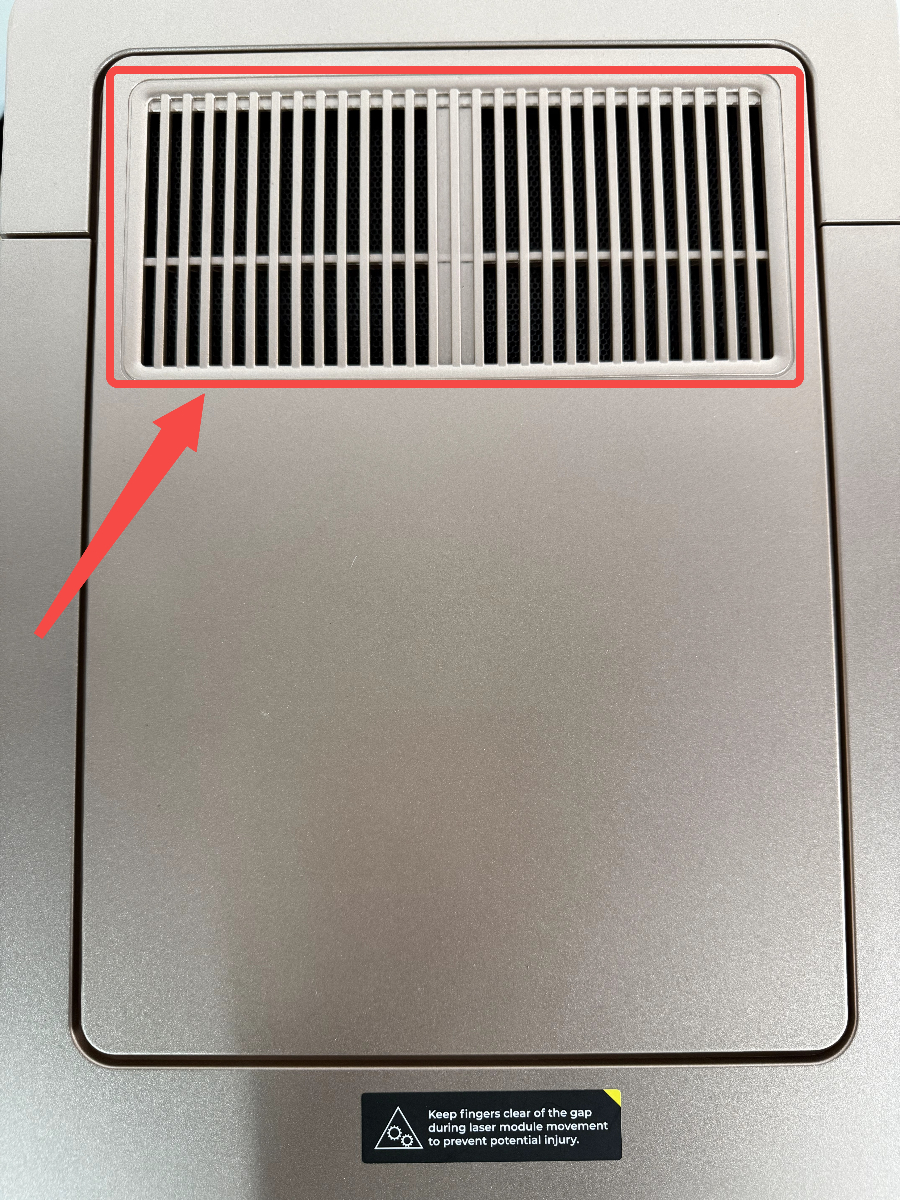
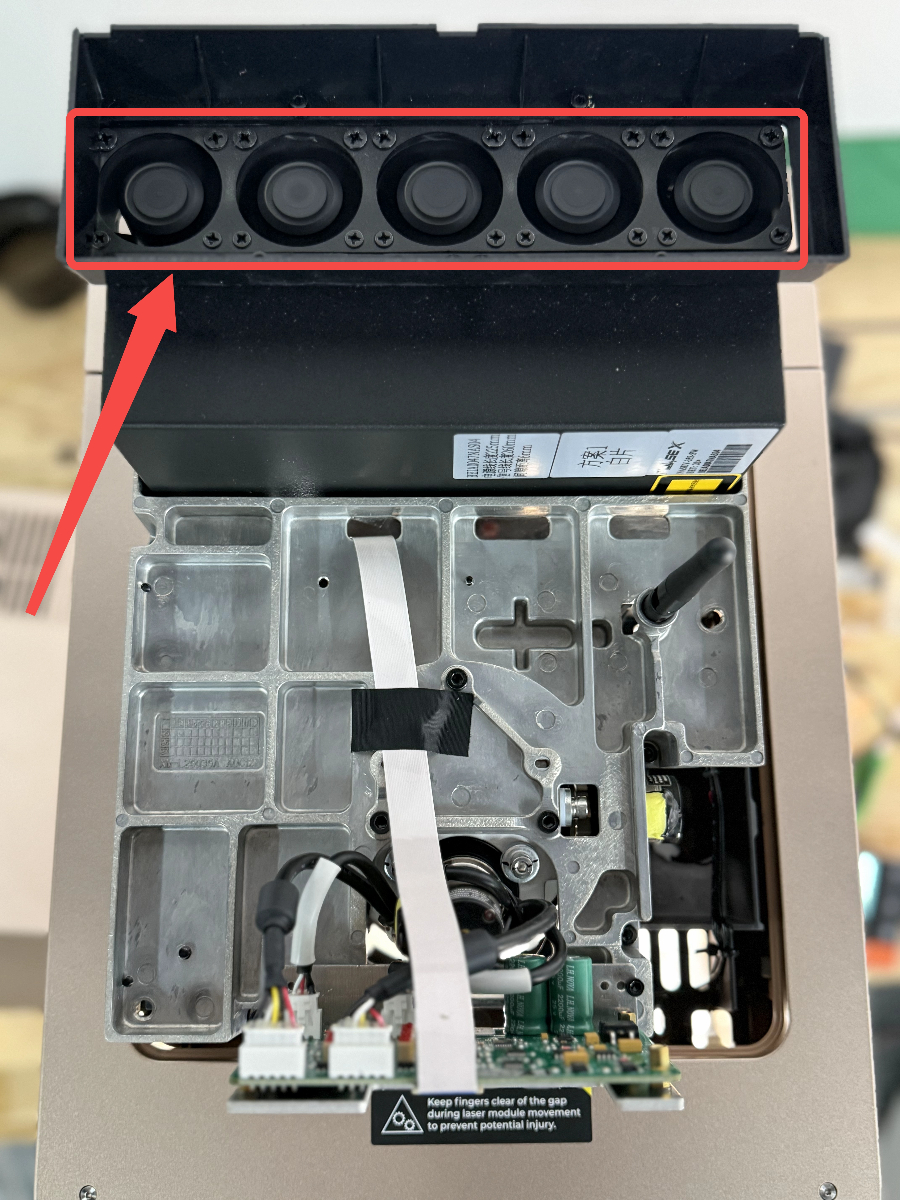
18. Why do the cooling fans of the laser module keep rotating continuously after F2 Ultra UV is powered on?
It is normal for the cooling fans of F2 Ultra UV's laser module to rotate while in standby mode. The device features a laser module sleep function that activates after a period of inactivity (default is 30 minutes). In sleep mode, the internal temperature of the laser module decreases, and once it reaches a certain threshold, the cooling fans will stop rotating.
The position of the cooling fans is shown below.
19. What precautions should be taken when replacing the field lens (inner engraving lens and surface engraving lens)?
Disconnect power before lens replacement.
Please follow the guidelines below for this precision operation.
(1) NEVER touch the galvanometer mirrors with your hands! After removing the field lens, under no circumstances should you touch the two galvanometer mirrors inside the device with your hands.
(2) The field lens and galvanometer mirrors must be kept absolutely clean.
(3) To clean the field lens (surface engraving lens or inner engraving lens), use a lint-free cloth moistened with absolute ethanol.
(4) To clean the galvanometer mirrors, use a lint-free cloth moistened with absolute ethanol to gently wipe them only if you confirm the presence of dirt or contamination.
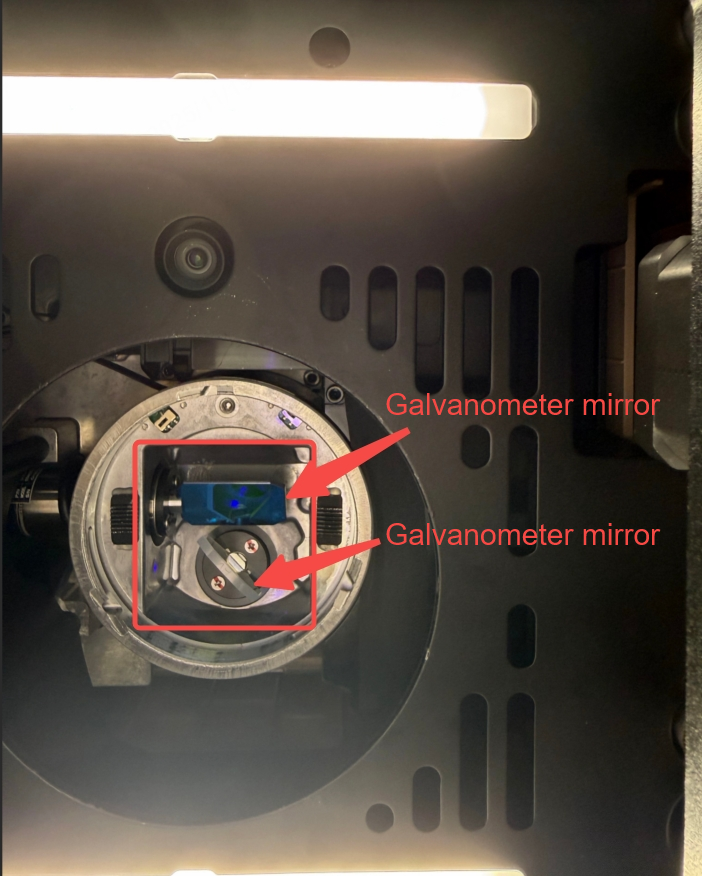
[IMPORTANT] Failure to maintain the cleanliness of the optical components in a timely manner can result in minor issues such as power attenuation, reduced beam quality, and poor processing results, or in severe cases, permanent damage to the optical components!
Software
1. What software does xTool F2 Ultra UV support? Does it support LightBurn or other third-party software?
xTool F2 Ultra UV supports xTool Studio (Windows and macOS) and LightBurn (V2.2.0 or later). Other third-party software is not currently supported.
2. What file types are supported in 3D mode?
3D models: STL, OBJ, AMF, 3MF, GLB, and PLY.
2D vectors/bitmaps: SVG, DXF, JPG, JPEG, GIF, PNG, BMP, SVG, and WEBP.
Text: Based on the input text, the system generates a 3D text object.
3. How does xTool F2 Ultra UV focus?
xTool F2 Ultra UV features an intelligent focusing system, along with settings designed specifically for laser engraving inside glass.
Scenario 1: Surface engraving
- Auto-focus (recommended): xTool F2 Ultra UV uses a camera and laser rangefinder to intelligently detect the material height and automatically adjusts the Z-axis to reach the most precise focal point.
- Manual focus: You can also adjust the laser module manually using the Up/Down button for laser module. The optimal focal point is achieved when the red and blue indicator lights completely overlap.
Note: Auto-focus may not work properly with transparent, mirrored, or highly reflective materials. In such cases, use manual focus.
Scenario 2: Inner engraving on glass
This is xTool F2 Ultra UV's signature feature! In this mode, the operating logic is entirely different. You do not need to focus or take photos for positioning. Simply input the dimensions and position information of the glass into xTool Studio, and our algorithm will automatically calculate and control the laser focal point inside the glass to achieve the magical inner engraving effect.
4. Can the parameters of traditional UV lasers be reused on F2 Ultra UV?
Yes. Traditional laser parameters, such as frequency and Q-switch open (Q-pulse) time, can be converted into our power parameters through calculation. We use power as the representation method, which allows users to quickly find the optimal duty cycle for a specified frequency without needing to perform the cumbersome calculations associated with traditional Q-pulse values.
- The relationship between power and Q-switch open duty cycle is illustrated below.
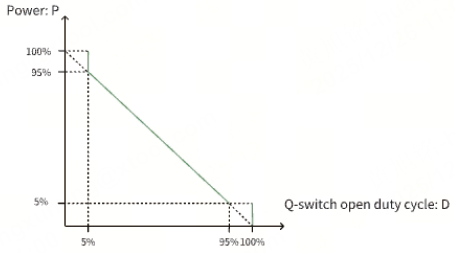
- The conversion formula is D=Q*F/1000, where
D | P |
5% | 95%~100% |
5%≤D≤95% | 1-D |
100% | 0%~5% |
- D represents the Q-switch open duty cycle, expressed as a percentage (100%).
- Q represents the Q-switch open (Q-pulse) time, expressed in microseconds (µs).
- F represents the frequency, expressed in kilohertz (kHz).
- P represents the power, expressed as a percentage (100%).
Others
1. Why is there no trace inside the glass during inner engraving with xTool F2 Ultra UV? What should I do?
Take the following steps.
(1) Check whether the inner engraving lens is installed. If the surface engraving lens is installed, replace it with the inner engraving lens.
(2) Check whether your glass is suitable for inner engraving, or try using the glass block provided for confirmation.
(3) Check whether the dimensions and position of the glass match the settings in the software.
(4) Ensure the thinnest point of the laser beam (the focal point) is inside the glass (wear safety goggles or pull down the protective enclosure to check).
(5) If the issue persists, please contact us by submitting a ticket.
2. Why did the glass shatter completely during inner engraving with xTool F2 Ultra UV? How can it be avoided?
The UV laser failed to stay consistently focused, leading to low engraving efficiency and heat buildup. Thermal stress can cause the glass to crack.
Ways to avoid this:
- For inner engraving: Reduce the laser power appropriately, increase the engraving speed, or shorten the dotting time.
- For cutting: Improve the focusing accuracy or reduce the cutting time.
3. What should I do if the surface engraving effect on glass using xTool F2 Ultra UV is poor?
Surface engraving on glass has the following characteristics:
- The surface of glass is transparent, and since light passes through it, the auto-focus will not function properly.
- When processing glass materials, the UV laser has a relatively short effective focal depth, approximately 2 mm to 2.5 mm.
- Generally, when engraving on a glass surface, the focus is set at the center of the processing area.
Therefore, we recommend the following focusing methods for glass surfaces:
- Method 1: Place a thin object, such as paper, over the transparent object to make the measured object no longer transparent, allowing the auto-focus function to work again. Note that you need to subtract the thickness of the thin object after focusing.
- Method 2: If the thickness of the transparent object is known, directly input the thickness of the transparent object. This method provides the most accurate results.
Note: If the glass cannot be engraved on the surface, check whether the glass material is suitable for engraving (avoid using tempered or laminated glass) and whether the focus is accurate. You can slightly lower the focal point by 1–2 mm to achieve better focusing results.
4. Why are the scale marks on the riser top plate of xTool F2 Ultra UV easily worn?
The riser for inner engraving provides support and helps with positioning during use. During inner engraving of glass, if the engraved model is relatively low and the focal point is close to the riser top plate, there is a risk of damage to the riser top plate. Please use it with caution.
5. Why is the effect of engraving 2.5D photos using xTool F2 Ultra UV not satisfactory? How can I improve it?
- For 2.5D photos, dotting mode is used. Increasing the dot spacing can help enhance and deepen the displayed effect.
- Proper lighting and a black background are beneficial for achieving the best inner engraving results.
6. What are the precautions for glass surface engraving with F2 Ultra UV?
(1) Prevent damage to F2 Ultra UV's baseplate and the glass to be engraved
- Since glass is transparent, the laser can easily pass through the surface and strike the area beneath it. To prevent damage to the baseplate from laser, it is recommended to place the glass on the slatted panel provided during surface engraving.
- If the glass to be engraved is too thin (with a thickness of 5 mm or less), the focal depth range may extend to the slatted panel, and any supporting material beneath the glass could be affected by laser engraving, potentially causing damage to the back of the glass. In this case, it is recommended to suspend the glass by supporting its edges to prevent the supporting material from being engraved and to avoid damage to the glass.
(2) Minimize temperature fluctuations
The focal length can be slightly affected by temperature changes. Maintaining a stable temperature in the laser optical cavity ensures more accurate focal length.
- When the ambient temperature is between 20°C and 30°C, it is recommended to start processing after the device has been running for 5 minutes, allowing the laser module to warm up.
- When the ambient temperature is between 15°C and 20°C, it is recommended to warm up the device for 5–20 minutes.
- When the ambient temperature is between 10°C and 15°C, it is recommended to warm up the device for approximately 20 minutes to allow the laser module to reach thermal equilibrium before starting processing.
- The device must not be used at ambient temperatures above 30°C or below 10°C.
More information
xTool F2 Ultra UV Unboxing and First Use
Failure to Perform Surface Engraving on Glass
Failure to Perform Inner Engraving on Glass

