
xTool Store
xTool Studio Can't Find F2 Through Wi-Fi
Updated Nov 24,2025
Updated Nov 24,2025
Issue description
After connecting xTool F2 and the computer under the same Wi-Fi network, the machine's name can't be found in the device list.
Troubleshooting
Step 1: Check the xTool Studio version
Ensure you have downloaded the latest version of xTool Studio.
Download address: s.xtool.com/software.
Step 2: Check VPN software
Exit any VPN software and try again.
Step 3: Check Wi-Fi signal
Try another Wi-Fi environment where the signals are strong enough.
Step 4: Check the Wi-Fi name and password
- Make sure the Wi-Fi name and password consist of only pure letters and numbers.
- In order to avoid mistyping, please make the password visible when typing.
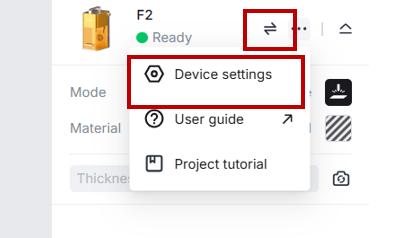
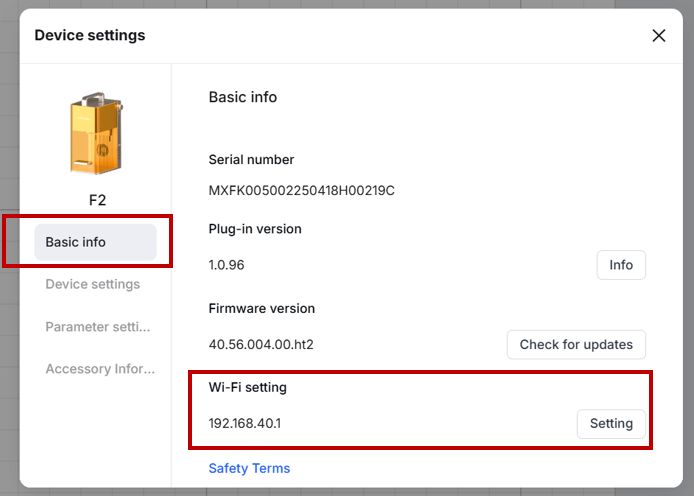
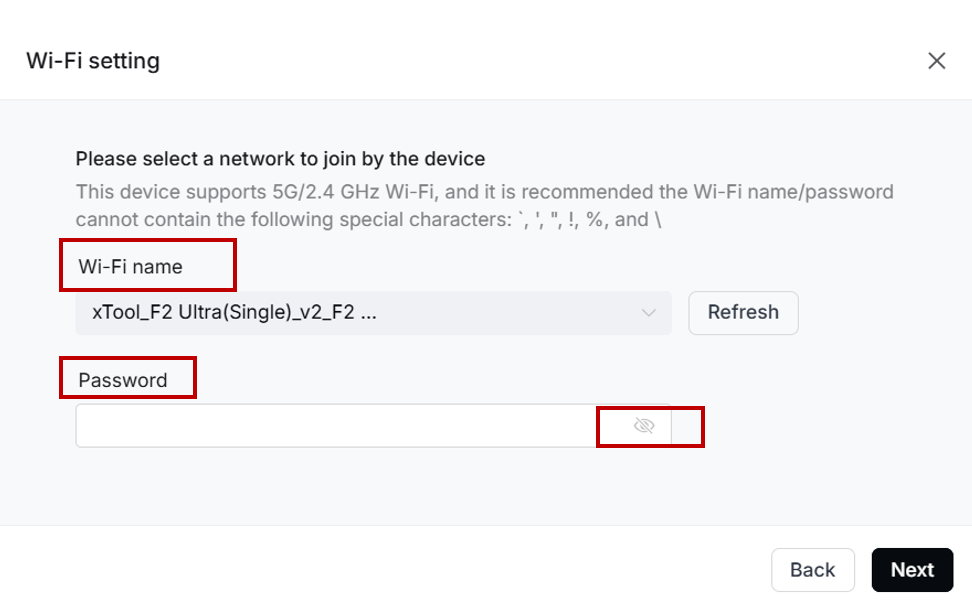
Step 5: Check Wi-Fi connection
- Connect the machine to the computer via USB.
- Choose the correct Wi-Fi and connect the machine to the computer through Wi-Fi.
Preview
Was this page helpful?
23 out of 27 found this helpful
Help Ticket
Use this help ticket to submit your issue. We will respond within 1 business day
Submit a Ticket Tags
Help Ticket
Use this help ticket to submit your issue. We will respond within 1 business day
Submit a Ticket 
Services & Help
Learn & Education

Copyright © 2025 xTool All Rights Reserved.