
1. Issues
1.1 Printer Film Rolls may experience jamming during the transfer process, causing overlapping in the ink-printed area.
1.2 Printer Film Rolls may bulge in the middle layer during processing, leading to wrinkling and uneven ink printing.
1.3 When pressing the stop button during processing, the printer may not stop immediately.
2. Observations
2.1 If the locking bar is not secured, Printer Film Rolls may shake during the transfer process.
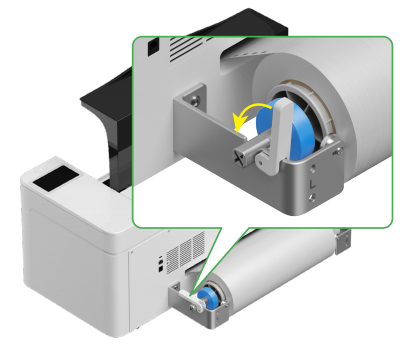
2.2 If the Printer Film Rolls are loaded on the wrong side, the uneven smoothness between the two surfaces can cause poor printing results.
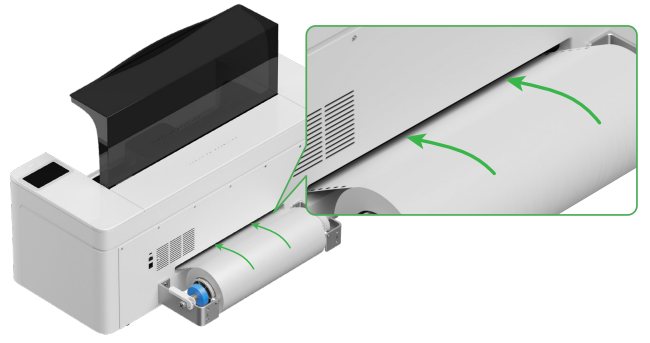
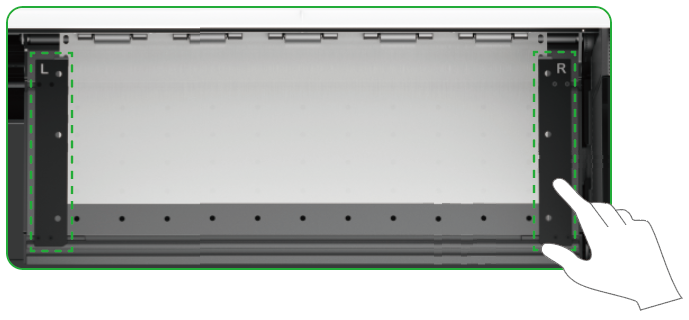
2.3 When placing the Printer Film Rolls in the machine, adjust the guide plates on both sides to properly cover the film. Note that the distance between the guide plates and the film should not be too close or too far; otherwise, issues such as bulging may occur.
3. Solutions
3.1 Correct Installation of Apparel Printer Film Rolls
Proper installation of the Apparel Printer Film Rolls can effectively prevent issues such as film jamming and bulging during processing.
If jamming or bulging occurs during operation, you can avoid abnormal processing by readjusting the placement of the film.
3.2 Normal Operation When Pausing Mid-Process
When pressing Stop during printing, it is normal for the device not to stop immediately.
The continued operation protects the print head and effectively prevents the Printer Film Rolls from blocking the entry channel of the Automatic Shaker Oven Machine.

Services & Help
Learn & Education

Copyright © 2025 xTool All Rights Reserved.