Troubleshooting-xTool Studio gets stuck on the splash screen
Updated Sep 23,2025
Updated Sep 23,2025
Symptom
When launching xTool Studio, the software fails to open properly. It either gets stuck on the splash screen (the initial loading page) or displays a black screen.
Cause
This issue can occur in certain situations where the software's video decoder receives unexpected data, causing the application to freeze. This can be triggered by graphics card driver bugs, issues with the software's built-in media components (Electron/Chromium FFmpeg), or incompatible video encoding formats.
Solution
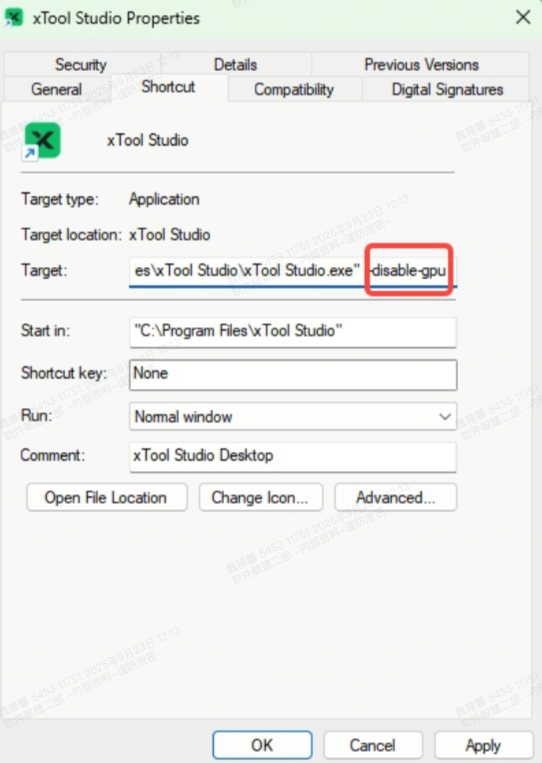
You can resolve this by disabling GPU hardware acceleration for the software. Please follow the steps below:
- Find the desktop shortcut for the xTool Studio software
- Right-click -> Properties
- Select the "Shortcut tab"
- Enter --disable-gpu at the end of the target input box
Note that there is a space before -- - Finally, click Apply -> OK and restart the software
Preview
Was this page helpful?
4 out of 16 found this helpful
Help Ticket
Use this help ticket to submit your issue. We will respond within 1 business day
Submit a Ticket