
About specifications
1. What is the power of xTool P3 laser tube?
- 80 W
2. What is the expected lifespan of xTool P3 laser tube?
- About 10000 hours
3. What is the wavelength of xTool P3?
- 10.6 μm (10600 nm)
4. What is the power of xTool P3?
- Input: 100 – 240 V AC, 50/60 Hz
- Power consumption (maximum): 1400 W
5. What class of laser machine is xTool P3?
- xTool P3 is classified as a Class 1 laser machine. However, if you use it with the conveyor feeder, it is classified as a Class 4 laser machine.
6. What is the size and weight of xTool P3?
Weight (kg) | Size (mm) | |
|---|---|---|
Device without packaging | 105 | 1250 × 808 × 496 |
Device with packaging | 152 | 1350 × 920 × 700 |
7. What is the operation noise of xTool P3?
- xTool P3 only: ≤ 65 db
- Connected to xTool SafetyPro™ IF2 2.0 and xTool SafetyPro™ AP2: ≤ 68 db
8. What is the airflow rate of xTool P3 air assist?
- The maximum airflow rate is 30 L/min. The maximum air pressure is 200 kPa.
9. What is the processing area and height of xTool P3?
- The maximum processing area is 915 mm × 458 mm (36.02 inches × 18.03 inches);
- The maximum processing height of manual mode is 220 mm (8.66 inches);
- The maximum processing height of auto mode is 180 mm (7.08 inches).
About processing
1. What kinds of materials can be processed by xTool P3?
- Wooden boards, leather, acrylic, PVC, ABS, marble, fabric, paper, etc.
Most of them are the same as xTool P2/P2S materials. Go to xTool P series materials to learn more.
2. What is the cutting capability of xTool P3?
- Maximum cutting thickness for a wooden board is 20 mm.
- Maximum cutting thickness for transparent acrylic is 25 mm.
3. What is the maximum processing speed of xTool P3?
- For vector: 400 mm/s
- For bitmap: 1200 mm/s
4. What is the processing accuracy of xTool P3?
- 0.01 mm (The minimum step accuracy of a stepper motor)
5. What is the maximum weight that the slat panel can support during processing?
- 10 kg
6. What is the diameter of materials that can be processed by using the rotary attachment?
- Recommended processing diameter range:
Rotary Attachment 2 (RA2) | Rotary Attachment 3 (RA3) | |
|---|---|---|
Roller | 3 mm – 198 mm | 3 mm – 198 mm |
Chuck | 0 mm – 100 mm | 0 mm – 130 mm |
Sphere | 25 mm – 100 mm | 25 mm – 100 mm |
Ring | 11 mm – 70 mm | 11 mm – 70 mm |
About unboxing and first use
1. What are the precautions for unboxing?
- Check whether the device is complete first.
- Place the device on a flat and stable surface, then open the lid.
2. After turning on xTool P3, it makes a loud and abnormal sound. Why?
- Check whether the 4 thumb screws and green parts are removed.
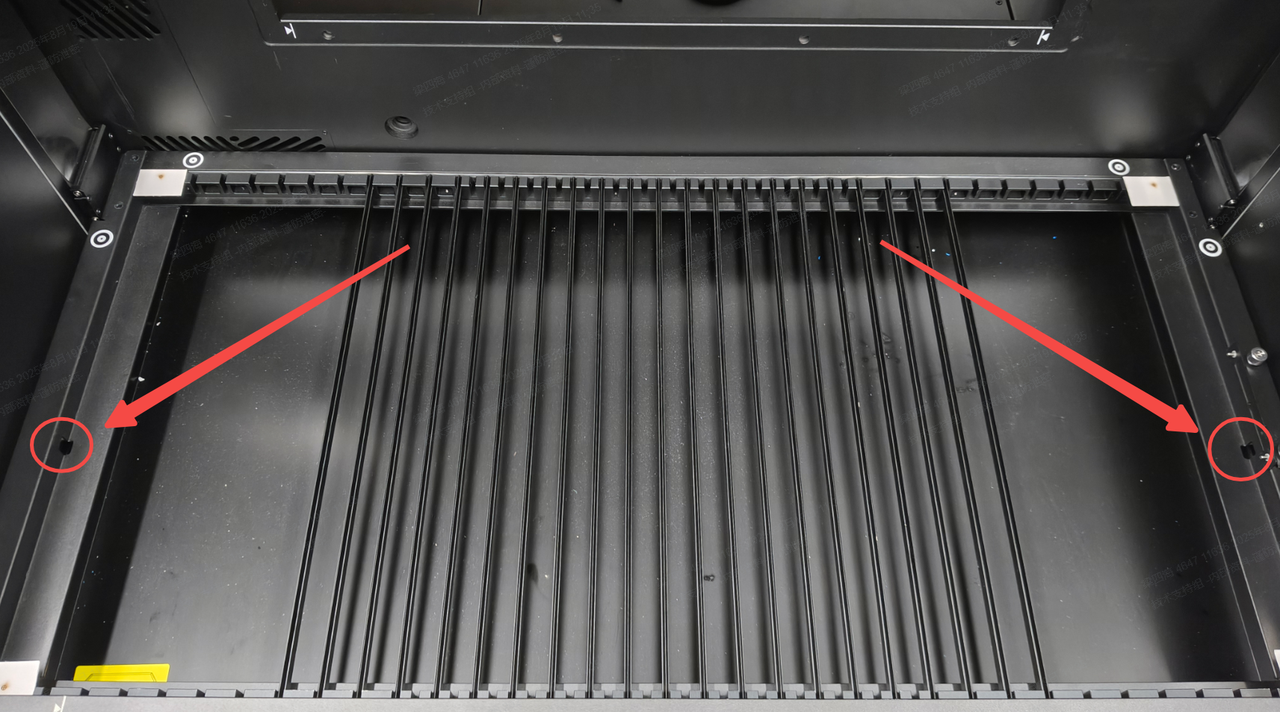
3. I cannot take out the baseplate. Why?
- The baseplate is secured by 2 screws on two sides. Remove them and take out the baseplate.
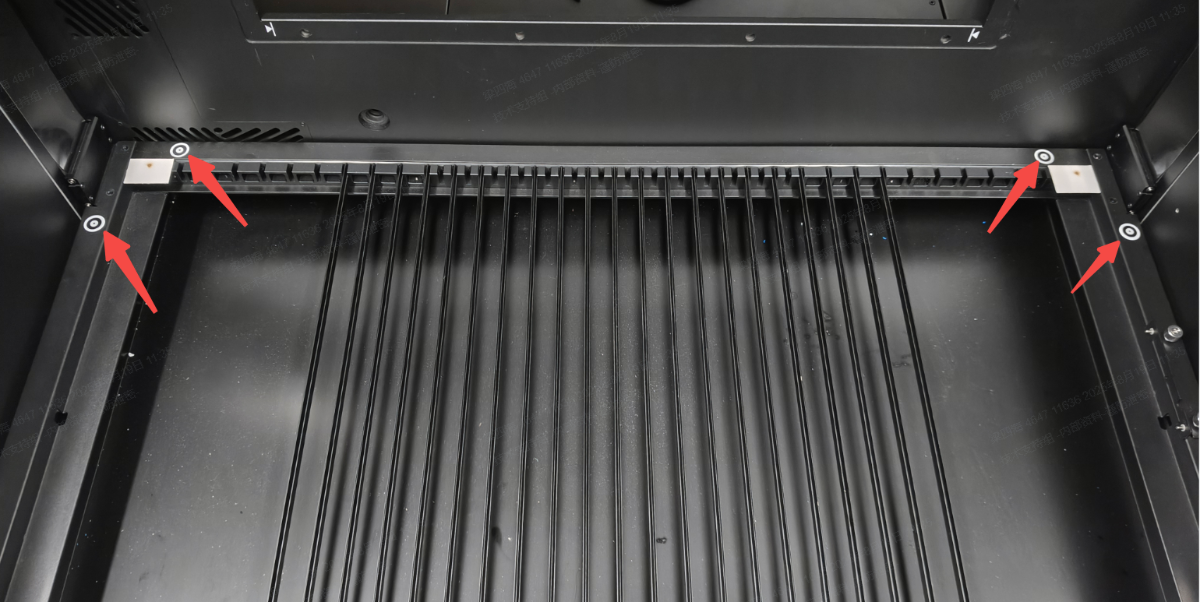
4. Four round stickers are on the corners of the slat panel. Can I remove them?
- No. They are camera viewpoint stickers.
5. The slats do not fully cover the slat panel. Why?
- The package equips 17 slats, and they cannot cover the whole slat panel. You can move the slats to adapt to different-sized materials.
6. Do I need to calibrate the optical path when unboxing xTool P3?
- It is not necessary generally.
The optical path is calibrated before the device leaves the factory. However, due to uncertainties arising from long-distance transportation, to ensure the device functions properly, inspect the optical path upon initial unboxing and verify its integrity before use. If any issues are detected, calibrate the optical path following the first-time use guide.
7. How many volume of antifreeze is to be prepared?
Lowest annual temperature in your region (℃) | Recommended concentration (%) | Antifreeze (ml) | Purified water (ml) |
|---|---|---|---|
T > 0 | 0 | 0 | 1200 |
-10 ≤ T ≤ 0 | 20 | 240 | 960 |
-20 ≤ T ≤ -10 | 35 | 420 | 780 |
-30 ≤ T ≤ -20 | 45 | 540 | 660 |
-40 ≤ T ≤ -30 | 50 | 600 | 600 |
-50 ≤ T ≤ -40 | 60 | 720 | 480 |
8. What are the components of antifreeze?
- A 98% propylene glycol solution.
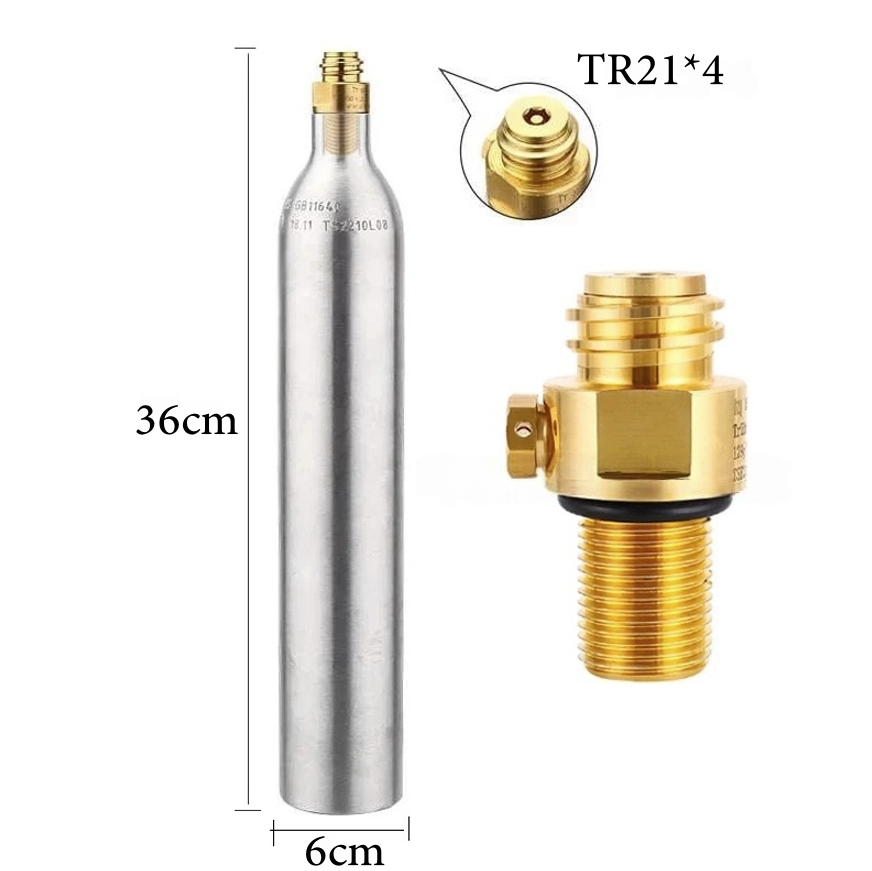
9. What kind of CO₂ gas cylinder is applicable to xTool P3?
- A 0.6L soda bottle, with a minimum CO₂ capacity of 400g of carbon dioxide, the thread specification of M18*1.5, and the valve thread of TR21-4.
- You may purchase CO₂ cylinders that meet the above specifications through authorized channels.
10. What type of water is suitable for preparing antifreeze?
- Distilled water. If using tap water or other water containing impurities, sediment may accumulate over time.
About using the device
1. Which software can xTool P3 work with?
- It can work with xTool Studio (PC version) only. Lightburn and XCS (mobile and iPad versions) are not supported.
2. What are the differences among the 3 focus lenses?
- There are 3 types of focus lenses (S/M/L). The standard version is M size.
Size | Focal length (mm) | Laser spot (mm) | Scenario |
|---|---|---|---|
S | 38.1 | 0.18 × 0.18 | The spot is more accurate, and it is more suitable for laser engraving. |
M | 50.8 | 0.2 × 0.2 | Both the laser engraving and cutting results are good. |
L | 63.5 | 0.23 × 0.23 | It is more suitable for laser cutting. |
3. What is the use of the port on the side of the laser module?
- It is an extension port, which can be connected to the infrared laser module.
4. What is the use of the 4 cameras?
- Distant-view camera (on the top of the lid): captures distant-view pictures for positioning, material identification, and monitoring processing in real time.
- Close-view camera (under the laser module): captures close-view pictures for positioning.
- Upper left corner camera: monitors processing in real time and flames.
- Bottom left corner camera: monitors flames.
5. What is the positioning accuracy of the cameras?
- Distant-view camera:
- At the center: 60%
- Processing area: 0.5 mm
- Edge: 1 mm
- Close-view camera
- At the center: 80%
- Processing area: 0.2 mm
- Edge: 0.5 mm
6. What is the accuracy of auto measure?
- 0.5 mm
7. What is the capturing area of the close-view camera?
- 160 mm × 140 mm
8. What is the use of auto mode?
- Captures the processing area automatically
- Identifies materials
- Auto focusing
9. What kind of desktop materials are suitable for placing xTool P3?
- Wooden or metal surfaces.
It is not suitable for placing xTool P3 on a plastic surface because the baseplate temperature is high after cutting for a long time, which may melt the plastic.
10. What kind of connection can P3 connect to the software?
- USB connection or Wi-Fi connection (2.4G or 5G).
11. What is the Bluetooth version of xTool P3?
- BLE 5.1
12. What kind of materials can be used in Auto-measure?
- Most opaque or non-reflective materials are suitable.
- For transparent material: Use manual measurement or apply the masking tape before using Auto measure.
- For the black matte, red, or highly reflective materials may cause distance measurement failure or significant measurement errors. You can use manual measurement or apply the masking tape before using Auto measure.
13. Can xTool P3 identify materials of different heights in auto mode?
- No. It focuses on the highest height only.
14. What kinds of processing modes that xTool P3 support?
As shown below:
.png)
15. What kinds of curved materials does that xTool P3 supports?
As shown below:
.png)
16. The cross-section is not vertical by laser cutting. Why?
- The laser is a laser beam instead of a laser column. The thicker the material being cut, the more obvious this result becomes.

17. Is xTool P3 applicable to the 240V voltage electrical outlet in the United States?
- No. Please use the 110V standard voltage electrical outlet.
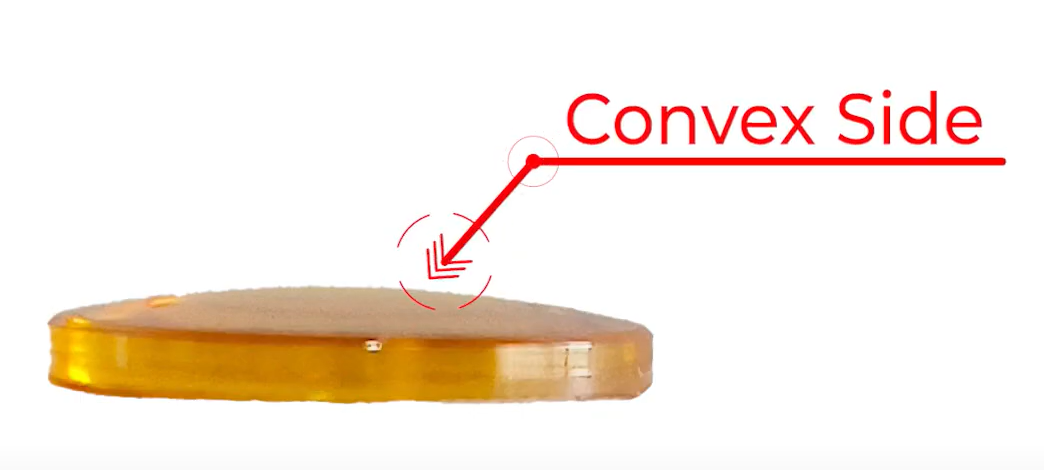
18. How to distinguish different sizes of the focus lens?
- If you have multiple focus lenses, you can distinguish their models by the markings on the packaging. If packaging markings are unavailable, observe the lens's convexity—the shorter the focal length, the more convex it is, that is, the height of the bulge: S>M>L.
19. In Auto mode, the nozzle hits the material during processing. Why?
- In Auto mode, the slat slots can't be obstructed by anything, as it serves as the distance reference point. Obstruction will affect focusing.
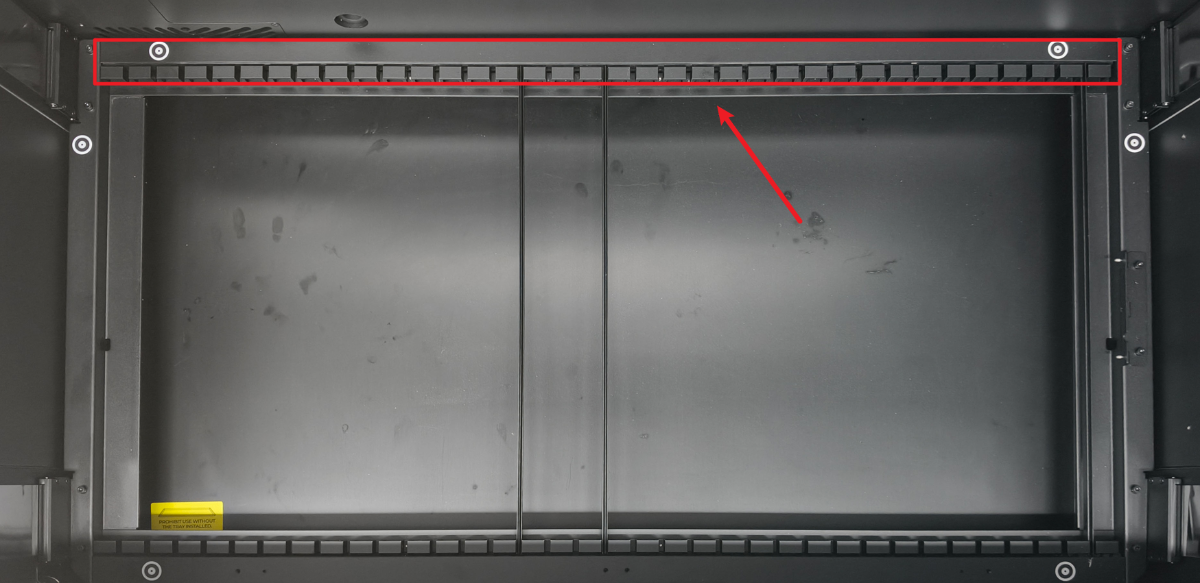
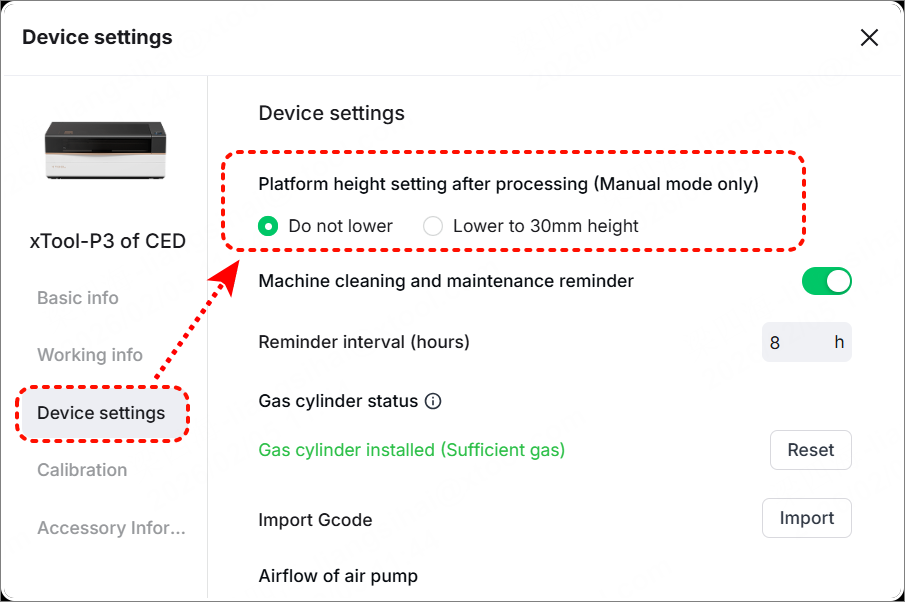
20. The height of the lifting platform changes during distance measurement and after processing. Why?
- During distance measurement, the device automatically adjusts the lifting platform height according to material thickness to achieve proper focus.
- After processing, the lifting platform automatically returns to a height of 30mm above the baseplate. In manual mode, you can modify this setting (as shown) to prevent the lifting platform from lowering after processing (The firmware version should be 40.23.006 or higher. And this setting does not apply to process with rotary attachment).
About frequent questions
1. False flame alarms may often occur during processing. Why?
- Flame sensors are susceptible to strong light or sunlight. Avoid using them in direct bright light or under the sun.
2. The round stickers are not detected when capturing the background. Why?
- Ensure the lid is opened to the utmost, and the round stickers are clean and not covered. Otherwise, the detection may fail.
3. The captured screen is flickering. Why?
- xTool P3 camera uses an automatic exposure solution, and the fill light brightness also changes with the height of the lifting platform (the lower the platform, the brighter the light). Therefore, the brightness of the screen captured may vary.
4. When using the close-view camera, the software prompts "solid area is needed". Why?
- Distance measuring is needed when using the close-view camera. Ensure there is solid material in the capturing area.
If materials have already been placed, elevate the lifting platform to 30 mm or above. However, ensure the surface of the materials remains at least 5 mm below the nozzle on the laser module.
5. The software prompts "distance measurement failed" during capturing. Why?
- Elevate the lifting platform to 30 mm or above. However, ensure the surface of the materials remains at least 5 mm below the nozzle on the laser module.
6. Blank screen occurs on the control knob. Why?
- It may be affected by static electricity. Please restart the device.
7. The monitoring screen of processing is stuttering. Why?
- The transmission rate is unstable. Switch to the USB connection, lower the resolution, or restart the device.
8. When connecting to xTool SafetyPro™ IF2 2.0 and xTool SafetyPro™ AP2 Max, the software displays an error code, and the inline fan gets stalled. Why?
- These two accessories cannot be used at the same time. You can connect to xTool SafetyPro™ AP2 Max separately and use it.
9. Why is the cutting performance of the L-size focus lens worse than that of the M/S-size focus lenses?
The L-size focus lens has a larger spot size and a longer depth of focus. Its advantage is that it can cut thick materials (preferably over 10 mm). However, when cutting thin wooden boards, its larger spot size results in poorer cutting performance than the M-size and S-size focus lenses.
About accessories
1. Is Rotary Attachment 2 (RA2) compatible with xTool P3?
- Yes. But auto-focus works in RA3 instead of RA2.
2. Is xTool SafetyPro™ AP2 compatible with xTool P3?
xTool SafetyPro™ AP2 cannot work with xTool P3 separately, it must work with xTool SafetyPro™ IF2 2.0. However, it is not recommended because:
- Due to insufficient airflow, xTool SafetyPro™ AP2 cannot effectively exhaust smoke when used with xTool P3, which shortens the lifespan of the filter and consumables. Therefore, it should not be used with xTool P3 separately.
- When xTool SafetyPro™ IF2 2.0 and xTool SafetyPro™ AP2 are used together with xTool P3, xTool SafetyPro™ AP2's filter and xTool SafetyPro™ IF2 2.0 become clogged more easily, resulting in xTool SafetyPro™ IF2 2.0 reporting stalling issues.
It is recommended to connect xTool P3 directly to xTool SafetyPro™ AP2 Max or xTool SafetyPro™ IF2 2.0. Regularly clean the exhaust system to ensure effective smoke extraction.
3. Is xTool SafetyPro™ AP2 Max compatible with xTool P3?
- Yes. But xTool SafetyPro™ AP2 Max can only work with xTool P3 separately. It cannot work with xTool SafetyPro™ IF2 2.0.
4. Is Screen Printing compatible with xTool P3?
- It is compatible with the steel meshes, but not compatible with the polyester meshes.
5. Is the fire safety set compatible with xTool P3?
- No.
xTool P3 has an in-built flame sensor and fire extinguishing module. But the gas cylinder in the fire extinguishing module is sold separately.
6. Does the gas cylinder come with xTool P3?
- The gas cylinder is sold separately.
7. Is a riser base compatible with xTool P3?
- No. You can use the lifting platform as a riser base, which can be elevated and lowered automatically.
8. What xTool P2/P2S accessories are compatible with xTool P3?
- xTool P2/P2S conveyor feeder and riser base are not compatible with xTool P3.
- xTool P2/P2S honeycomb panels can be placed on the slats of xTool P3, but their dimensions are slightly smaller in xTool P3.
- xTool P3 processing area: 915 mm × 458 mm
- xTool P2/P2S honeycomb panel sizes: 600 mm × 305 mm
9. Does the infrared module come with xTool P3?
- No. But you can purchase it separately.
10. Does the honeycomb panel come with xTool P3?
- No. But you can purchase it separately.
11. Does xTool P3 have an in-built exhaust fan?
- No. But an xTool SafetyPro™ IF2 2.0 is included in the packaging of xTool P3.
12. Are the lenses for xTool P3 and xTool P2/P2S interchangeable?
- The laser mirrors are not interchangeable.
- The focus lens for xTool P2/P2S is the same as the M-size focus lens for xTool P3.
About maintenance
1. What is the proper operating temperature and ambient humidity of xTool P3?
- The operating temperature is 10°C – 30°C. The ambient relative humidity is<90%.
2. What is the proper storage temperature and ambient humidity of xTool P3?
- For device in unopened packaging:
- Storage temperature: -10°C – 35°C
- Ambient relative humidity:<90%
- For device have been unpacked and used:
- Storage temperature: -10°C – 35°C
- Ambient relative humidity:<90%
- The antifreeze in the device must be prepared according to the user manual's specifications. If the device will not be used for an extended period, it is recommended to drain the antifreeze before storing the device.
3. How long should I replace the laser mirror and laser lens of xTool P3?
- It varies the usage scenarios and frequency. Generally, if there are no severe oxidative marks on the laser mirror or laser lens, they can be cleaned thoroughly and reused.
4. Can I discard the packaging and inner cardboard of xTool P3 after unboxing?
- If possible, it is recommended to retain it for subsequent use, such as sending the device for repair or moving.
5. What kind of grease is suitable for the guide rails and bearings of xTool P3?
- The lithium-based grease for standard mechanical structures is sufficient.
6. How do I clean the laser mirror, laser window, and laser lens?
- Use the dust blower to remove the dust on the lens.
- Spray high-concentration alcohol, isopropyl alcohol, or other optical lens cleaners.
- Gently wipe in a straight line using a non-woven cloth or optical lens cleaning cloth, moving in the same direction. No water stains should remain.
7. What should I pay attention to during daily maintenance?
- Clean every week (cleaning frequency varies from processing frequency): Baseplate/guide rail/laser mirror/laser lens
- Check every month: Fan/Water-cooling system
- Replace laser tube: The laser tube has a lifespan of approximately 10,000 hours, which gradually diminishes with usage. When power output significantly decreases, it is recommended to purchase a replacement through the official website.
- Fill coolant: Whenever possible, use purified water as the coolant. If the device does not need to be stored in sub-zero temperatures, using only purified water can achieve better heat dissipation.
- For more maintenance guides, go to xTool P3 Maintenance Guide.

