
xTool Store
Troubleshoot Film Detection Sensor Indicator Flashing on xTool OS1
Updated Jul 22,2025
Updated Jul 22,2025
Issue description
While you are operating your xTool OS1, you observe that the indicator light on the film detection sensor is blinking.
- Normal Condition: When the oven is powered on but not processing film (i.e., no film is being fed into it), the sensor's indicator light should be solid on (not blinking).
- Malfunction: The indicator light is blinking continuously. See the glitching video reference: Film Detection Sensor Indicator Flashing.
Potential causes
- Powder Obstruction (Most Likely): The sensor is partially or fully blocked by adhesive powder.
- Light Reflection: Powder buildup in the surrounding area is causing light to reflect, leading to a false sensor reading.
- Failed Sensor or Cable: The film detection sensor itself or its connection cable is malfunctioning.
- Failed Main Control Board Port: The sensor's port on the main control board of the oven has an issue.
Troubleshooting
Step 1: Clean film detection sensor & surrounding areas
Clean the sensor
- Follow the maintenance cleaning procedure for the sensor as demonstrated in the video tutorial below:
- Video Reference: Routine Cleaning & Care for xTool OS1 Shaker Oven
- Timeframe: 0:22 - 0:30 seconds in the video.
- Additional cleaning:
- In addition to brushing, use a small tool to gently tap the outer housing of the sensor.
- This will help dislodge any excess powder trapped inside the sensor area.
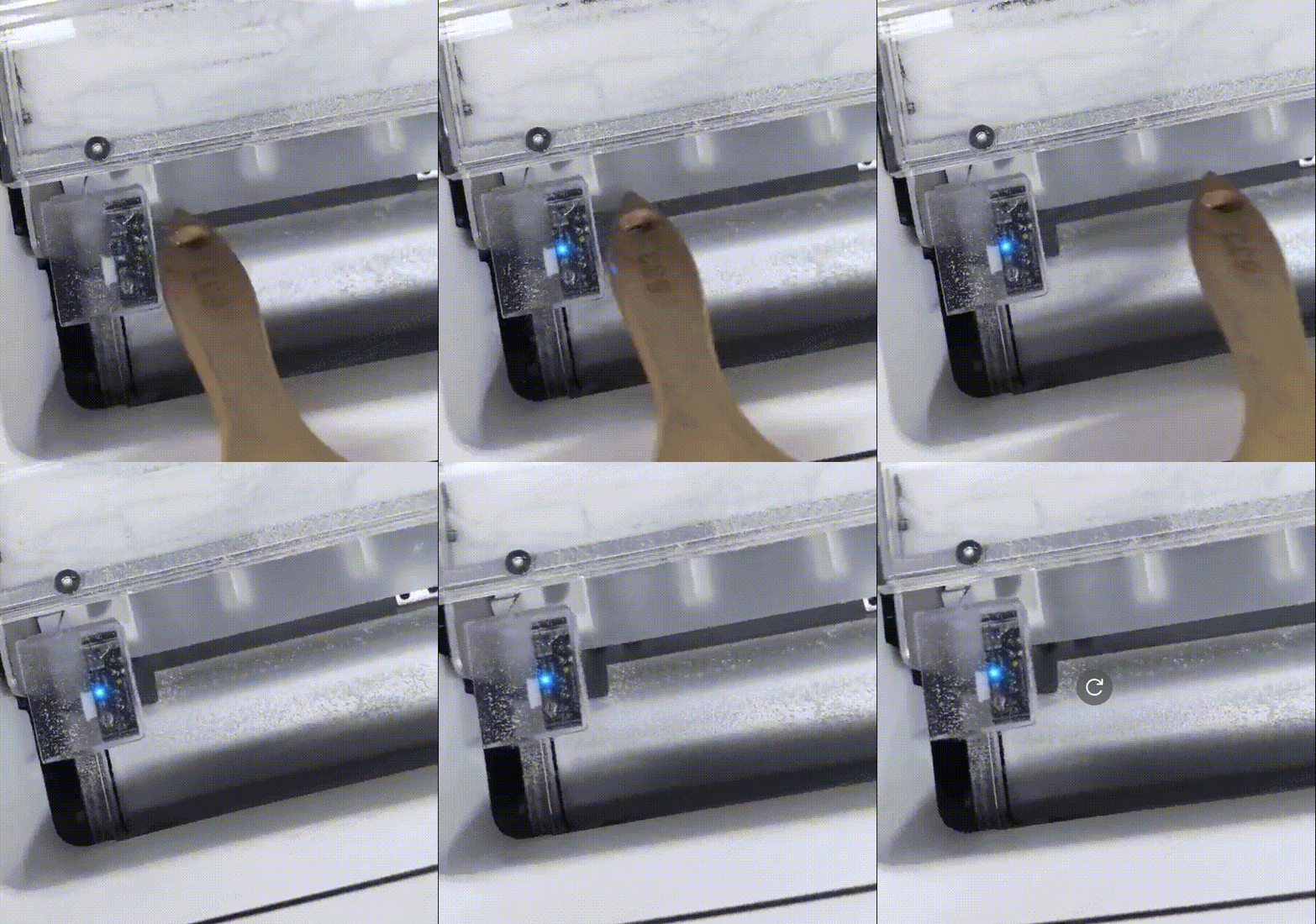
Clean the surrounding reflective areas
- Using a brush, clean any powder buildup from the surfaces and panels around the sensor.
- This helps prevent stray light reflections that can cause false readings.
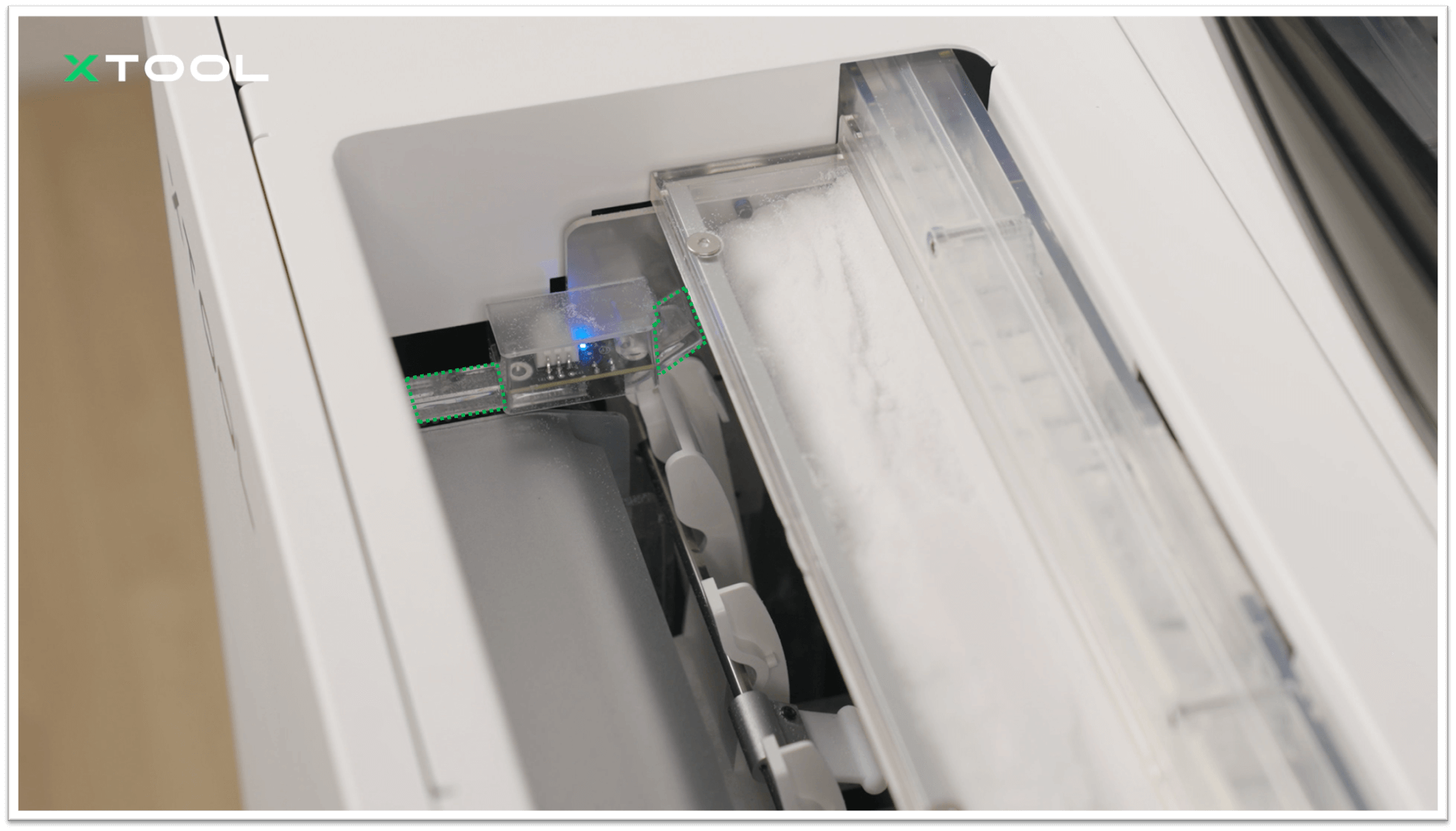
Test the sensor after cleaning
- If the flashing issue continues, proceed to Step 2.
Step 2: Check Sensor Connection Cables
⚠️ Safety preparation:🪛 Tools required:
- Turn off the oven power completely.
- Wait for the oven to cool down to room temperature before proceeding.
- M2.5mm Hex Screwdriver (included in your package)
- Access the connection points:
- Remove the left-side panel of the oven to access the main control board.
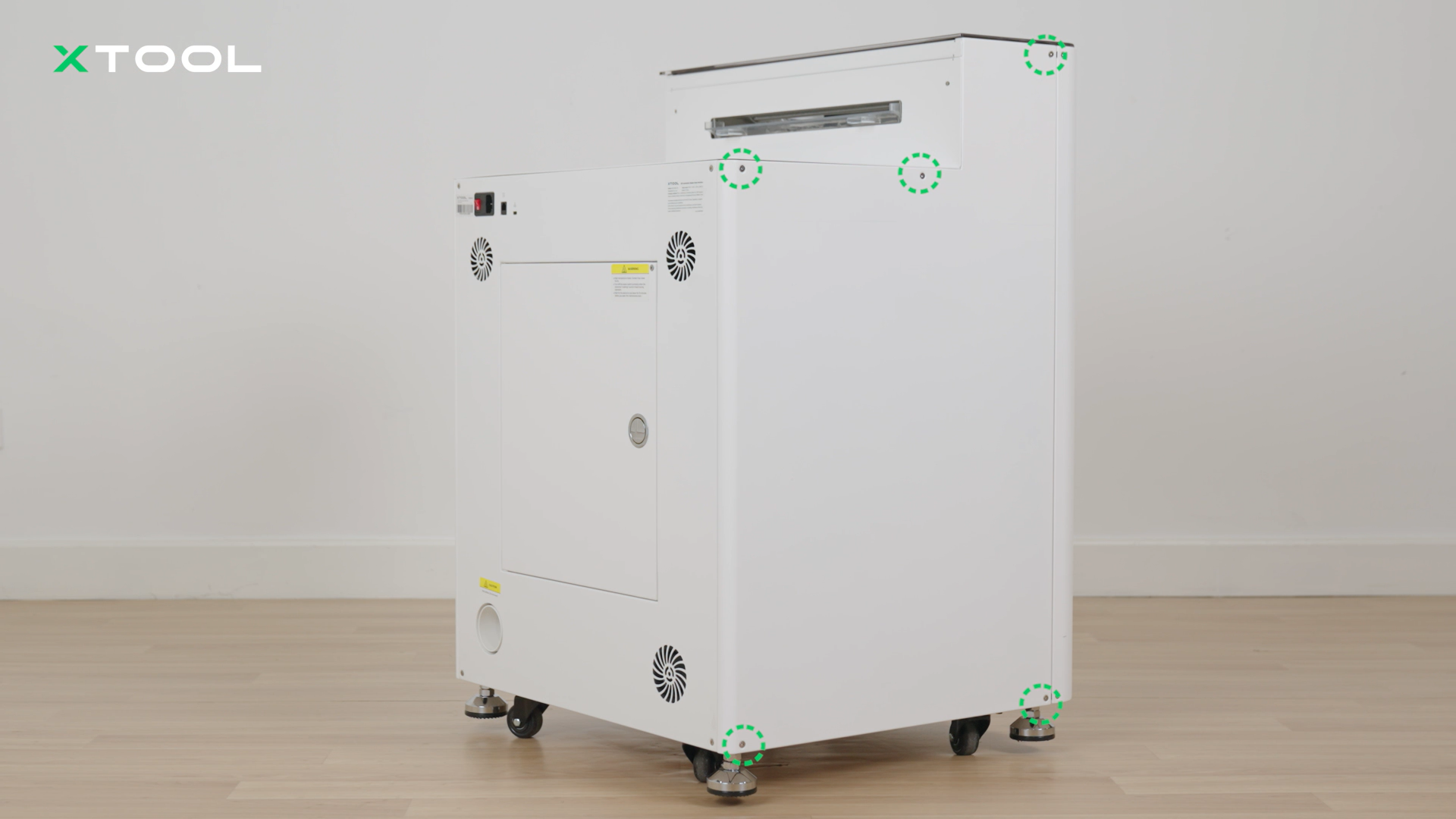
- Reconnect the mainboard cables:
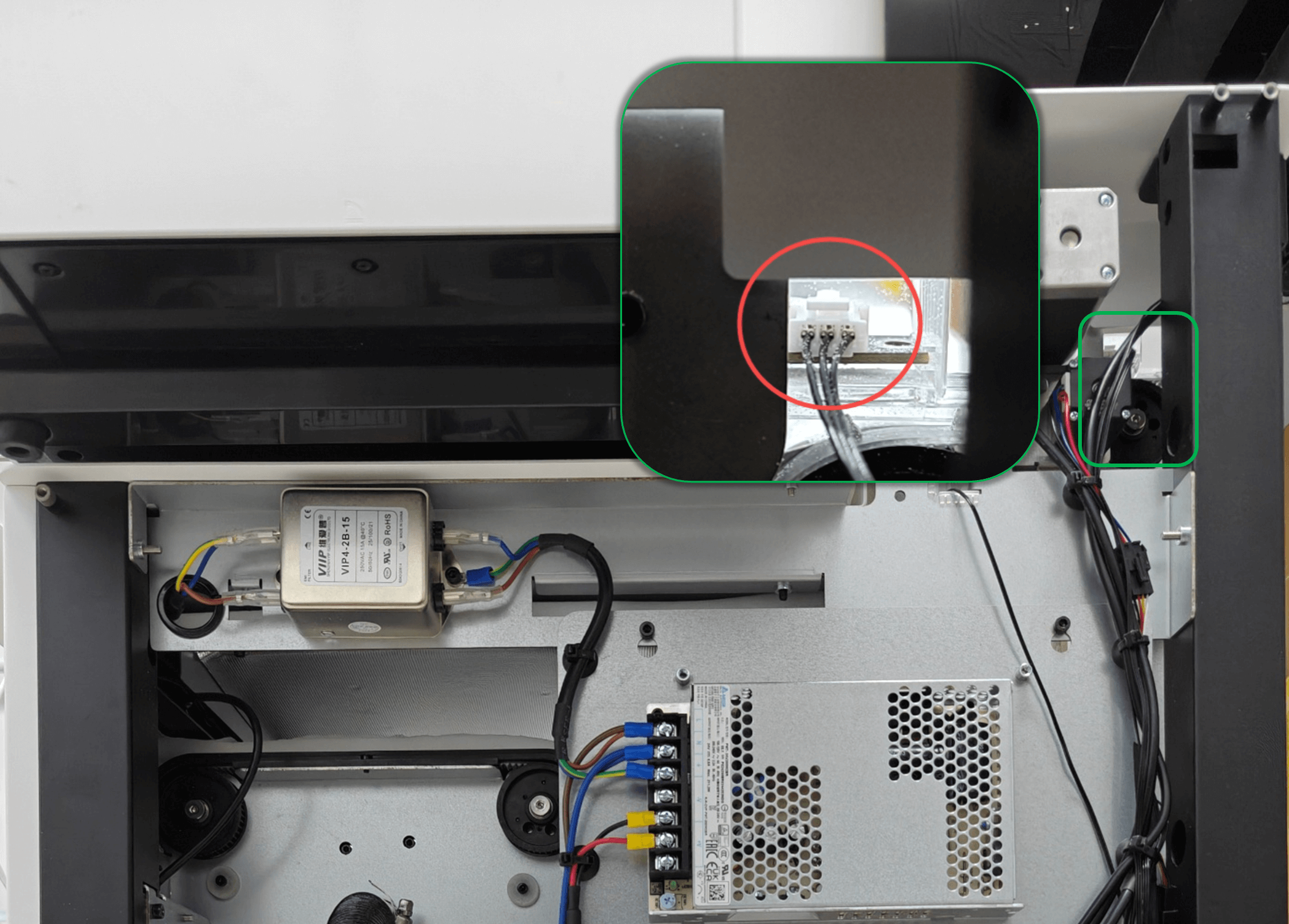
- Locate the sensor's connection cable on the main control board. See the reference image below.
- Carefully disconnect and then firmly reconnect the connector to ensure it is securely seated.
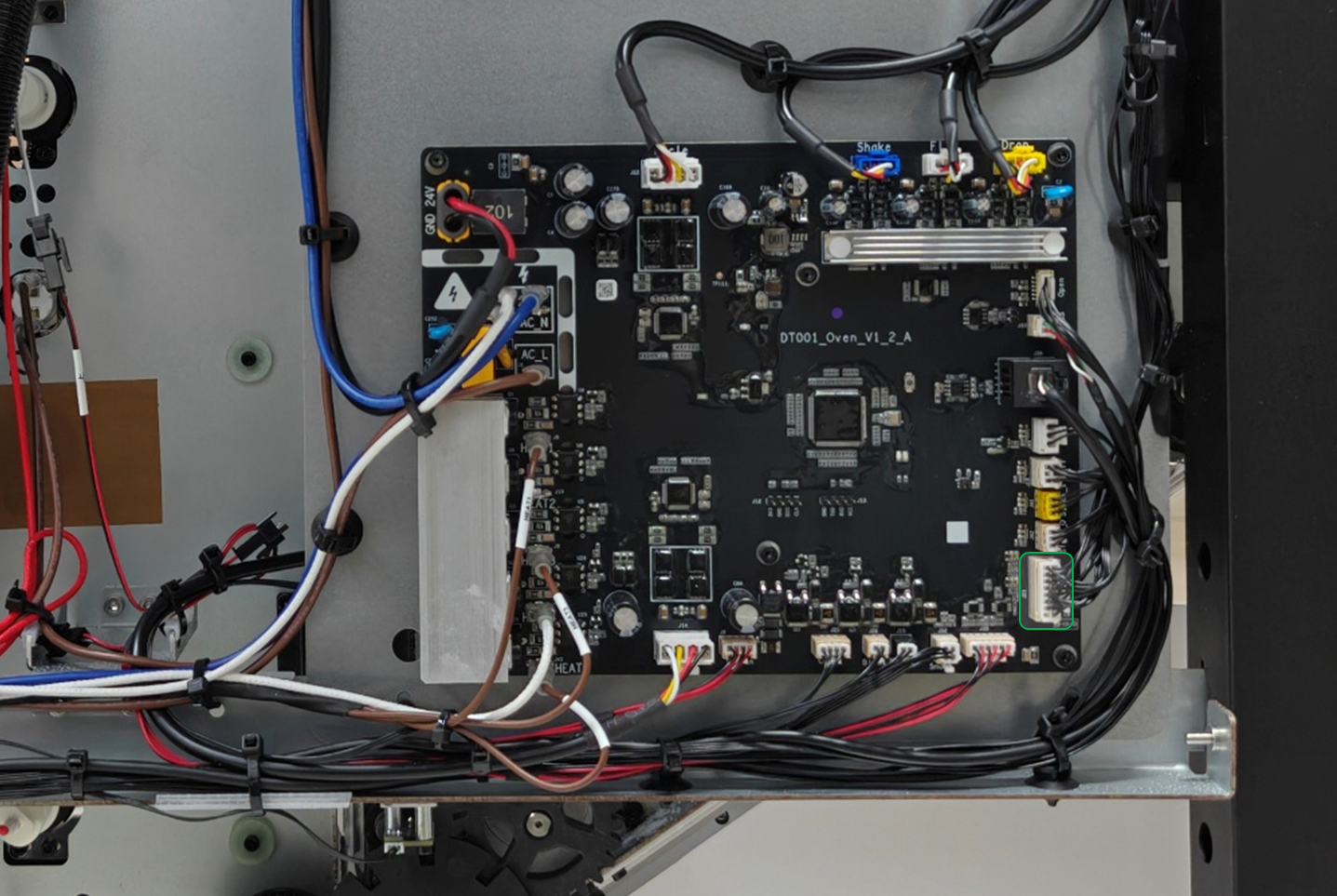
- Check the sensor connection:
- If reseating the cable on the mainboard doesn't resolve the issue, trace the cable back to the film detection sensor itself. Use appropriate tools to disconnect and reconnect the cables at the film detection sensor end.
- Handle cables carefully to avoid damage.
- Test the system:
- Reassemble the side panel.
- Power on the oven and test the sensor.
- If the problem persists, proceed to Step 3.
Step 3: Replace film detection sensor
Determine replacement necessity:
- If all previous troubleshooting steps have failed to resolve the flashing indicator light, the issue is likely caused by a failed connection cable or film detection sensor.
Advanced intervention:
- This step requires advanced technical intervention. Please proceed to the "Still experiencing issues" section to contact xTool Customer Service for further diagnosis.
- If deemed necessary by xTool technical experts, the film detection sensor connection cable or film detection sensor may need to be replaced.
Still experiencing issues?
Should the issue persist after completing the preceding steps, submit a ticket via the "Submit a Ticket" button in the "Help Ticket" section below. The standard response time for xTool Customer Service is one business day.
For a prompt resolution, please include the following details:
- Issue Description: A detailed explanation of the observed problem.
- Video Evidence: Attach a video demonstrating the issue, where applicable.
- Troubleshooting Performed: Any troubleshooting steps you have already attempted, along with their results.
This information is crucial for xTool technical support engineers to provide timely assistance.
Documentation feedback
Help improve this content by providing feedback. If this content did not meet your requirements, select "No" in the "Was this page helpful?" section below. Include specific details about what was unclear or missing in the pop-up suggestion box. Feedback submissions are reviewed by xTool technical writers to enhance future documentation.
Preview
Was this page helpful?
0 out of 0 found this helpful
Help Ticket
Use this help ticket to submit your issue. We will respond within 1 business day
Submit a Ticket Tags
Help Ticket
Use this help ticket to submit your issue. We will respond within 1 business day
Submit a Ticket 
Services & Help
Learn & Education

Copyright © 2025 xTool All Rights Reserved.