
xTool Store
Troubleshoot "Access-control key" for xTool F2 Ultra
Updated Jul 10,2025
Updated Jul 10,2025
Issue description

Troubleshooting
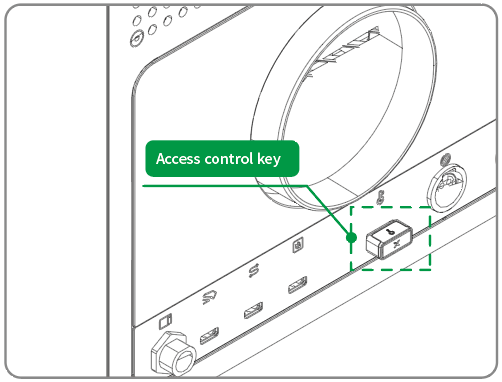
- If this error is triggered, the USB security key may be faulty or not properly inserted in the port.
- Ensure your machine's firmware has been upgraded to the latest version, and check that the security key is inserted properly. If the problem persists, turn the machine off, use the spare security key, and turn it back on. If the problem persists, contact customer support.
Still experiencing issues?
Should the issue persist after completing the preceding steps, submit a ticket via the "Submit a Ticket" button in the "Help Ticket" section below. The standard response time for xTool Customer Service is one business day.
For a prompt resolution, please include the following details:
- Issue description: A detailed explanation of the observed problem.
- Video evidence: Attach a video demonstrating the issue, where applicable.
- Troubleshooting performed: Any troubleshooting steps you have already attempted, along with their results.
This information is crucial for xTool technical support engineers to provide timely assistance.
Preview
Was this page helpful?
27 out of 27 found this helpful
Help Ticket
Use this help ticket to submit your issue. We will respond within 1 business day
Submit a Ticket Tags
Help Ticket
Use this help ticket to submit your issue. We will respond within 1 business day
Submit a Ticket 
Services & Help
Learn & Education

Copyright © 2025 xTool All Rights Reserved.