
Laser source
Q1: What laser sources are compatible with the xTool MetalFab CNC Cutter?
A: xTool MetalFab is designed exclusively for use with the integrated laser source of the xTool MetalFab Laser Welder and CNC Cutter (800W and 1200W models). It is not compatible with other standalone xTool laser modules (e.g., those used with xTool engravers) or laser welding/cutting units from any other manufacturers.
Materials and thickness
Q1: What materials can xTool MetalFab CNC Cutter handle, and what's the maximum cutting thickness?
A: CNC Cutter compatible with the 1200W Laser Welder supports various materials. The maximum thicknesses are listed below:
Material | Recommended Cutting Gas | Max Cutting Thickness |
Stainless Steel | Compressed Air / Nitrogen | 5mm |
Aluminum | Compressed Air / Nitrogen | 4mm |
Brass | Compressed Air / Nitrogen | 3mm |
Galvanized Steel | - ≤1 mm: Compressed Air / Nitrogen - >1 mm: Oxygen | 10mm
|
Carbon Steel | - ≤1 mm: Compressed Air / Nitrogen - >1 mm: Oxygen | 10mm
|
Q2: Can xTool MetalFab CNC Cutter process precious metals like gold or silver?
A: Processing precious metals such as gold, silver, and platinum with this machine is not recommended. The laser cutting process inherently melts and vaporizes the material, which leads to significant material loss. This makes it generally unsuitable for valuable precious metals where material conservation is critical.
Q3: Can xTool MetalFab CNC Cutter process pure copper (red copper)?
A: No, the machine cannot process pure copper. Pure copper is a highly reflective material. During processing, a significant amount of laser energy can be reflected back towards the machine, posing a high risk of damage to critical components like the laser source and the welding/cutting head optics.
Cutting and gas/nozzle selection
Q1: How should I select the auxiliary gas when cutting different sheet materials?
A: The appropriate auxiliary gas varies depending on the metal sheet material being cut. The general guidelines are summarized below:
Material | Thickness | Nitrogen / Compressed Air | Oxgen
|
Stainless Steel | <=1mm | √ | NO |
2-5mm | √ | NO | |
Aluminum Sheet | <=1mm | √ | NO |
2-4mm | √ | NO | |
Brass | <=1mm | √ | NO |
2-3mm | √ | NO | |
Carbon Steel /Galvanized Sheet | <=1mm | √ | NO |
2-5mm | NO | 0.06 MPa pressure from cylinder |
Q2: What’s the difference between cutting with compressed air and nitrogen?
A: When cutting common metals like stainless steel, brass, and aluminum, you can use either compressed air or nitrogen.
- Nitrogen leaves a bright and clean cut edge.
- Compressed air is more cost-effective but may not produce the same surface finish.
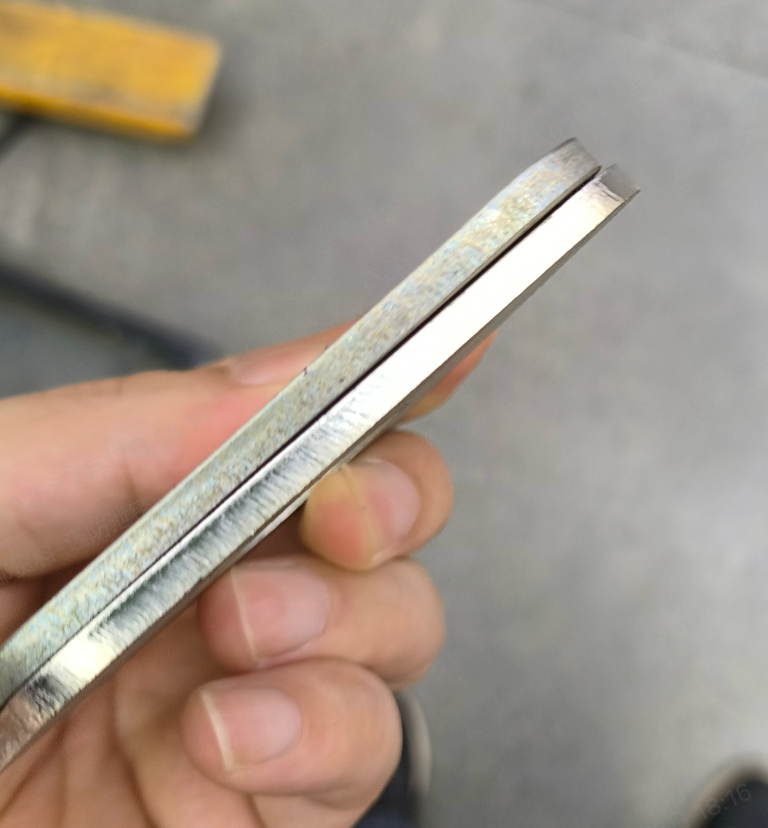
Q3: Can xTool MetalFab CNC Cutter achieve thicker cuts by repeating passes?
A: No.
With a 1200W laser welder, CNC Cutter can cut:
- Maximum thickness for stainless steel with nitrogen or compressed air: 5mm
- Maximum thickness for carbon steel with oxygen: 10mm
Why multiple passes don't work: If the first pass fails to cut through, molten metal splashes onto the surface, leaving residue around the kerf. This interferes with subsequent passes and tracking, making it impossible to cut deeper through repetition.
Q4: How should I choose a gas supply system?
A: We offer a recommended gas setup: xTool selected air compressor and air dryer, which can stably supply 0.6 MPa of pressure. When used with xTool’s self-developed nozzle, it supports cutting up to:
- 5mm stainless steel
- 4mm aluminum
- 3mm brass
However, the self-developed nozzle works via contact cutting, which may leave scratches on the material surface.
For fine crafts with high surface quality requirements, we recommend using:
- A nitrogen gas cylinder (available from local gas suppliers), or
- A larger laser-grade screw compressor.
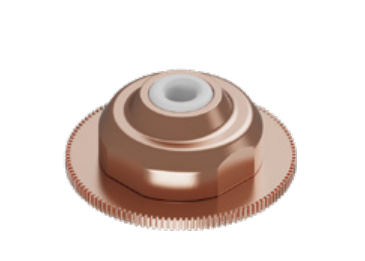
Q5: Two nozzles are included with the machine. What are the differences between them, and when should each be used?
Nozzle
| Image
| Typical Operating Gas Pressure | Advantages | Disadvantages |
Preinstalled nozzle/Ordinary nozzle | >1.2Mpa | Non-contact design; prevents scratching the surface of the material during cutting. | Requires higher gas pressure (typically > 1.0 MPa / 1.2 MPa) to effectively cut plates 2mm or thicker. | |
Telescopic cutting nozzle |
| >0.6Mpa | 1. More efficient gas consumption (saves gas). 2. Capable of cutting thicker plates even at 0.6 MPa. | Contact-based, may scratch material surfaces. Not for sheets under 2 mm (prone to deformation). Use ordinary nozzle for thin materials. Precautions
|
Q6: How should I select the nozzle when cutting different sheet materials?
Material | Thickness | Preinstalled nozzle/Ordinary nozzle | Telescopic cutting nozzle (included) | Double-layer nozzles and extension tubes (not included) |
Stainless Steel | <=1mm | √ | NO | NO |
2-5mm | √ (Requires 1.2 MPa gas pressure) | √ | NO | |
Aluminum Sheet | <=1mm | √ | NO | NO |
2-4mm | √ (Requires 1.2 MPa gas pressure) | √ | NO | |
Brass | <=1mm | √ | NO | NO |
2-3mm | √ (Requires 1.2 MPa gas pressure) | √ | NO | |
Carbon Steel /Galvanized Sheet | <=1mm | √ | NO | NO |
2-5mm | NO | NO | √ |
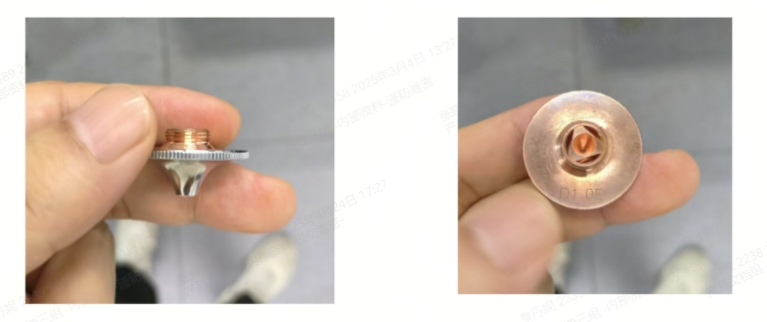
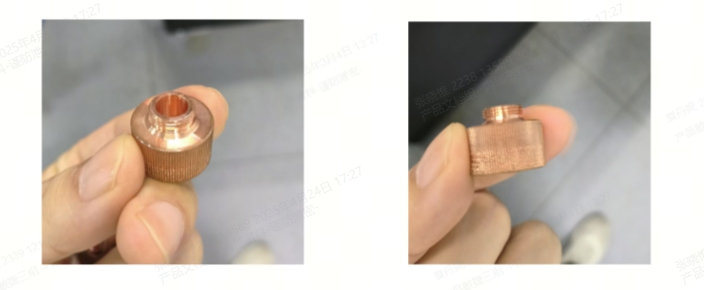
Q7: What additional equipment is needed to cut carbon steel and galvanized sheet?
A: If you plan to cut Carbon Steel or Galvanized Sheet thicker than 1mm, you will need to prepare the following specific items:
Item | Image |
Oxygen Cylinder |
|
Double-layer nozzle |
|
Extension tube |
|
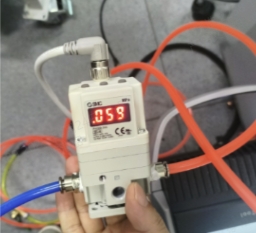
Oxygen Proportional Valve |
|
Processing
Q1: Can xTool MetalFab CNC Cutter do marking?
A: Marking is not recommended on highly reflective materials.
- It is possible to mark stainless steel, but be sure to limit marking duration and use appropriate parameters.
- Brass and aluminum are highly reflective, and marking them can cause laser back-reflection, leading to permanent damage to the laser. Marking on these materials is not supported.
Recommended marking settings for stainless steel:
- Power: 11%–15%
- Duty cycle: 20%
- Use only simple vector graphics like letters or numbers for each pass.
Q2: Do I need to wear protective glasses while using xTool MetalFab CNC Cutter?
A: No. The protective window includes optical filtering material, designed to block 1080nm wavelength. It meets Class 1 laser safety standards with leakage below 1.95mW, which is equivalent to regular room lighting. The large viewing window also ensures safe viewing throughout the cutting process.
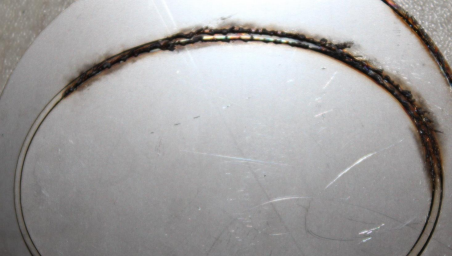
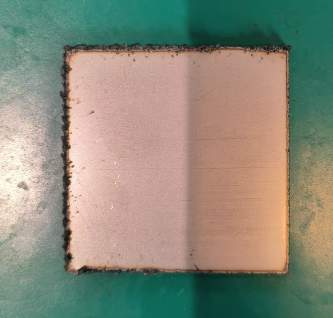
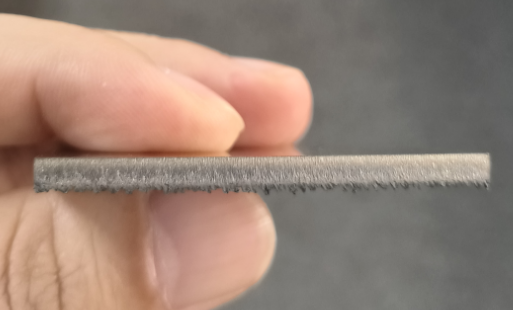
Q3: I'm getting slag (dross) even when using the cutting parameters from the XCS library. What should I do?
A: Refer to the examples below and adjust the focal point accordingly:
Sample Image | Possible Cause | Solution |
| Cutting speed too fast or focus too low | Reduce speed, or raise the focal point. For example, if the current focus is -4, try changing it to -3 or -2. |
| Laser is off-center | Check if the laser beam is aligned to the center.
|
| Hard dross on the bottom indicates focus is too high | Lower the focus further (negative direction). For example, if the focus is -2, try -3 or -4. |
| The cut edge is clean
| No adjustment needed. |
| Soft slag starts to appear — focus slightly too low | Raise the focus slightly. |
| Layered cut surface — focus is too low | Raise the focus. |
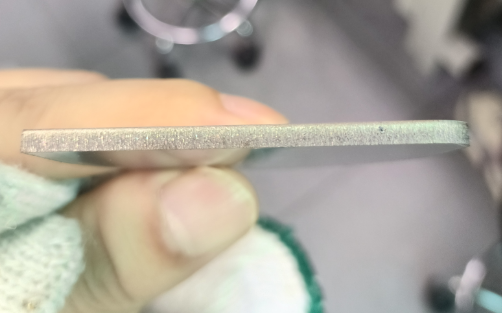
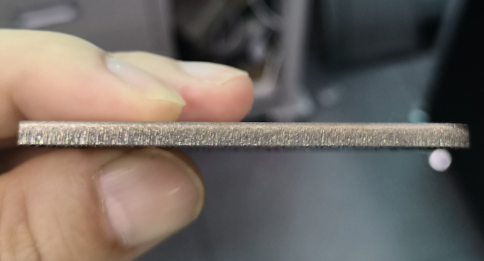
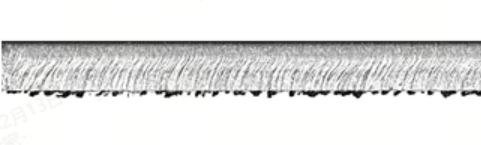
Other checks:
- Check the current gas pressure — Make sure it meets the required level
- Ordinary nozzle: 1.2 MPa
- Telescopic Nozzle: 0.6 MPa
Q4: When cutting thick materials, the ceramic ring on the telescopic nozzle gets contaminated during piercing. How can I avoid this?
A:
- For shapes with a lead-in line: Enable the Soft start function in the software.
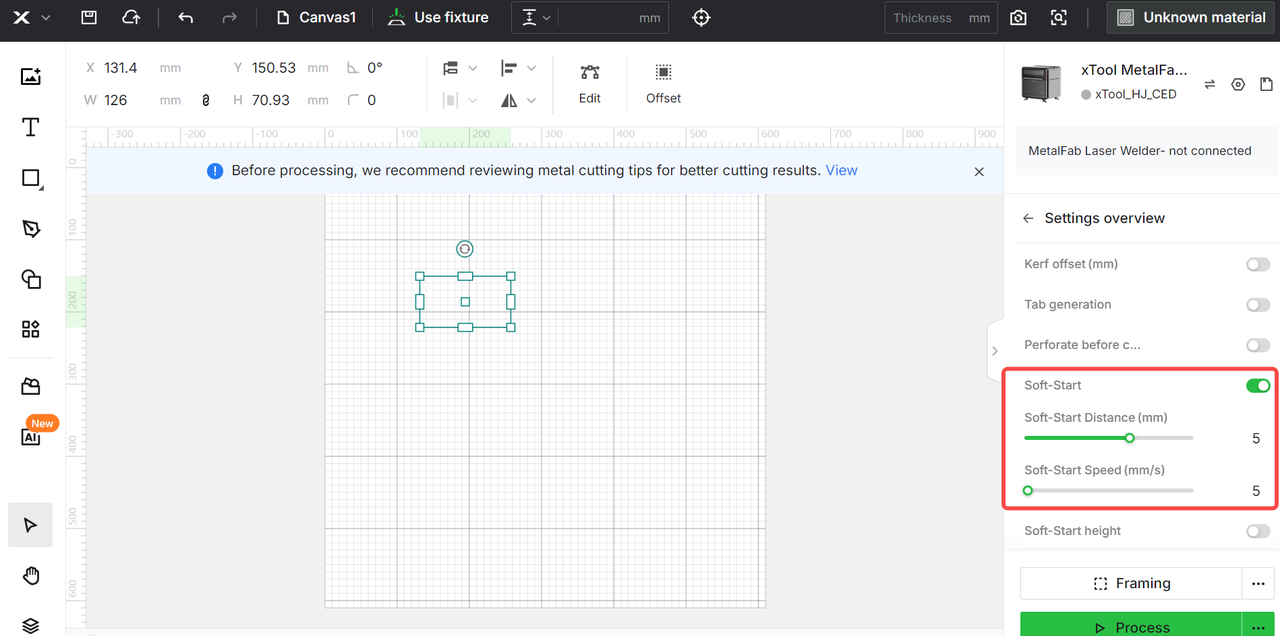
- For open paths without a lead-in: Use Perforate before cutting in the software to reduce splatter buildup on the ceramic nozzle.
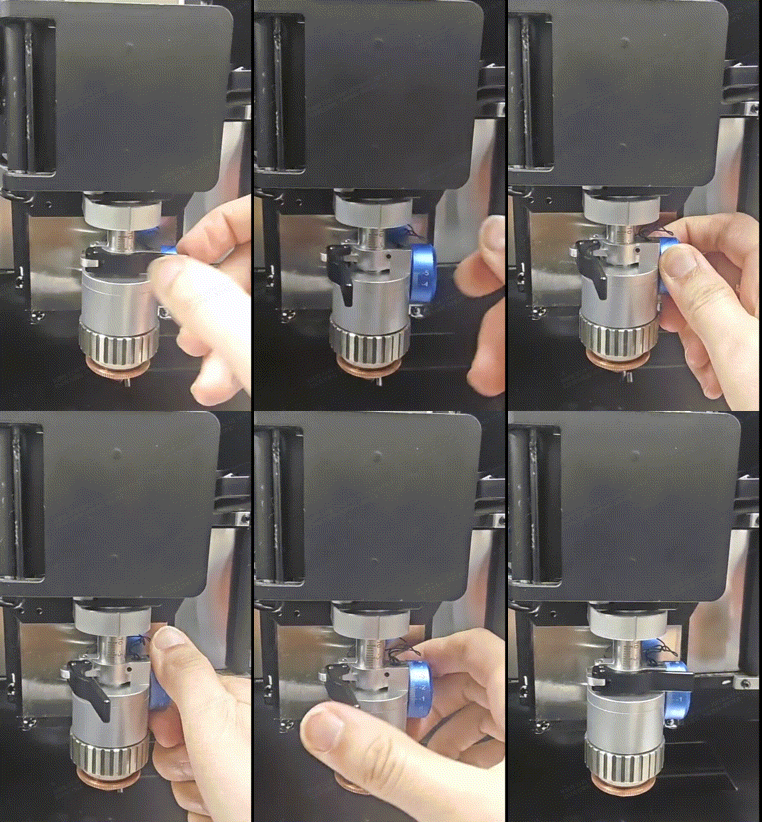
Q5: How to adjust focus manually?
Use with XCS
Q1: What software is required to operate xTool MetalFab CNC Cutter? Is CYPCUT supported?
A: xTool MetalFab Laser Welder and CNC Cutter are designed to work exclusively with xTool Creative Space (XCS). Third-party software, including CYPCUT, is not supported.
XCS supports functions including perforate before cutting, fly cut and smart nesting, which are designed specifically for MetalFab. Users can download the latest XCS on https://www.xtool.com/pages/software.
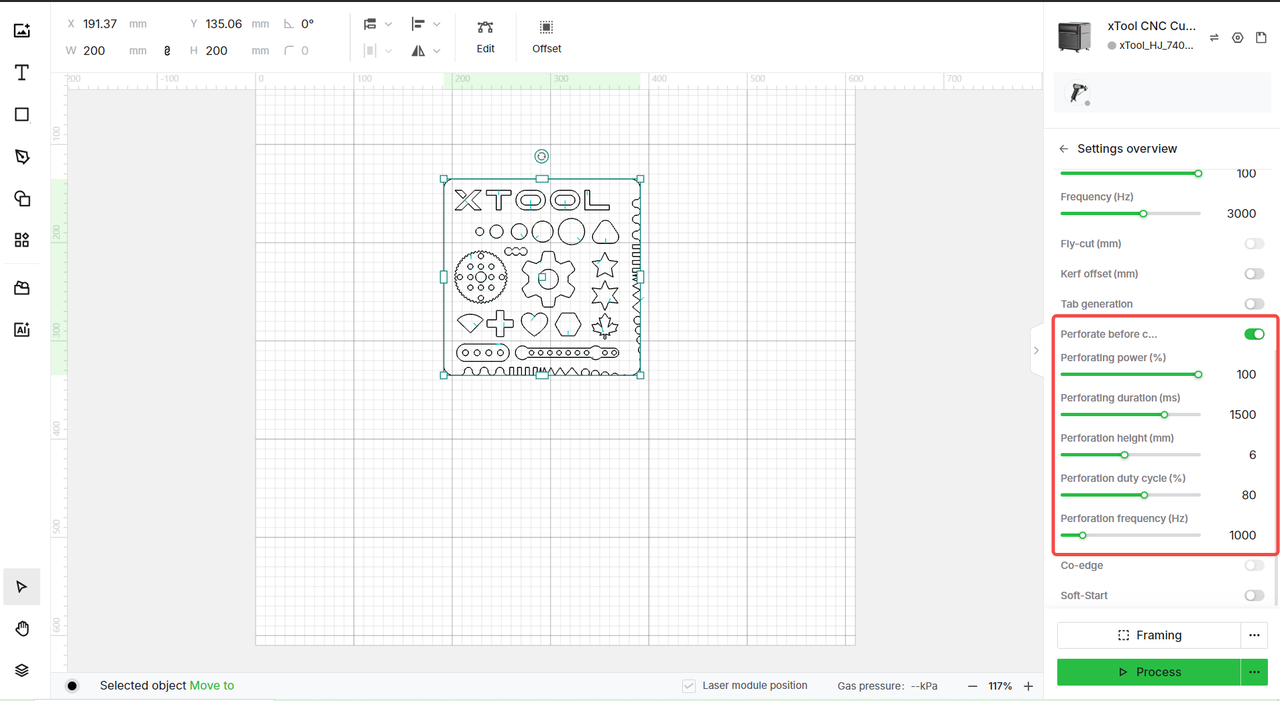
Q2: What is "Perforate before cutting" in XCS? When should I use this function?
A: Perforate before cutting is a critical initial step in the laser cutting process, primarily used when working with thick materials or materials with high surface reflectivity.
- Function: Instead of starting the cut while moving along the path, the laser first dwells at the starting point to create an initial hole through the material.
- Purpose: This ensures a clean start to the cut and prevents issues such as incomplete penetration or excessive laser energy reflecting off an uncut surface, which could potentially damage the material or the machine.
- Configuration: To adjust piercing parameters in XCS, select your design on the canvas. The relevant settings can usually be found in the process parameters panel displayed on the right side of the interface.
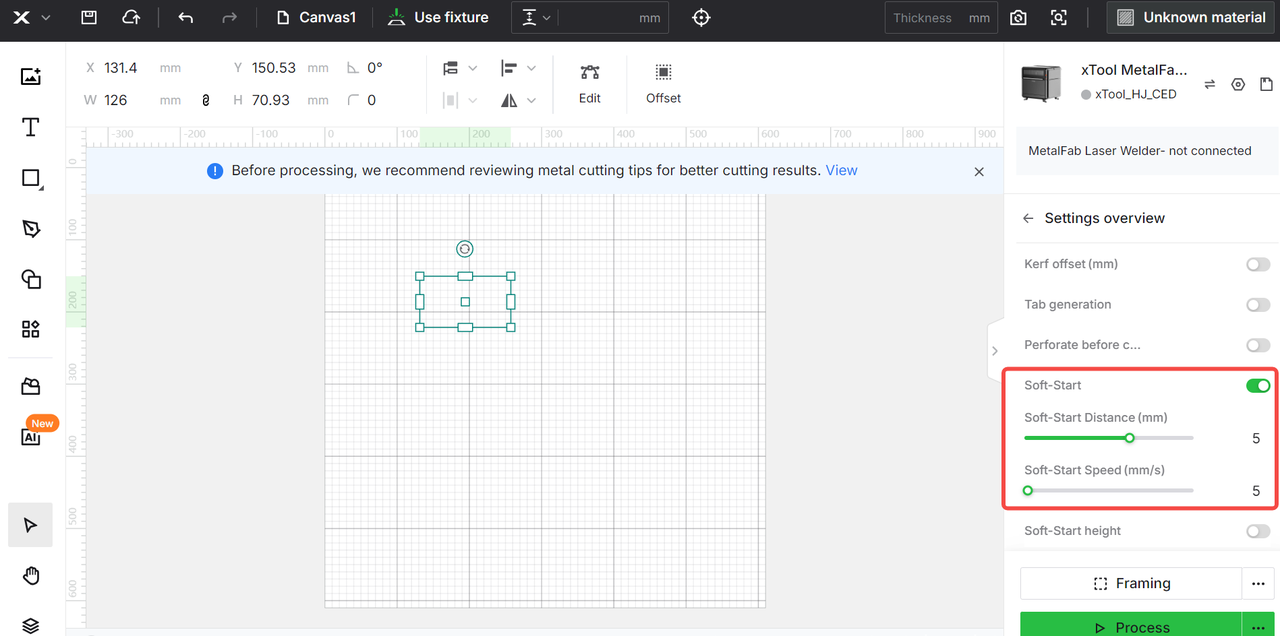
Q3: What is "Soft start" in XCS, and when should I use it?
A: For thicker materials, if slag or burning occurs at the cut's starting point after adding a lead-in, enable "Soft start." This feature initiates the cut at a slower speed to ensure cut quality.
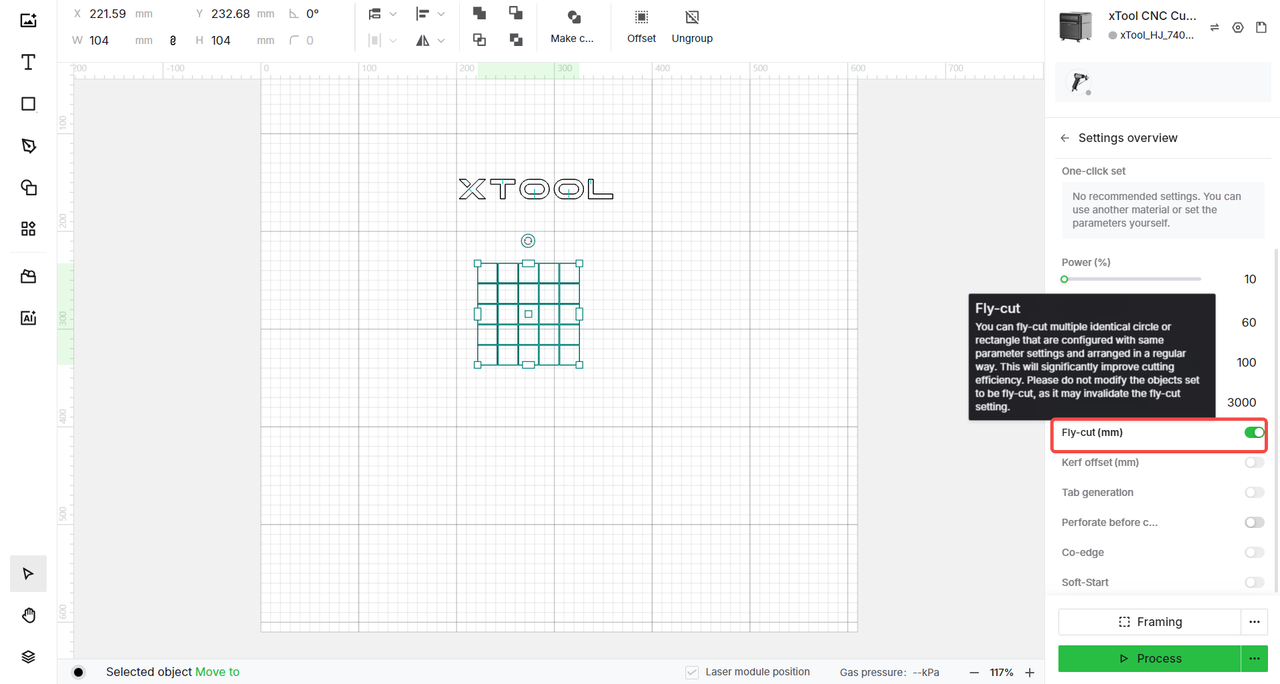
Q4: What is "Fly-cut" in XCS, and when should I use it?
A: Fly-cut is a feature designed to improve cutting efficiency when processing multiple shapes that are identical in size and parameters (such as circles or rectangles) and arranged in a regular grid.
Maintenance
Q1: What are the operating and storage temperatures for xTool MetalFab CNC Cutter?
| Laser Welder Main Unit | CNC Cutter |
Storage Temperature | -10°C ~ 60°C | -10°C ~ 60°C |
Operating Temperature | -10 °C-40 °C | 0 °C-40 °C |
Q2: Are there components that need maintenance after long use? How do I take care of them?
Component | Maintenance Interval | Cleaning Instructions |
Cutting nozzle
| Every 4 hours of operation
| Power off, remove the nozzle, clean with alcohol and a cotton cloth. Use a brush to clean metal residue off the ceramic sleeve. Replace if heavily contaminated. |
Baseplate | Every 4 hours of operation | Power off, remove and clean out cut waste to keep the drawer base clean. |
Exhaust fan | Every 20 hours of operation | Power off, disconnect, and clean gently with a damp cloth. |
Protective lid
| Every 20 hours of operation | Power off and clean gently with an alcohol-soaked cloth. |
Lens protecter | Every 20 hours of operation | Power off and clean gently with an alcohol-soaked cloth. |
Close/Distant view camera fill light | Every 20 hours of operation | Power off and clean gently with an alcohol-soaked cloth. |
Dust sheet | Every 20 hours of operation | Power off and clean gently with an alcohol-soaked cloth. |
Slats | Every 20 hours of operation | Remove and clean any attached metal particles or oil. |
Baseplate rail | Every 20 hours of operation | Power off and clean gently with an alcohol-soaked cloth. |
X/Y axis | Every 20 hours of operation | Power off and clean gently with an alcohol-soaked cloth. |
Fixture | Every 20 hours of operation | Power off and clean gently with an alcohol-soaked cloth. |
Protective lid surface
| Every 20 hours of operation | Power off and clean gently with an alcohol-soaked cloth. |
Q3: What are the necessary consumables for machine operation?
A: Lens protectors of the welding head, cutting nozzles, welding nozzles, cleaning nozzles, slats, steel wire, and metal sheets.

