
Issue description
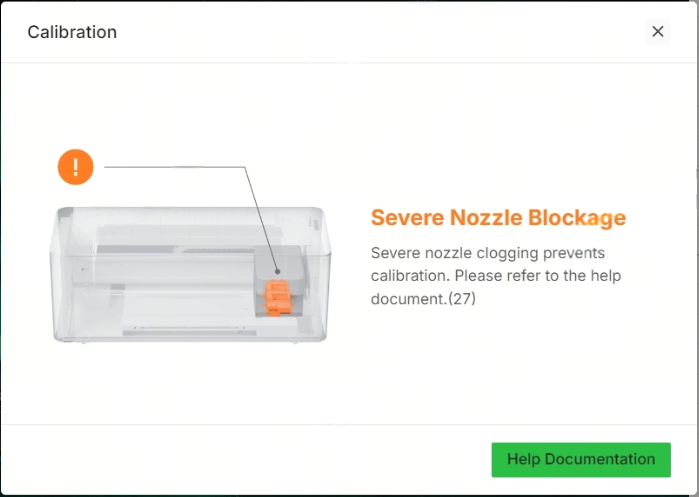
During xTool Apparel Printer operation, you may receive an error message stating "Severe Nozzle Blockage". This message may appear as a pop-up window in xTool Studio software or directly on xTool Apparel Printer's LCD panel. This error indicates that the system cannot correctly detect the print pattern.
- Please follow these steps to identify and resolve the issue.
Possible causes
- The print head nozzles are severely clogged with dried ink or debris.
- The ink tubes supplying ink to the print head are clogged or obstructed.
Troubleshooting procedure
Please identify which scenario best describes when the error occurred.
Scenario A: Error occurs during first-time setup
If this error appears while you are setting up your device for the very first time:
Complete the Initial Configuration
- Follow all on-screen prompts on the printer's LCD display to finish the first-time setup.
Recalibrate the System
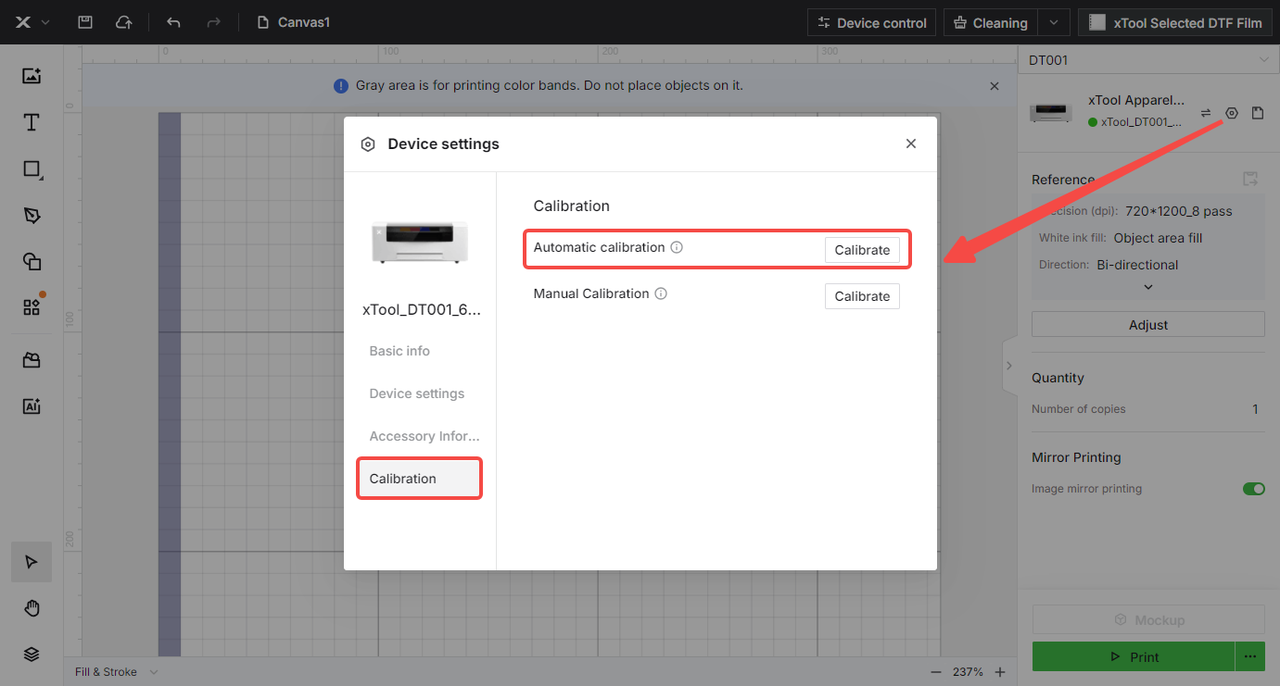
- In xTool Studio software:
- Navigate to:
Device settings>Calibration>Automatic calibration - Follow the prompts to complete the calibration process. This recalibration after the initial setup often resolves the errors that occur during the first-use.
- Navigate to:
Scenario B: Error occurs during regular use
STEP1: Clear print head clogs
- Address Print Head Blockage
- Follow the troubleshooting procedure: Solve Missing Strip Lines / Failed Printing Sample Test for xTool Apparel Printer/xTool Apparel Printer Plus
- Maintain Optimal Operating Conditions
- Keep your printer powered on to maintain automatic maintenance procedures.
- Operate the printer in suitable temperature and humidity conditions.
- Use the printer at regular intervals.
- Perform routine cleaning and maintenance to prevent print head blockages.
- Evaluate Results
- If the print head cleaning solutions are effective (the printing test shows significant improvement), the issue was likely caused by print head blockage.
- If printing tests show no improvement even after manual deep cleaning of the print head, proceed to the next solution.
STEP2: Check & clear ink-tube blockages
- Inspect ink tubes for possible clogging.
- Please proceed to the "Still experiencing issues?" section below to contact xTool Customer Service for further diagnosis and assistance.
Preventive measures
To prevent "Severe Nozzle Blockage" errors in the future:
- Keep the Printer Powered On: It's generally recommended to leave your printer powered on (in standby mode). This allows the printer to perform its automatic maintenance cycles, which help prevent ink from drying in the nozzles.
- Maintain Optimal Environment: Operate the printer within the recommended temperature and humidity ranges specified in the user manual. Extreme conditions can affect ink viscosity and promote clogging.
- Use Regularly: Printing periodically (even just a small test print or nozzle check) helps keep the ink flowing. Long periods of inactivity increase the risk of clogging.
- Perform Routine Maintenance: Regularly follow the recommended cleaning and maintenance procedures outlined in your xTool Apparel Printer user manual.
Still experiencing issues?
Should the issue persist after completing the preceding steps, submit a ticket via the "Submit a Ticket" button in the "Help Ticket" section below. The standard response time for xTool Customer Service is one business day.
For a prompt resolution, please include the following details:
- Issue Description: A detailed explanation of the observed problem.
- Video Evidence: Attach a video demonstrating the issue, where applicable.
- Troubleshooting Performed: Any troubleshooting steps you have already attempted, along with their results.
This information is crucial for xTool technical support engineers to provide timely assistance.
Documentation feedback
Help improve this content by providing feedback. If this content did not meet your requirements, select "No" in the "Was this page helpful?" section below. Include specific details about what was unclear or missing in the pop-up suggestion box. Feedback submissions are reviewed by xTool technical writers to enhance future documentation.

