
Issue description
- If you have a Mac computer running macOS version 15 or higher and are unable to connect to your xTool laser device, please refer to this troubleshooting guide for assistance.

Possible cause
When you operate Software for the first time, a notification will prompt you to allow xTool Creative Space(XCS)/xTool Studio to access local networks.
- If the "Don’t Allow" is selected, xTool Creative Space(XCS)/xTool Studio will be denied access to the machine.

- To ensure a seamless connection, click on the "Allow" at this step.

Troubleshooting
#Check local network access for XCS/xTool Studio
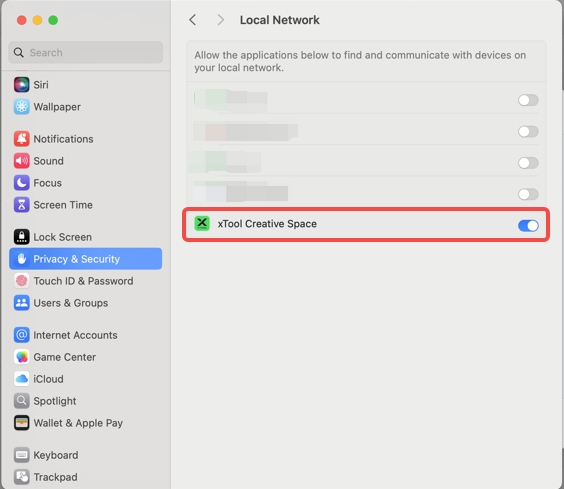
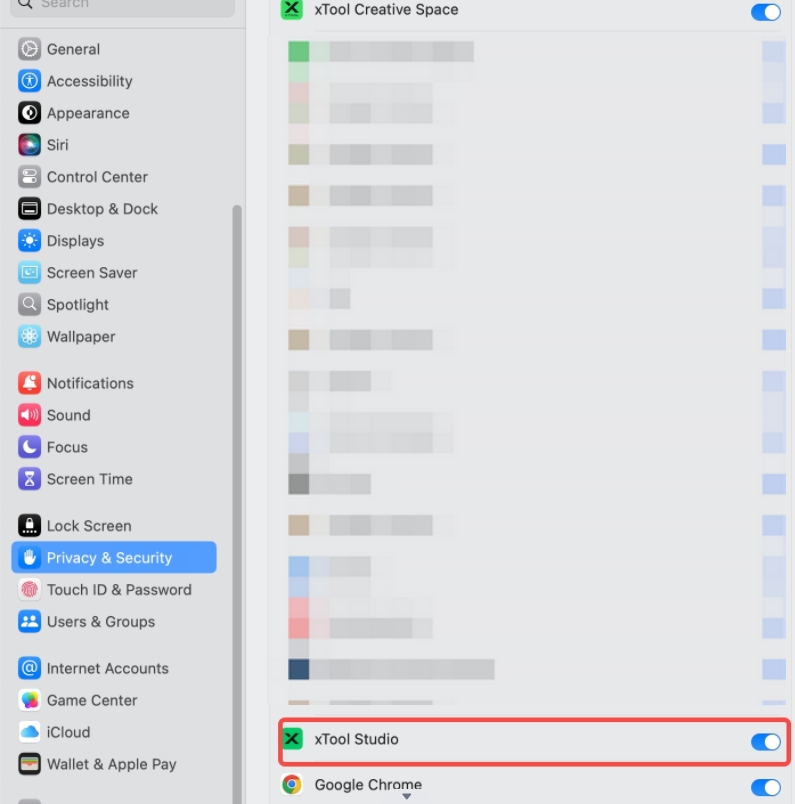
- Go to Settings > Privacy & Security > Local Network.
- Ensure that xTool Creative Space has network access; otherwise, the machine cannot connect to the computer.
- If the local network access is disabled, toggle the switch to enable it, allowing the software to access your local network.

For xTool Creative Space:
For xTool Studio:
If the issue persists despite following the above steps, please contact xTool Customer Service at support@xtool.com. Include a detailed description of the issue and a list of the troubleshooting results you have already attempted to help us determine the appropriate course of action promptly.
Help us improve
If this article or video doesn't effectively assist you in resolving the issue, please let us know by clicking the “No” button in the “Was this page helpful?” section below, and leave your feedback in the pop-up suggestion box. Our knowledge base team will review it and consider it for future updates.
Still need help?
If you need any human assistance, please create a ticket by clicking the “Submit a Ticket” button in the “Help Ticket” section below. Our service team will get back to you in 1 business day via E-mail.

