
xTool Air-Compress Assist is an accessory that can help improve the engraving and cutting performance of xTool S1. In auto mode, this accessory can adjust its own power to accommodate the laser module and processing tasks.
Using the wireless dongle included in the pack, you can connect xTool Air-Compress Assist to S1 via 2.4 GHz wireless network.
This document is organized as follows:
- Connect xTool Air-Compress Assist with S1
- Use xTool Air-Compress Assist
- Pair xTool Air-Compress Assist with S1 again
- Replace the filter
Connect xTool Air-Compress Assist with S1
1. Obtain and connect the wireless dongle

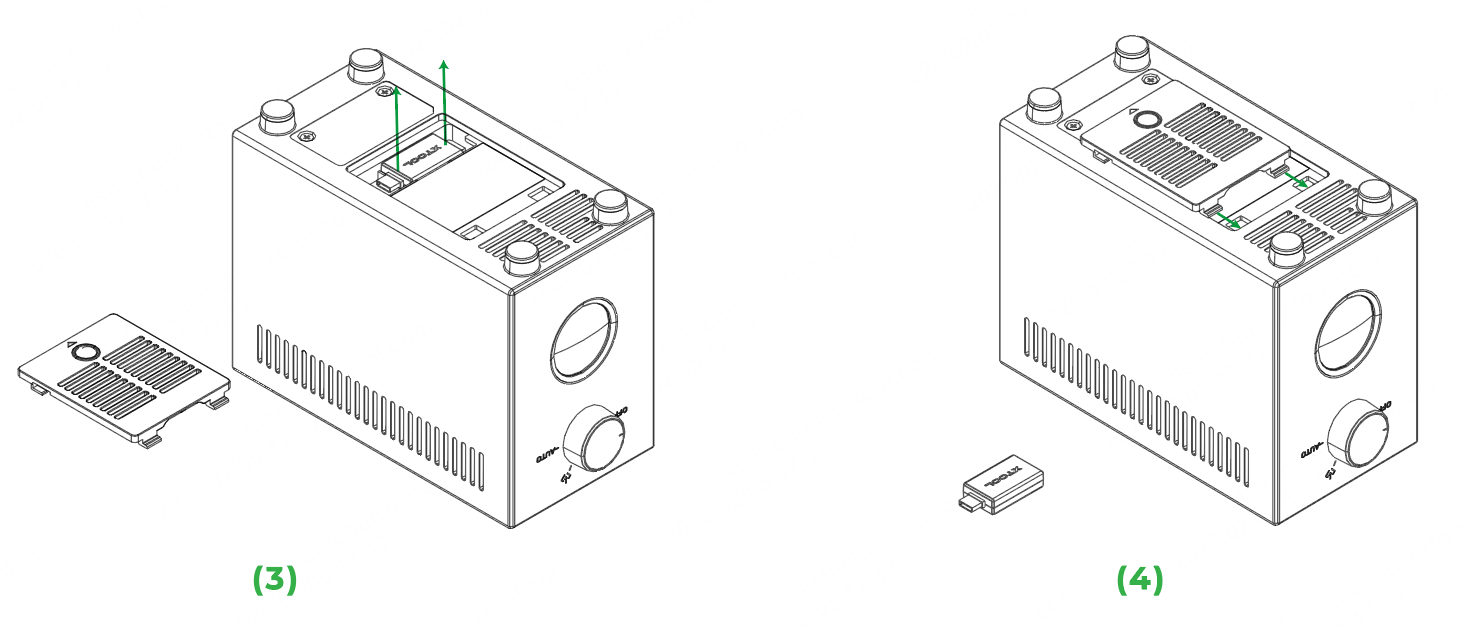
2. Connect the Bluetooth dongle

3. Connect the tube

4. Connect to a power supply

Use xTool Air-Compress Assist
Mode for engraving
Mode for cutting
Auto mode
Pair xTool Air-Compress Assist with S1 again
If the wireless dongle is missing or faulty, please contact our after-sales services or your distributor to obtain a new one. After obtaining the new dongle, pair the accessory with your device again. The following are the steps:
Step 1. Insert the wireless connection reset pin into the reset hole. Hold for one second and remove the pin.

Step 2. Insert the new wireless dongle to the extension port of S1. Wait until the wireless connection indicator turns from white slow blinking to solid white.
Replace the filter



