
This article applies to:
xTool S1 with all laser modules.
Issue Description
During operation of your xTool S1, you may encounter one of the following situations:
- After enabling the red cross position mark in xTool Creative Space (XCS), the red cross does not move on the canvas in sync with the laser module; or
- The red crosshair position in XCS does not align with the laser module's actual position, and, sometimes, the processing status indicator light may flash rapidly in multiple colors.
Please refer to the instructions in this guide for troubleshooting.
Troublehsooting
#1 Reinstall the XCS software
There could be a software cache problem that prevent the position mark from showing up. Please reinstall the XCS software and restart the machine. For the latest software, please see here.
#2 Retrieve the coordinate information again
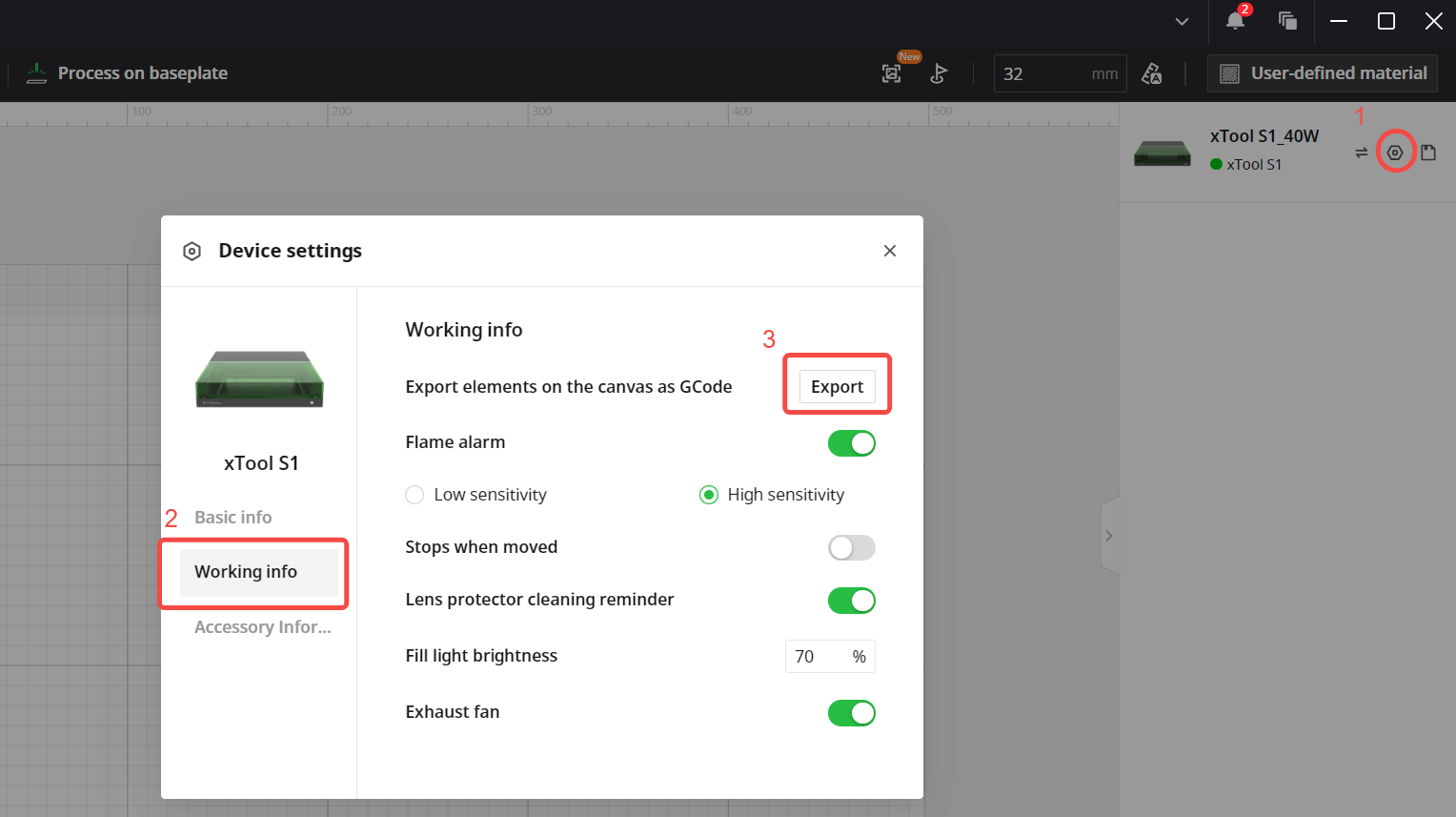
Connect xTool S1 in the software first. Then, in the top-right corner of the software, click the icon > Device settings to enter the device settings page. After opening the device settings page, the software will automatically retrieve the coordinate information again.
If the problem persists, please try restarting xTool S1. If the problem still remains, please export the device logs and send them to us for further analysis.
(This issue is expected to be resolved in xTool Studio V1.6.)
#3 Disconnect the accessories
The function of the position mark can get affacted if there is a short circuit in the connection cable of the accessories. If you use any of the following accessories with xTool S1, please read on and test if there is a short circuit
- Air Assist Set
- Conveyor Feeder
- Fire Safety Set
- Rotary Attachment
To determine if there is a short circuit in the connection cable:
- Power off the machine, disconnect all accessory cables, restart XCS and the machine, and see if the issue persists.
- If the position mark is back, the connection cable may have a short circuit. Please contact us for a replacement.
- If the symptom persists, please move on to the next troubleshooting step.


#4 Disconnect the rear interface board
Now we've ruled out a possible short circuit in the connection cable of the accessories, let's see if the interface board that the cables connected to has short circuit. The rear interface board is also known as the accessory board. It's located behind the rear panel of the machine.
- Please disconnect it from the main control board. For how to find and disconnect it, please see this video guide (1:16).
- After it's disconnected, put the main control board back in, restart XCS and the machine, and see if the issue persists.
- If the position mark is back, the interface board may have a short circuit. Please contact us for a replacement.
- If the symptom persists, please move on to the next troubleshooting step.

#5 Clear the static electricity
Static electricity buildup on the main control board can affect the fuction.
- Please turn off the machine and leave it still for 12 hours.
- Start the machine and XCS and see if the issue persists.
- If the position mark is back, the issue is solved.
- If the symptom persists, please move on to the next troubleshooting step.
#6 Check the motor encoder
Bad cable connections may cause the motor encoder to malfunction. To solve this, please check and secure the motor connection cables. Follow the steps below:
1) Power off the machine, and remove the four screws on the motor protective cover at the back of the X-axis gantry.

2) Check the motor connection wires for any breakage or bend. And make sure they are inserted firmly.

3) Unplug and reconnect the motor wires and encoder wires on the main control board. They are number-coded in the photo below (5, 6, 11, 12). For more about the ports on the main control board, please see this guide.

#7 If none of above works
If you've tried all the five steps above and the problem still exists, please contact our support team for further assistance.
At this point, It's possible that the main control board or the motor is faulty. We will help you confirm if a replacement is needed.
Note: Replacing the X-axis motor can be very difficult. If it needs to be replaced, we recommend that you request a repair process where we fix it and ship it back to you.
Help Us Improve
If this article or video doesn't effectively assist you in resolving the issue, please let us know by clicking the “No” button in the “Was this page helpful?” section below, and leave your feedback in the pop-up suggestion box. Our knowledge base team will review it and consider it for future updates.
Still Need Help?
If you need any human assistance, please create a ticket by clicking the “Submit a Ticket” in the “Help Ticket” section below. Our service team will get back to you in 1 business day via E-mail.

