xTool M2 3W Infrared Module User Guide
Download PDF file (multi-language)
List of items
xTool M2 3W Infrared Module | Art scratch paper | User manual |
Meet xTool M2 3W Infrared Module
Warning and instruction signs
Laser specifications
Wavelength | Beam divergence | Maximum power output | |
|---|---|---|---|
Working laser | 1064 ± 10 nm | 1.5 mrad (IEC 60825-1 Default (simplified) ) | 3.3 W |
Indicator laser | 650 nm | / | 390 uW |
Working temperature
The 3W infrared module works properly at temperatures from 0°C to 35°C.
Install xTool M2 3W Infrared Module
· Ensure that xTool M2 is powered off before installing.
· Use the infrared module only with xTool M2. Before use, read and follow Safety Instructions and Quick Start Guide of xTool M2.
(1) When you install the infrared module, the two location pins on its back and the multi-function module holder should be aligned.
(2) Connect the infrared module and the multi-function holder with a module connection cable.
(3) Connect to a power supply and turn on the power switch.
Use xTool M2 3W Infrared Module
(1) Go to s.xtool.com/software to get the xTool software.
(2) Connect xTool M2 to your computer.
Note: If you use the adapter, it can only be used to connect to a computer and must not be used to connect to a device.
(3) Follow the instructions in the software to start processing.
Maintenance
Clean the lens protector and nozzle
Laser processing often produces a large amount of smoke, which may cause the lens protector to get dirty or block the nozzle. If they are not cleaned in a timely manner, the laser power may reduce, and the laser module may be damaged.
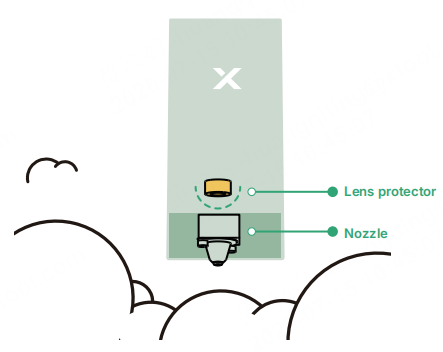
Maintenance
Avoid scratches: The surface of the lens protector is fragile and may easily get scratched. When installing, replacing, or cleaning the lens protector, be very careful and avoid sharp objects contacting the protector.
Working environment: Poor environmental conditions may accelerate the aging and damage of the lens protector. Therefore, keep the inside of the device dry without dust and corrosive gas and ensure that the exhaust fan works properly.
Regular check: Regularly check whether the lens protector is installed firmly in place. If it is loose or displaced, adjust and fix it promptly.
Regular cleaning: The lens protector may accumulate dust, dirt, or other impurities that reduce the laser transmission rate. You need to clean it regularly.
Regular replacement: Overly worn lens protector may reduce the transmission rate of laser or even cause device faults. You need to replace it regularly based on the use of the device and the wear of the lens protector.
Cleaning steps
When the software prompts a cleaning reminder, follow the steps to clean lens protector and nozzle.
(1) Turn off the device, disconnect the power supply, and remove the laser module.
(2) Remove the nozzle from the laser module.
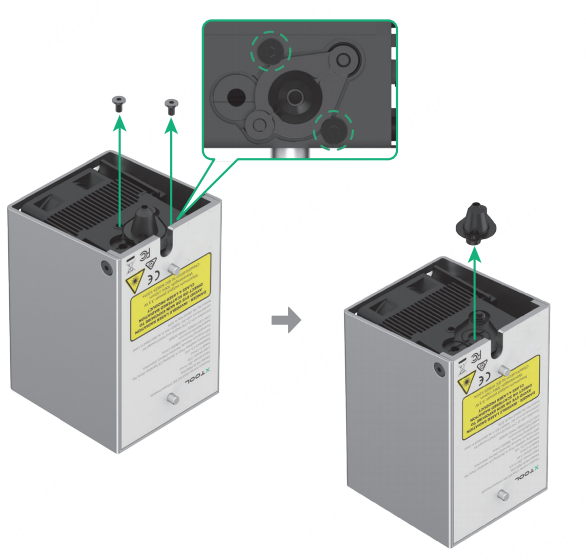
(3) Use a lint-free cloth or a cotton swab moistened with alcohol to clean the lens protector and the inside and outside of the nozzle in order.
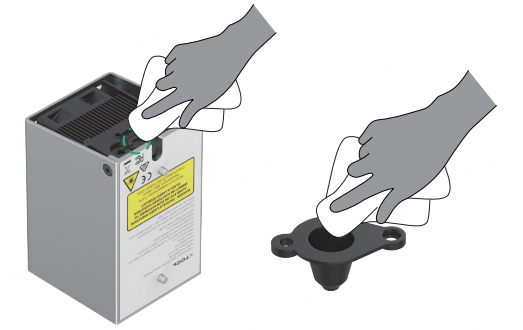
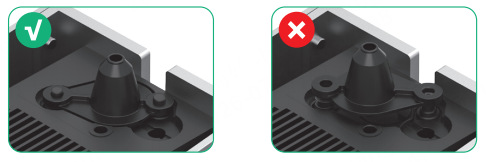
When installing the nozzle, ensure the correct orientation.